
Secure Password Manager
Securely manage passwords, generate strong passwords, and organize by categories
- Installs
- 229
- Measured
- Rating
- —
- Ratings
- —
- Version
- Varies with device
- Updated 20 Nov 2025
- Released
- 20 Dec 2024
- Tracked since 13 May 2026
- Size
- —
Screenshots


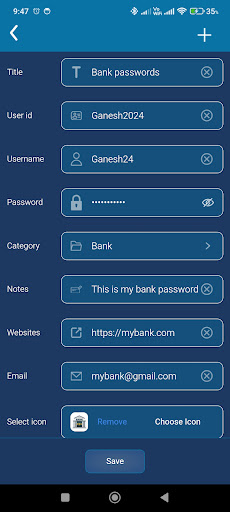


About Secure Password Manager
The description on the store listing
Secure Password Manager is your ultimate app to protect and manage your passwords easily and securely. With advanced features and a user-friendly interface, this app ensures your sensitive data stays safe while giving you quick access whenever needed.
Key Features:
Password Generator
Generate strong and secure passwords with customizable options.
Support for numbers, uppercase, lowercase letters, and symbols.
Create passwords up to 30 characters long for enhanced security.
App Settings
Change your app password anytime for added safety.
Enable biometric authentication for seamless login.
Lock the app automatically when running in the background.
Allow or block screenshots for …
Read the full description
Secure Password Manager is your ultimate app to protect and manage your passwords easily and securely. With advanced features and a user-friendly interface, this app ensures your sensitive data stays safe while giving you quick access whenever needed. Key Features: Password Generator Generate strong and secure passwords with customizable options. Support for numbers, uppercase, lowercase letters, and symbols. Create passwords up to 30 characters long for enhanced security. App Settings Change your app password anytime for added safety. Enable biometric authentication for seamless login. Lock the app automatically when running in the background. Allow or block screenshots for extra security. Enable self-destruction to erase all data after multiple failed attempts. Organized Password Storage Save all your passwords neatly under categories. Use default categories or create your own custom ones. Store additional details like usernames, user IDs, notes, emails, websites, and titles. Customizable Icons Choose from a variety of default icons for your categories. Upload and select custom icons from your phone’s gallery. Why Choose Secure Password Manager? Enhanced Security: Protect all your sensitive information in an encrypted vault. Convenient Features: From biometrics to auto-lock, enjoy peace of mind. User-Friendly: Intuitive design with customizable options to fit your needs. Backup & Restore: Securely back up your data and restore it on any device. Take control of your online security with Secure Password Manager. This app combines robust password generation, secure storage, and flexible management options into a single, must-have tool. Perfect for individuals seeking an effortless way to stay secure online! Why Choose Secure Password Manager? All-in-One Solution: Securely store and manage your passwords in a single encrypted vault. Generate strong passwords to protect your online accounts. Save usernames, user IDs, titles, notes, websites, and emails in one place. Ultimate Security Features: Lock the app with a master password or biometric authentication. Self-destruction mode erases all data after failed attempts. Disable screenshots for maximum privacy. Automatic app lock when running in the background. Organized and Customizable: Save passwords under default categories or create custom ones. Choose from a library of default icons or upload your own icons. User-Friendly Features: Seamless Access: Find stored passwords quickly with the built-in search function. Backup & Restore: Securely back up your data and restore it across multiple devices. Offline Access: No internet? No problem! Access your vault anytime, even offline. Regular Updates: Stay up-to-date with continuous feature enhancements and improved security. Who Is This App For? Professionals managing multiple accounts. Students, families, and businesses seeking enhanced password security. Anyone tired of forgetting or misplacing passwords! How It Works: Download and install the app. Set up your master password or biometric authentication. Add your passwords, categorize them, and customize their details. Enjoy hassle-free access while keeping your data secure. Download now and experience a smarter, safer way to manage your digital life.
Installs since 14 Nov 2026 Measured
Exact Google Play install counts, collected daily
Daily history starts once this app is in our daily install sample.
Ratings
- 5 ★0.0%
- 4 ★0.0%
- 3 ★0.0%
- 2 ★0.0%
- 1 ★0.0%
Recent reviews
Latest public reviews from the store
- 11 Nov 2025
soo good I wish we come also have a Hymn song book too
- 1 Mar 2025
The app was great when first downloaded, but now it crashes and won't even open. I uninstalled it and reinstalled it several times and it still crashes.
- 17 Sep 2024
Great app
- 11 Apr 2024
It's wonderful
What reviewers bring up
Topics mentioned in the latest 11 reviews, by how many reviews mention them
Liked in good reviews (10 reviews)
- bible 4
- ability 2
- access 2
- come 2
- book 2
- word 2
- tool 2
Raised in bad reviews (0 reviews)
No topic comes up twice.
Top chart positions
Latest Google Play chart ranks by country, last 10 days
Not in any tracked top chart in the last 10 days.
Secure Password Manager history
Release, install milestones, listing and store changes
- Reached 100+ installs 20 Nov 2025
- Reached 50+ installs 23 Feb 2025
- First released on the store 20 Dec 2024
Recent versions
Current version Varies with device
- Version 1.318 Jul 2025
Listing keywords
Words and phrases Secure Password Manager repeats most in its store listing
Top phrases: secure password manager (5), password manager (5), secure password (5), biometric authentication (3), generate strong (3).
Highlighted words also appear in the title. Counts cover the title, short description and description.
Business model and tech
From the store listing and declared permissions
- Business model
- Free to downloadShows ads
- Sensitive access
- Advertising ID
15 permissions
0 special access, 1 sensitive, 14 standard
- Show notificationsPOST_NOTIFICATIONSSensitive
- Ad attribution (Privacy Sandbox)ACCESS_ADSERVICES_ATTRIBUTIONStandard
- Ad topics (Privacy Sandbox)ACCESS_ADSERVICES_TOPICSStandard
- Read how it was installed (install referrer)BIND_GET_INSTALL_REFERRER_SERVICEStandard
- Read the advertising IDAD_IDStandard
- Read the advertising ID (Privacy Sandbox)ACCESS_ADSERVICES_AD_IDStandard
- Keep the phone awakeStandard
- Run a foreground serviceFOREGROUND_SERVICEStandard
- Start when the phone turns onStandard
- Use fingerprint or face unlockUSE_BIOMETRICStandard
- Use the fingerprint readerUSE_FINGERPRINTStandard
- Full internet accessStandard
Compliance
What the listing and the app package show
- Store status
- Live
- Upkeep
- Updated 20 Nov 2025
- Registered in
- India
- Privacy policy
- Linked on the listing
- Advertising
- Shows ads
- In-app purchases
- None declared
- Age rating
- Everyone
- Sensitive permissions
- 1 sensitive of 15
- Location access
- No
- Camera and microphone
- Neither
Apps like Secure Password Manager
들어서 화면켜기Won3.5K installs★ 4.0
Height PredictionEcliptic App Ventures45.9K installs★ 2.4
Speicers`Pro VPNEldiablolucifer202021.2K installs★ 4.14
Lightning Tracker with AlertsYaksh Software4.3K installs★ 3.0
Mana Pathi (Unit Converter)Shirish Koirala2.2K installs★ 4.6
Multi-tab Calc - A simple app.Naoyuki Rikiji1.3K installs★ 5.0
Photo Recovery PlusBillApps7.1K installs★ 4.53
Just Silence. Scheduled.Akid Soft1.6K installs★ 5.0
- WoWp AssistantВиталий Робиновский2K installs★ 4.2
Secure Password Manager: questions and answers
How many downloads does Secure Password Manager have?
Secure Password Manager has 229 installs on Google Play, measured from the store's own count on 14 Nov 2026.
Who makes Secure Password Manager?
Secure Password Manager is published by Code Play, a developer based in IN.
When was Secure Password Manager last updated?
The latest version (Varies with device) was released on 20 Nov 2025.
Is Secure Password Manager free?
Yes. Secure Password Manager is free to download, and it shows ads.
Is Secure Password Manager still available?
Yes. Secure Password Manager is live on Google Play as of 14 Nov 2026.
Track Secure Password Manager and its competitors
Watch any app for new versions, rating drops, chart moves and removals. Free plan, no card.