
Secured Notes
Securely store notes, contacts, passwords, and other private info
- Installs
- 8.54K
- Measured
- Rating
- 4.0
- Ratings
- 69
- 9 reviews
- Version
- 5.3.0
- Updated 20 Aug 2026
- Released
- 25 Mar 2018
- Tracked since 11 May 2026
- Size
- 6 MB
- Needs 4.2
Screenshots



About Secured Notes
The description on the store listing
This app allows you to securely store personal notes, passwords, bank details, contacts, and any other confidential information. All data is hidden from unauthorized access and protected by a password.
Key Features:
• Simple and Easy to Use: Just set up a password and start adding your secret notes.
• Ad-Free: The free version contains no ads.
• Google Drive Auto Backup: Automatically backs up encrypted notes to your Google Drive, secured by your Google Account credentials.
• Backup & Restore:
- Take a backup of your notes anytime.
- Transfer backups to another device and restore easily.
- All backups are encrypted for security.
• Cross-Device Restore: …
Read the full description
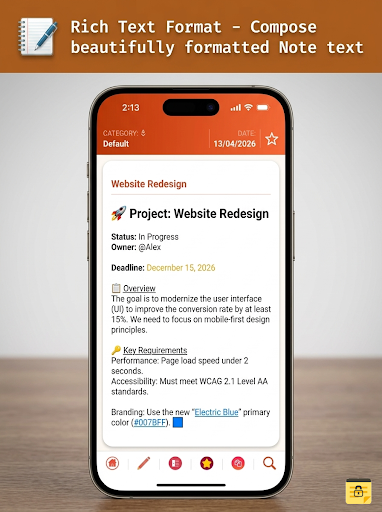
This app allows you to securely store personal notes, passwords, bank details, contacts, and any other confidential information. All data is hidden from unauthorized access and protected by a password. Key Features: • Simple and Easy to Use: Just set up a password and start adding your secret notes. • Ad-Free: The free version contains no ads. • Google Drive Auto Backup: Automatically backs up encrypted notes to your Google Drive, secured by your Google Account credentials. • Backup & Restore: - Take a backup of your notes anytime. - Transfer backups to another device and restore easily. - All backups are encrypted for security. • Cross-Device Restore: Restore your saved notes on any device. • Multiple Sharing Options: Share your notes securely through various methods. Advantages: 1. Extremely user-friendly. 2. All notes are securely protected and accessible only to you. 3. Built-in search functionality. 4. Automatic lock when idle or after a set time. 5. Biometric/Fingerprint authentication support. 6. Organize notes into categories/labels. 7. Rich text formatting for beautifully composed notes. 8. Advanced search and filter options by category. 9. Google Drive auto backup for peace of mind. Important Note: The default password for Secured Notes is 1234. Please change your password upon first login. Permissions Explained: 1. Identity & Contacts: Required for Google Drive Auto Backup. You need to select a Google account for backup. 2. Photos/Media/Files & Storage: Required for exporting/importing notes backup to/from internal or external storage. 3. Network Access: Required for Google Drive Auto Backup to transfer encrypted files to the cloud. 4. Prevent Device Sleep During Sync: Ensures uninterrupted backup during file transfer to Google Drive.
Installs since 29 Aug 2026 Measured
Exact Google Play install counts, collected daily
Ratings
69 ratings, 9 reviews
- 5 ★61%
- 4 ★9.8%
- 3 ★9.8%
- 2 ★9.8%
- 1 ★9.8%
Recent reviews
Latest public reviews from the store
No reviews in our sample for this app yet.
Top chart positions
Latest Google Play chart ranks by country, last 10 days
Not in any tracked top chart in the last 10 days.
Secured Notes history
Release, install milestones, listing and store changes
- Moved from Tools to Productivity 22 Dec 2025
- Reached 5,000+ installs 9 Jul 2021
- Reached 1,000+ installs 24 Oct 2018
- Reached 500+ installs 26 Sep 2018
- First released on the store 25 Mar 2018
Update frequency
How often Secured Notes ships a new version, month by month
3 updates in the last 12 months. More often than most similar apps: they shipped a median of 0 updates in the same year.
Recent versions
Current version 5.3.0
- Version 5.3.020 Aug 2026
🆕 New Features: • Export notes as PDF • Customizable sync interval (6, 12, 24, or 48 hours) • PIN verification required to enable Biometric Unlock ⚡ Sync & Backup • More reliable background sync 🌍 Localization • Full translations: German, French, Spanish, Japanese, Chinese 🔧 Bug Fixes, Security Improvements & Compatibility
- Version 5.0.013 Apr 2026
### 🎨 Modern UI Refresh -The application has been revamped with the latest modern UI, delivering a cleaner and more intuitive user experience. ### 🎨 User-Selectable Themes - Choose from **5 colour themes**: The theme will be applied instantly across all screens ### 🔤 Configurable Font Settings *(Notes Editor & Viewer)* - **Font Size & Style **: Font Size support for editors - Settings apply to both rich-text and plain-text note views
- Version 4.3.118 Nov 2025
- Version 4.313 Nov 2025
Listing keywords
Words and phrases Secured Notes repeats most in its store listing
Top phrases: google drive (6), drive auto backup (4), google drive auto (4), auto backup (4), drive auto (4).
Highlighted words also appear in the title. Counts cover the title, short description and description.
Business model and tech
From the store listing, the SDKs in the app package and its declared permissions
- Business model
- Free to download
- Built with
- No cross-platform framework or game engine detected
- Ad networks (0)
- None detected
- Analytics and crash reports
- Firebase
- Sensitive access
- Photos, videos and filesAccounts on the device
1 ad, attribution and analytics SDKs detected. SDKs are read from the app package and permissions from the store listing, so code that loads later is not seen.
Technology
11 SDKs found in the app package
9 permissions
0 special access, 3 sensitive, 6 standard
- See accounts on the deviceSensitive
- Change or delete shared storageSensitive
- Read shared storageSensitive
- Keep the phone awakeStandard
- Use the fingerprint readerUSE_FINGERPRINTStandard
- Full internet accessStandard
- See network connectionsStandard
- Add or remove accountsStandard
- Internal app permissionDYNAMIC_RECEIVER_NOT_EXPORTED_PERMISSIONStandard
Compliance
What the listing and the app package show
- Store status
- Live
- Upkeep
- Updated 20 Aug 2026
- Privacy policy
- Linked on the listing
- Advertising
- No ads declared
- In-app purchases
- None declared
- Age rating
- Everyone
- Sensitive permissions
- 3 sensitive of 9
- Location access
- No
- Camera and microphone
- Neither
Apps like Secured Notes
Glider MDPGlider AI, Inc.52.8K installs★ 2.38
SearcherrCF-Search2.3K installs★ 3.59
NavNet RemoteFURUNO softech16.7K installs★ 5.0
NTPC EXEMPLOYEESCorporate IT, NTPC Ltd24.2K installs★ 3.4
AI Smishing CheckerAI Security Systems38.1K installs★ 3.87
Sora-2 AI Video DirectionsHoop.id47K installs★ 2.6
Club Assist MBC-1000DHC Specialty Corporation18.3K installs★ 3.71
COMEXIOComexio5.5K installs★ 4.8
CPG Data™CPG Data, LLC6.9K installs★ 2.05
Secured Notes: questions and answers
How many downloads does Secured Notes have?
Secured Notes has 8,538 installs on Google Play, measured from the store's own count on 14 Nov 2026.
Who makes Secured Notes?
Secured Notes is published by Pramoda S.
When was Secured Notes last updated?
The latest version (5.3.0) was released on 20 Aug 2026.
Is Secured Notes free?
Yes. Secured Notes is free to download.
Is Secured Notes still available?
Yes. Secured Notes is live on Google Play as of 14 Nov 2026.
Track Secured Notes and its competitors
Watch any app for new versions, rating drops, chart moves and removals. Free plan, no card.