
Seinxon
Seinxon Finder supports Apple Find My or the Seinxon app on Google Play.
- Installs
- 6.58K
- Measured
- Rating
- 3.0
- Ratings
- 47
- 5 reviews
- Version
- 1.3.4
- Updated 13 Mar 2025
- Released
- 14 Feb 2023
- Tracked since 13 May 2026
- Size
- —
Screenshots

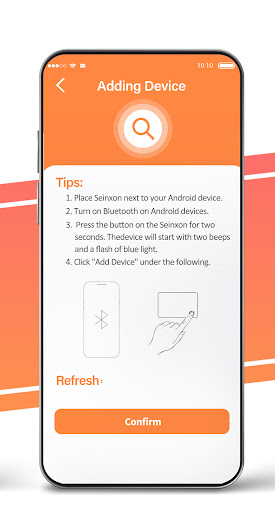
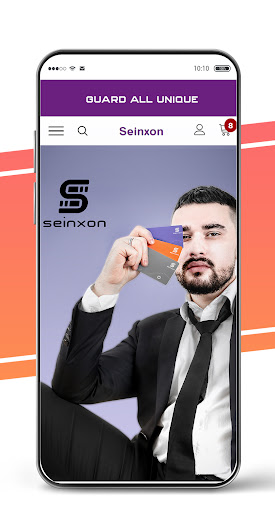


About Seinxon
The description on the store listing
Seinxon APP, applying the powerful IoT smart ecology, also has Seinxon intelligent products, interconnects people, things, and assets, and builds a secure positioning network.
Function:
NOTE: Seinxon Finder supports Apple Find My or the Seinxon app on Google Play. It should be noted here that the Find My application and the Seinxon application cannot be used simultaneously, and the mode switching needs to be performed as follows. [The product defaults to the FMN (Find My Network) connection mode. If you need BLE (Android) mode, you need to do the following. ]
How to switch FMN mode to BLE mode
1. Press and hold the button for 2 consecutive beeps and then release it.
2. Press the …
Read the full description
Seinxon APP, applying the powerful IoT smart ecology, also has Seinxon intelligent products, interconnects people, things, and assets, and builds a secure positioning network. Function: NOTE: Seinxon Finder supports Apple Find My or the Seinxon app on Google Play. It should be noted here that the Find My application and the Seinxon application cannot be used simultaneously, and the mode switching needs to be performed as follows. [The product defaults to the FMN (Find My Network) connection mode. If you need BLE (Android) mode, you need to do the following. ] How to switch FMN mode to BLE mode 1. Press and hold the button for 2 consecutive beeps and then release it. 2. Press the button 3 times (remove it after each beep). 3. If the switching is successful, you will hear 4 consecutive beeps in BLE mode. (Repeat above if you want to switch BLE mode back to Find My mode.) How to set up Card in the Seinxon app 1. Switch FMN mode to BLE mode. 2. Download the free Seinxon app for your Android phone and follow the in-app instructions. 3. Make sure your phone's Bluetooth is enabled and you have shared location permissions with the Seinxon app. 4. Allow the Seinxon app to always access your location. This is required to allow the app to always locate your valuables. If you lose an item, the app notifies you of the last known location. 5. Reconnect: Reset the device to factory settings, and press and hold the button until a long beep. The product has the function of positioning and searching, and the reminder of lost items. When you can't find your items nearby, click the button of the APP to play the sound to accurately locate the Seinxon Finder Card and the item, and you can get the route to its location in the "Map". The whole process is completely anonymous and encrypted to protect everyone's privacy.
Installs since 31 Aug 2026 Measured
Exact Google Play install counts, collected daily
Ratings
47 ratings, 5 reviews
- 5 ★30%
- 4 ★14%
- 3 ★14%
- 2 ★0.0%
- 1 ★43%
Recent reviews
Latest public reviews from the store
- 13 May 2025
Pairing is weird but works. Press and hold the button until it beeps once then beeps twice then release Right after that press it untill it beeps then let go press it again untill it beeps then let go That should change the Blurtooth mode to Android and be visible.
- 21 Aug 2024
its been a while the apps not working
- 14 Jul 2024
Not sure 😄
- 9 May 2023
Be sure there are no other BLE devices too close while pairing. Instructions differ between here, print and online tutorial. I had to hold the button for 1-2-3-solid tone for them to pair. Support gave me that as the factory reset procedure.🤦
What reviewers bring up
Topics mentioned in the latest 17 reviews, by how many reviews mention them
Liked in good reviews (1 reviews)
No topic comes up twice.
Raised in bad reviews (13 reviews)
- tracking 2
- horrible 2
- account 2
- android 2
- delete 2
- device 2
- those 2
- case 2
Top chart positions
Latest Google Play chart ranks by country, last 10 days
Not in any tracked top chart in the last 10 days.
Seinxon history
Release, install milestones, listing and store changes
- First released on the store 14 Feb 2023
Recent versions
Current version 1.3.4
- Version 1.3.413 Mar 2025
Add Traditional Chinese Language Add Permission Settings Page
Listing keywords
Words and phrases Seinxon repeats most in its store listing
Top phrases: ble mode (4), seinxon finder (3), finder supports apple (2), hold the button (2), mode to ble (2).
Highlighted words also appear in the title. Counts cover the title, short description and description.
Business model and tech
From the store listing, the SDKs in the app package and its declared permissions
- Business model
- Free to download
- Built with
- No cross-platform framework or game engine detected
- Ad networks (0)
- None detected
- Sensitive access
- LocationCameraPhotos, videos and filesNearby devices
0 ad, attribution and analytics SDKs detected. SDKs are read from the app package and permissions from the store listing, so code that loads later is not seen.
Technology
20 SDKs found in the app package
25 permissions
1 special access, 12 sensitive, 12 standard
- Show full-screen alertsUSE_FULL_SCREEN_INTENTSpecial access
- Take photos and videosSensitive
- Change or delete shared storageSensitive
- Read photosREAD_MEDIA_IMAGESSensitive
- Read shared storageSensitive
- Read videosREAD_MEDIA_VIDEOSensitive
- Approximate locationSensitive
- Location in the backgroundACCESS_BACKGROUND_LOCATIONSensitive
- Precise locationSensitive
- Advertise to nearby Bluetooth devicesBLUETOOTH_ADVERTISESensitive
- Connect to paired Bluetooth devicesBLUETOOTH_CONNECTSensitive
- Find nearby Bluetooth devicesBLUETOOTH_SCANSensitive
Compliance
What the listing and the app package show
- Store status
- Live
- Upkeep
- Updated 13 Mar 2025
- Registered in
- United States
- Privacy policy
- Linked on the listing
- Advertising
- No ads declared
- In-app purchases
- None declared
- Age rating
- Everyone
- Sensitive permissions
- 12 sensitive, 1 special access of 25
- Location access
- Yes, also in the background
- Camera and microphone
- Camera
Apps like Seinxon
Thần số học PILOGYSMARTGO VIETNAM .,JSC105K installs★ 4.3
세명대학교 모바일 신분증wiseneosco31.4K installs★ 3.5
Prayers to Blessed SacramentRMX Studio18.5K installs★ 4.2
Lancaster Baptist ChurchLancaster Baptist Church3K installs★ 4.92
My Will: TestamentNovaPrisma11.3K installs★ 3.06
Tie Helper Prolinux777523 installs★ 5.0
Talk To TuckerF.C. Tucker Company15.3K installs★ 3.47
- Tasbeeh Digital CounterTED Soft1.1K installs★ 4.9
Rigveda(ऋग्वेद) - HindiTransalationApps90K installs★ 3.8
Seinxon: questions and answers
How many downloads does Seinxon have?
Seinxon has 6,585 installs on Google Play, measured from the store's own count on 9 Nov 2026.
Who makes Seinxon?
Seinxon is published by seinxon, a developer based in US.
When was Seinxon last updated?
The latest version (1.3.4) was released on 13 Mar 2025.
Is Seinxon free?
Yes. Seinxon is free to download.
Is Seinxon still available?
Yes. Seinxon is live on Google Play as of 9 Nov 2026.
Track Seinxon and its competitors
Watch any app for new versions, rating drops, chart moves and removals. Free plan, no card.