
Sensor Suite
Log, graph, and export high precision data for all sensors on your Android.
- Installs
- 20.87K
- Measured
- Rating
- 3.57
- Ratings
- 118
- 8 reviews
- Version
- 1.0.9.1
- Updated 3 Aug 2024
- Released
- 17 Nov 2014
- Tracked since 14 May 2026
- Size
- 0 MB
- Needs 3.0
Also on App Store: Sensor Suite
Screenshots


About Sensor Suite
The description on the store listing
Sensor Suite provides high precision data acquisition, graphing, and export for all hardware and software sensors available on your Android device. Great for experiments, demonstrations, and learning about your device's sensors.
Android Sensor Types:
<b>Motion Sensors</b>: (http://developer.android.com/guide/topics/sensors/sensors_motion.html)
- Accelerometers
- Gravity
- Gyroscopes
- Rotational Vectors
- Step Detectors/Counters
<b>Position Sensors</b>: (http://developer.android.com/guide/topics/sensors/sensors_position.html)
- Orientation
- Magnetometers
- Proximity
<b>Environmental Sensors</b> …
Read the full description
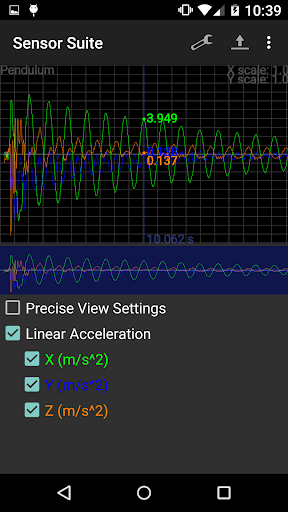
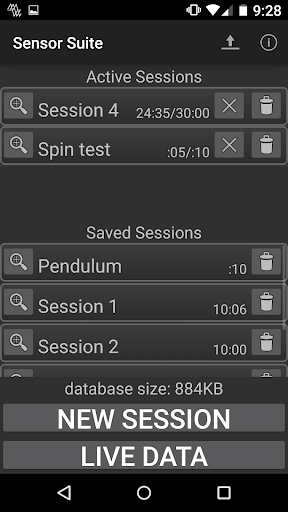
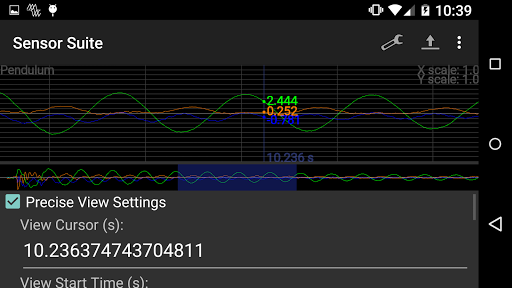
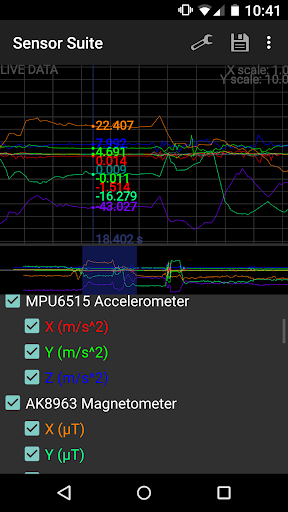
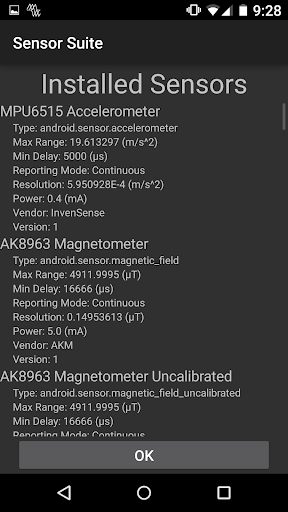
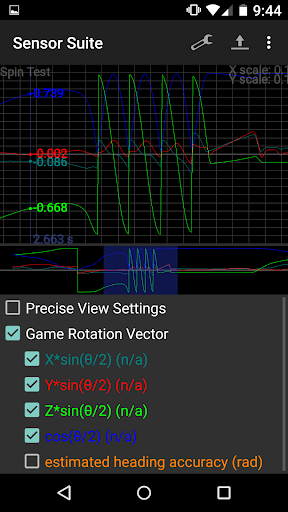
Sensor Suite provides high precision data acquisition, graphing, and export for all hardware and software sensors available on your Android device. Great for experiments, demonstrations, and learning about your device's sensors. Android Sensor Types: <b>Motion Sensors</b>: (http://developer.android.com/guide/topics/sensors/sensors_motion.html) - Accelerometers - Gravity - Gyroscopes - Rotational Vectors - Step Detectors/Counters <b>Position Sensors</b>: (http://developer.android.com/guide/topics/sensors/sensors_position.html) - Orientation - Magnetometers - Proximity <b>Environmental Sensors</b> (http://developer.android.com/guide/topics/sensors/sensors_environment.html) - Ambient Air Temperature - Device Temperature - Air Pressure - Illumination - Humidity <b>Body Sensors</b>: - Heart Rate NOTE: Support for new software sensors introduced in Android 5.0 (Lollipop) is very primitive right now. Support will improve as more information becomes available. An advanced graphing system provides a powerful data visualization tool to inspect parts of a graph or view exact measured values. On the lower graph view, touch controls and pinch gestures allow panning or zooming. On the top graph, touching or dragging controls a cursor that can be used to get the values of all sensor at any point time. Any sensor or component value can be toggled on or off. All sensors that are part of a particular session are overlaid on a single graph to make correlation between different sensors easy. A Live Data mode provides a more interactive experience but less recording control. An intuitive user interface makes tasks such as setting up a sensor data logging session or exporting to external storage such as an SD card easy. Logging settings include the ability to toggle any available sensor or set the session duration and update interval. Note that some sensors ignore the update interval by internal design, including event based sensors such as step counters and certain orientation sensors. A background service (with notification icon) lets you capture sensor data over long periods of time, even when the device is locked/deactivated. After capturing sensor data you can view it in the application's graphing windows, save it to a .csv (Excel) file, or export the entire SQL database to an SD card. <b>Menu Options:</b> Settings - Shows/Hides the sensor and setting checkboxes while viewing graphs. Save - Saves the data from the Live Data mode in a new session. Export - In the main menu this exports the entire SQL database to your external storage folder. While viewing a session this exports the data for that session to a .csv file. New Session - Takes you to the New Session window defaulting to the settings of whatever session you were looking at for convenience. Information - Shows you information about every hardware and software sensor available to your device.
Installs since 29 Aug 2026 Measured
Exact Google Play install counts, collected daily
Ratings
118 ratings, 8 reviews
- 5 ★57%
- 4 ★0.0%
- 3 ★21%
- 2 ★0.0%
- 1 ★21%
Recent reviews
Latest public reviews from the store
- 24 Dec 2021
Wonderful game, I like the classic style merged with the unique idea of changing the colors, not so bugy or laggy or weird and messing stuff in general. The repetitive sound effects makes it a bit annoying and difficult to play online especially without any headphones. The menu could be improved or add custome background for unique ideas as destroying blocks in space, in short... Good game but with weird mechanism
- 10 Feb 2020
Quite good but would like more levels!
- 21 Oct 2017
Damn tho... This only has 122 people playing it. That's sad tbh. The game is great, maybe more lvls? Nebulous, Obourous, and Rebellious has way more players and is way more popular. Did this game come out as one of your first few?? Anyways it's a really gud game but there's only 20 lvls, and after that it gets boring
- 10 Dec 2015
Could add some music, but otherwise great! BUT... err... it gets boring after a while.
What reviewers bring up
Topics mentioned in the latest 7 reviews, by how many reviews mention them
Liked in good reviews (6 reviews)
- nebulous 2
Raised in bad reviews (0 reviews)
No topic comes up twice.
Top chart positions
Latest Google Play chart ranks by country, last 10 days
Not in any tracked top chart in the last 10 days.
Sensor Suite history
Release, install milestones, listing and store changes
- Reached 10,000+ installs 23 Dec 2018
- Reached 5,000+ installs 18 Dec 2015
- Reached 1,000+ installs 4 Jul 2015
- Reached 500+ installs 30 May 2015
- Reached 100+ installs 8 Jan 2015
- Reached 50+ installs 21 Dec 2014
- First released on the store 17 Nov 2014
Update frequency
How often Sensor Suite ships a new version, month by month
0 updates in the last 12 months. Less often than most similar apps: they shipped a median of 2 updates in the same year.
Recent versions
Current version 1.0.9.1
- Version 1.0.9.13 Aug 2024
Update SDK to support newer Android versions.
- Version 1.0.915 Oct 2022
- Version 1.0.816 Apr 2015
Listing keywords
Words and phrases Sensor Suite repeats most in its store listing
Top phrases: sensor data (3), entire sql database (2), hardware and software (2), high precision data (2), live data mode (2).
Highlighted words also appear in the title. Counts cover the title, short description and description.
Business model and tech
From the store listing and declared permissions
- Business model
- Free to download
- Sensitive access
- No sensitive permission declared
Compliance
What the listing and the app package show
- Store status
- Live
- Upkeep
- No update since 3 Aug 2024
- Registered in
- United States
- Privacy policy
- Linked on the listing
- Advertising
- No ads declared
- In-app purchases
- None declared
- Age rating
- Everyone
Apps like Sensor Suite
aDataConMonamazing-create13.6K installs★ 4.3
Universal TV Remote for All TVAlphard Solutions56K installs★ 3.17
Auto Scroll TTAbyssiniatech64.2K installs★ 2.67
Whistle SoundsInfinite_Apps64.4K installs★ 3.5
QR Barcode : Scanner & CreateScan Team320K installs★ 3.38
Calendario de Puerto Rico 2025FamilyAppsPro15.2K installs★ 4.57
Motion Detector: Security CamFabioDeveloper8.1K installs★ 4.1
Watt VA Amp Volt CalculationsElectroMission Co.53.2K installs★ 1.0
Zip Extractor–Unzip UnRARMS Apps Lab30.1K installs★ 3.5
Sensor Suite: questions and answers
How many downloads does Sensor Suite have?
Sensor Suite has 20,866 installs on Google Play, measured from the store's own count on 14 Nov 2026.
Who makes Sensor Suite?
Sensor Suite is published by Simplicial Software, LLC, a developer based in US.
When was Sensor Suite last updated?
The latest version (1.0.9.1) was released on 3 Aug 2024.
Is Sensor Suite free?
Yes. Sensor Suite is free to download.
Is Sensor Suite still available?
Yes. Sensor Suite is live on Google Play as of 14 Nov 2026.
Track Sensor Suite and its competitors
Watch any app for new versions, rating drops, chart moves and removals. Free plan, no card.