
ServerX: FTP Server & HTTP
Powerful FTP Server & HTTP Server. Securely share files from your phone.
- Installs
- 420
- Measured
- Rating
- —
- Ratings
- —
- Version
- Varies with device
- Released
- 4 Feb 2026
- Tracked since 12 May 2026
- Size
- —
Screenshots


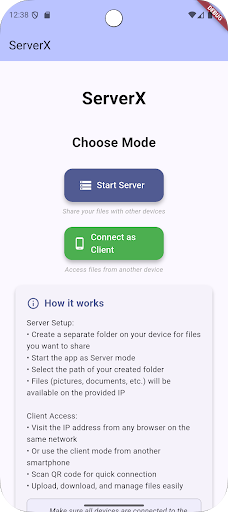


About ServerX: FTP Server & HTTP
The description on the store listing
ServerX: High-Speed FTP Server & HTTP Server
Unlock the full potential of your device with ServerX: FTP & HTTP, the ultimate solution for wireless file management. Transform your phone or tablet into a robust FTP Server and Web Server (HTTP) instantly. Access, transfer, and manage your files from any PC, Mac, or Linux machine on your network—no USB cables or cloud services required.
🚀 Why Choose ServerX?
ServerX bridges the gap between your mobile device and your computer (PC, Mac, Linux) or other mobile devices. Whether you need to back up your photos, load music and movies, or share documents with colleagues,
ServerX provides a fast, secure, and reliable connection …
Read the full description
ServerX: High-Speed FTP Server & HTTP Server Unlock the full potential of your device with ServerX: FTP & HTTP, the ultimate solution for wireless file management. Transform your phone or tablet into a robust FTP Server and Web Server (HTTP) instantly. Access, transfer, and manage your files from any PC, Mac, or Linux machine on your network—no USB cables or cloud services required. 🚀 Why Choose ServerX? ServerX bridges the gap between your mobile device and your computer (PC, Mac, Linux) or other mobile devices. Whether you need to back up your photos, load music and movies, or share documents with colleagues, ServerX provides a fast, secure, and reliable connection over your local Wi-Fi network. 🌟 Key Features: 1. Dual Server Power (FTP & HTTP) • FTP Server: Standard File Transfer Protocol support. Use any FTP client (like FileZilla, WinSCP, or Windows Explorer) to browse and manage your device's storage. Perfect for power users who need bulk transfer capabilities. • HTTP Server: A user-friendly web interface accessible from any web browser (Chrome, Firefox, Safari, Edge). View photos, play videos, and download files directly in the browser—no extra software required on the receiving device. 2. Seamless Wireless Transfers Forget about hunting for cables. With ServerX, your Wi-Fi connection is your data cable. Transfer speeds are limited only by your router, offering a significant performance advantage over Bluetooth. • Upload & Download: Send files to your phone or pull them off your phone with ease. • Cross-Platform: Works flawlessly with Windows, macOS, Linux, iOS, and other Android devices. 3. Quick Connect via QR Code Typing IP addresses can be annoying. ServerX generates a unique QR code for your server address. Simply scan it with another device to open the connection instantly. It’s the fastest way to share a link to your files. 4. Full Storage Access Unlike some apps that restrict you to specific folders, ServerX gives you control (with your permission). • Access Internal Storage. • Read and write to SD Cards (where supported). • Manage your entire file system remotely. 5. Share from Other Apps Found a funny video in your Gallery or a document in your File Manager? Use the Android "Share" menu to send it directly to ServerX. The app will start the server and give you a link to share that specific file immediately. 6. Background Reliability Transfers shouldn't stop just because your screen turns off. ServerX includes a Wake Lock feature and battery optimization handling to ensure your server stays alive and accessible during long transfer sessions. 7. Lightweight & Efficient Designed to be minimal on resources, ServerX runs smoothly without draining your battery unnecessarily when not in use. It’s there when you need it, and out of the way when you don't. 🛠️ Use Cases: • Backup Your Life: Quickly copy all your camera photos and videos to your PC for safekeeping. • Cord-Free Media: Push movies and music albums from your computer to your phone before a trip. • Office Utility: Share a presentation or large PDF with a coworker sitting across the desk without using email attachments or internet data. • Developer Tool: Test local websites or inspect app files effortlessly. 🔒 Privacy First ServerX operates entirely on your local network. Your files never touch external cloud servers, ensuring your data remains private and secure. You are in complete control of your data. How to Use: 1. Connect your device to Wi-Fi. 2. Open ServerX. 3. Tap the Start button for FTP or HTTP (or both!). 4. Enter the displayed URL (ftp://... or http://...) into your computer's browser or file explorer. 5. Start transferring!
Installs since 14 Nov 2026 Measured
Exact Google Play install counts, collected daily
Daily history starts once this app is in our daily install sample.
Ratings
- 5 ★0.0%
- 4 ★0.0%
- 3 ★0.0%
- 2 ★0.0%
- 1 ★0.0%
Recent reviews
Latest public reviews from the store
No reviews in our sample for this app yet.
Top chart positions
Latest Google Play chart ranks by country, last 10 days
Not in any tracked top chart in the last 10 days.
ServerX: FTP Server & HTTP history
Release, install milestones, listing and store changes
- First released on the store 4 Feb 2026
Update frequency
How often ServerX: FTP Server & HTTP ships a new version, month by month
0 updates in the last 12 months. Less often than most similar apps: they shipped a median of 1 updates in the same year.
Listing keywords
Words and phrases ServerX: FTP Server & HTTP repeats most in its store listing
Top phrases: ftp server (5), server http (4), ftp server http (3), http server (3), wi fi (3).
Highlighted words also appear in the title. Counts cover the title, short description and description.
Business model and tech
From the store listing and declared permissions
- Business model
- Free to downloadShows ads
- Sensitive access
- CameraPhotos, videos and filesAdvertising ID
18 permissions
0 special access, 6 sensitive, 12 standard
- Take photos and videosSensitive
- Change or delete shared storageSensitive
- Read music and audioREAD_MEDIA_AUDIOSensitive
- Read photosREAD_MEDIA_IMAGESSensitive
- Read shared storageSensitive
- Read videosREAD_MEDIA_VIDEOSensitive
- Ad attribution (Privacy Sandbox)ACCESS_ADSERVICES_ATTRIBUTIONStandard
- Ad topics (Privacy Sandbox)ACCESS_ADSERVICES_TOPICSStandard
- Read the advertising IDAD_IDStandard
- Read the advertising ID (Privacy Sandbox)ACCESS_ADSERVICES_AD_IDStandard
- Ask to skip battery optimisationREQUEST_IGNORE_BATTERY_OPTIMIZATIONSStandard
- Keep the phone awakeStandard
Compliance
What the listing and the app package show
- Store status
- Live
- Privacy policy
- Linked on the listing
- Advertising
- Shows ads
- In-app purchases
- None declared
- Age rating
- Everyone
- Sensitive permissions
- 6 sensitive of 18
- Location access
- No
- Camera and microphone
- Camera
Apps like ServerX: FTP Server & HTTP
RedcoatRedcoat AI15.8K installs★ 4.47
Remy RemindersSam Beckman6.1K installs★ 2.33
Pop Proteção InteligentePOP Plataforma de Proteção inteligente29.6K installs★ 3.0
TabmediaClose-Up International8.7K installs★ 4.1
Future Life Goals PlannerFlivion Apps14.2K installs★ 3.5
Kits-Ai: Advice AppAdrigra Karya69.2K installs★ 3.0
Geez Calendar AppDesale F. Hdremariam31.7K installs★ 4.89
Q-AnywhereACF Technologies Inc.23.6K installs★ 2.35
AsphCalcProPoggi Carlo10.1K installs★ 4.6
ServerX: FTP Server & HTTP: questions and answers
How many downloads does ServerX: FTP Server & HTTP have?
ServerX: FTP Server & HTTP has 420 installs on Google Play, measured from the store's own count on 14 Nov 2026.
Who makes ServerX: FTP Server & HTTP?
ServerX: FTP Server & HTTP is published by CodingMSTR.
Is ServerX: FTP Server & HTTP free?
Yes. ServerX: FTP Server & HTTP is free to download, and it shows ads.
Is ServerX: FTP Server & HTTP still available?
Yes. ServerX: FTP Server & HTTP is live on Google Play as of 14 Nov 2026.
Track ServerX: FTP Server & HTTP and its competitors
Watch any app for new versions, rating drops, chart moves and removals. Free plan, no card.