
- Installs
- 812
- Measured
- Rating
- —
- Ratings
- —
- Version
- Varies with device
- Updated 2 Mar 2021
- Released
- 24 Apr 2019
- Tracked since 14 May 2026
- Size
- —
Screenshots
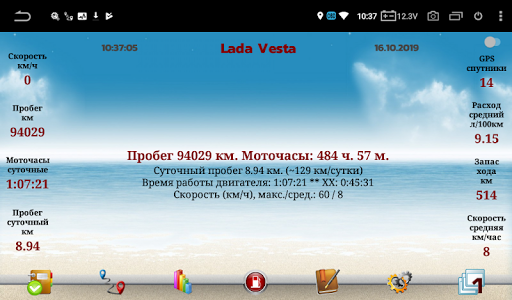
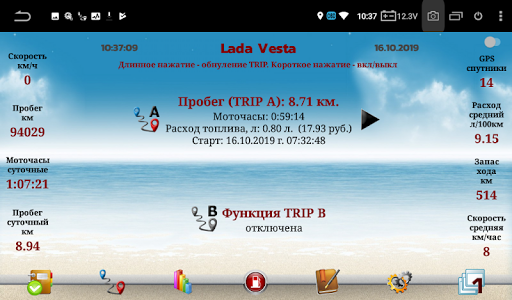

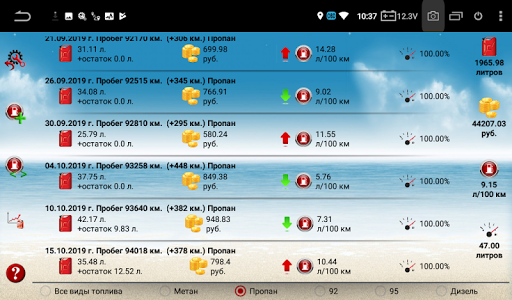


About ServiceNote
The description on the store listing
The program "ServiceNote" is intended for installation on MMS with Android OS in cars
Main functions:
- automatic calculation of the distance traveled by the car according to the average daily mileage or GPS (optional)
- automatic calculation of hours.
- alternative calculation of hours if the main one does not work
- display information about expired events
- display information about upcoming events for a certain time
- notification panel with mileage indication
- record of events by mileage
- recording events by time
- recording of events by hours
- maintaining a log of completed work
- event reminder every half hour
- 3 separately customizable multifunctional widgets
- …
Read the full description
The program "ServiceNote" is intended for installation on MMS with Android OS in cars Main functions: - automatic calculation of the distance traveled by the car according to the average daily mileage or GPS (optional) - automatic calculation of hours. - alternative calculation of hours if the main one does not work - display information about expired events - display information about upcoming events for a certain time - notification panel with mileage indication - record of events by mileage - recording events by time - recording of events by hours - maintaining a log of completed work - event reminder every half hour - 3 separately customizable multifunctional widgets - maintaining cyclic tasks - after installation, you need to add the program to the "white" list, in the MMS settings. - autoload - travel statistics. Mileage per day, total travel time per day, maximum speed per day. Display statistics by day - display on the pop-up window of data on mileage and engine hours, up to 60 km / h - every kilometer, from 60 to 100 km / h - every 10 km, more than 100 km / h - every 20 km - record data on gas stations, for 5 types of fuel (92, 95, methane, propane, diesel), display information on gas stations - display the average flow rate on the main screen - start the program by clicking on the curtain from the status bar - remembers the last fuel and cost - the ability to display gas stations for the current month - variable correction coefficient to mileage - display on the main screen of fuel consumption per day and the cost of travel per day - calculation of the average daily mileage based on travel statistics - added graphs of average mileage from mileage and mileage graph from date - automatic switching of the calculation method of the hour, from the on-board voltage or from the GPS sensor - Automatic daily backup of all databases. Indication of a successful reservation. At the bottom left is a red (unsuccessful) or green (successfully) icon - saving the progress report on Google Drive - the ability to adjust the total mileage when entering refueling data - backup of the database when entering new data, except for trip statistics - notification of scheduled events in the curtain - automatic mileage correction when GPS signal is lost (for example, tunnel passage). Not tested! - various icons in the magazine for different types of work - calculation of the average speed every day - Added information on the amount of fuel in the tank, for 1 or 2 types of fuel, warning about low fuel level - TRIP function (similar to automotive). Mileage calculation is possible with or without correction factor - notification in the status bar about the absence of a GPS signal - notification in the curtain about the number of GPS satellites - display of speed on the main screen (disabled) - the ability to set your background image. To do this, in the / sdcard / ServiceNote_backup folder, you need to copy the image with the name Mainback.jpg (name with a capital letter). For the image to change, close the program through the "Tasks" button, and run it again - setting your text color - day and night mode - support for Vesta cars with CanBus3 device, which allows you to automatically update mileage - many other features
Installs since 14 Nov 2026 Measured
Exact Google Play install counts, collected daily
Daily history starts once this app is in our daily install sample.
Ratings
- 5 ★0.0%
- 4 ★0.0%
- 3 ★0.0%
- 2 ★0.0%
- 1 ★0.0%
Recent reviews
Latest public reviews from the store
No reviews in our sample for this app yet.
Top chart positions
Latest Google Play chart ranks by country, last 10 days
Not in any tracked top chart in the last 10 days.
ServiceNote history
Release, install milestones, listing and store changes
- Reached 500+ installs 2 Mar 2021
- Reached 100+ installs 24 Sep 2019
- Reached 50+ installs 26 Jun 2019
- Reached 10+ installs 13 May 2019
- Reached 5+ installs 3 May 2019
- First released on the store 24 Apr 2019
Recent versions
Current version Varies with device
- Version 3.0.619 Nov 2020
- Version 3.0.511 Oct 2020
- Version 3.02 Sep 2020
- Version 2.3.17a9 Jun 2020
Listing keywords
Words and phrases ServiceNote repeats most in its store listing
Top phrases: display information (3), gas stations (3), main screen (3), average daily mileage (2), calculation of hours (2).
Highlighted words also appear in the title. Counts cover the title, short description and description.
Business model and tech
From the store listing and declared permissions
- Business model
- Free to download
- Sensitive access
- No sensitive permission declared
Compliance
What the listing and the app package show
- Store status
- Live
- Upkeep
- No update since 2 Mar 2021
- Registered in
- Russia
- Privacy policy
- Linked on the listing
- Advertising
- No ads declared
- In-app purchases
- None declared
- Age rating
- Everyone
Apps like ServiceNote
SuperTankSuperTank29.6K installs★ 2.7
Drive SafelyFRUCT team23.4K installs★ 4.8
SLICK - Car Key on your PhoneQuantum Inventions22.3K installs★ 2.0
ParkZone Go - ParkCareParkZone A/S - Vi skaber plads78.5K installs★ 1.3
MCEqual - Equalizer for AAOScorelogiclabs3.6K installs★ 4.04
TrackLocatePath Finder Tech7.1K installs★ 4.5
TRUCKS & DetailsWellhausen & Marquardt Medien5.5K installs★ 4.7
Progression Ignition Tuner v2Progression Ignition, LLC11.9K installs★ 4.68
License Plate LookupSearch Quarry18K installs★ 3.28
ServiceNote: questions and answers
How many downloads does ServiceNote have?
ServiceNote has 812 installs on Google Play, measured from the store's own count on 14 Nov 2026.
Who makes ServiceNote?
ServiceNote is published by Самусенко Артём, a developer based in RU.
When was ServiceNote last updated?
The latest version (Varies with device) was released on 2 Mar 2021.
Is ServiceNote free?
Yes. ServiceNote is free to download.
Is ServiceNote still available?
Yes. ServiceNote is live on Google Play as of 14 Nov 2026.
Track ServiceNote and its competitors
Watch any app for new versions, rating drops, chart moves and removals. Free plan, no card.