
Shift Work Calendar Planner
Simple Calendar for shift workers. Easy planning shifts and schedule with notes.
- Installs
- 1.12M
- Measured
- Rating
- 4.64
- Ratings
- 22.8K
- 207 reviews
- Version
- 2026.3.2
- Updated 2 Nov 2026
- Released
- 28 Jan 2014
- Tracked since 12 May 2026
- Size
- 12 MB
- Needs 7.0
Also on App Store: Shift Work Calendar Planner (9.4K ratings)
Screenshots


About Shift Work Calendar Planner
The description on the store listing
Shift Work Calendar Planner is the classic shift calendar app!
This free app makes shift management a breeze and helps you easily manage your schedule.
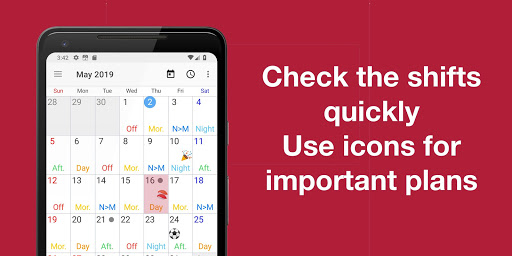
You can quickly and easily register your shifts and view them in calendar format.
You can also enter your schedule and other details, making this app a great alternative to a personal organizer!
● Convenient Shift Work Calendar Features (These features are free to use)
・Easy shift registration and management
Easily register shifts by tapping the buttons in order.
You can enter a month's worth of shifts in about 20 seconds.
Shift patterns such as early shifts and night shifts can be freely edited, including display names, display …
Read the full description
Shift Work Calendar Planner is the classic shift calendar app! This free app makes shift management a breeze and helps you easily manage your schedule. You can quickly and easily register your shifts and view them in calendar format. You can also enter your schedule and other details, making this app a great alternative to a personal organizer! ● Convenient Shift Work Calendar Features (These features are free to use) ・Easy shift registration and management Easily register shifts by tapping the buttons in order. You can enter a month's worth of shifts in about 20 seconds. Shift patterns such as early shifts and night shifts can be freely edited, including display names, display colors, work hours, and break times. ・Check shifts on the calendar screen Easily switch the displayed month with a swipe. ・Schedule management with the memo function Enter daily notes on the calendar screen, making it easy to manage your schedule. You can also set cute emoji icons for notes, allowing you to customize them to suit your schedule. In addition to emoji icons, you can customize the background color for each day for easy management. ・Shift Sharing with Family and Friends Save and share as calendar images Images can be instantly sent via email, making it easy to keep family and friends informed of your schedule. You can also set them as your smartphone wallpaper. ・Widget Quickly check your shifts and schedule from the home screen with the widget. ・Alarms based on shift times ●Even More Convenient: Premium Plan Upgrading to Premium offers even more convenient features. ・No-Ads No-Ads: Enjoy more screen real estate by removing ads. ・Google Calendar Integration Add your registered shifts to Google Calendar. Easily share shifts with family and friends. By syncing with Google Calendar, you can also link with third-party calendar services such as iCloud, Microsoft 365, Outlook Live, Exchange, and Facebook to view your shifts. ・Shift Schedule You can also register and view shifts for colleagues. Shift Plan users can share shifts via email or messaging apps. - Monthly View Widget Check your monthly shifts without opening the app. [Recommended for!] - Those who want to manage shifts and schedules: - Nurses, doctors, caregivers, and other hospital workers - Service industry workers such as apparel shops, convenience stores, supermarkets, ignition points, department stores, and drugstores - Call center workers, childcare workers, firefighters, police officers, retailers, shops, restaurants, and factories - Those who work a three-shift system or other shift system - Those who have shifts such as day shifts, early shifts, late shifts, night shifts, and after-hours shifts - Those who want to easily manage their shift work and attendance times - Those who want to view their shifts on a calendar - Looking for a simple and easy-to-understand calendar app - Looking for an app that allows for easy shift management - Want to view their own schedule as well as their shifts on the calendar - Those who want to manage their schedule on their smartphone
Installs, last 30 days Measured
Exact Google Play install counts, collected daily
Ratings
22,841 ratings, 207 reviews
- 5 ★72%
- 4 ★22%
- 3 ★4.9%
- 2 ★0.0%
- 1 ★0.9%
Recent reviews
Latest public reviews from the store
No reviews in our sample for this app yet.
Top chart positions
Latest Google Play chart ranks by country, last 10 days
- Countries ranked
- 1
- Best rank
- #80
- Top 10 placements
- 0
- of 2 chart placements
- Average rank
- #115
Best countries on Google Play
- 🇯🇵 Japan · Top grossing, Productivity#80
| Country | Chart | Category | Rank | Best (10 days) | Date |
|---|---|---|---|---|---|
| 🇯🇵 Japan | Top grossing | Productivity | #80 | #67 | 19 Nov 2026 |
| 🇯🇵 Japan | Top free | Productivity | #150 | #150 | 19 Nov 2026 |
Shift Work Calendar Planner history
Release, install milestones, listing and store changes
- Reached 1,000,000+ installs 6 Nov 2025
- Reached 500,000+ installs 11 Sep 2019
- First released on the store 28 Jan 2014
Update frequency
How often Shift Work Calendar Planner ships a new version, month by month
5 updates in the last 12 months. More often than most similar apps: they shipped a median of 4 updates in the same year.
Recent versions
Current version 2026.3.2
- Version 2026.3.22 Nov 2026
Improvement of stability
- Version 2026.3.12 Nov 2026
Improvement of stability
- Version 2026.2.122 Aug 2026
Improvement of stability
- Version 2026.2.07 Jul 2026
Improvement of stability
Listing keywords
Words and phrases Shift Work Calendar Planner repeats most in its store listing
Top phrases: shift work (4), family and friends (3), shift work calendar (3), google calendar (3), work calendar (3).
Highlighted words also appear in the title. Counts cover the title, short description and description.
Business model and tech
From the store listing, the SDKs in the app package and its declared permissions
- Business model
- Free to downloadIn-app purchasesShows ads
- Built with
- No cross-platform framework or game engine detected
- Ad networks (1)
- AdMob
- Subscriptions and payments
- Google Play billing
- Analytics and crash reports
- Firebase
- Sensitive access
- CameraCalendarPhotos, videos and filesAdvertising ID
2 ad, attribution and analytics SDKs detected. SDKs are read from the app package and permissions from the store listing, so code that loads later is not seen.
Technology
30 SDKs found in the app package
Ad networks
Advertising and install-attribution SDKs found in the app package
- AdMob
24 permissions
2 special access, 5 sensitive, 17 standard
- Set exact alarmsSCHEDULE_EXACT_ALARMSpecial access
- Show full-screen alertsUSE_FULL_SCREEN_INTENTSpecial access
- Read calendar eventsSensitive
- Take photos and videosSensitive
- Change or delete shared storageSensitive
- Read shared storageSensitive
- Show notificationsPOST_NOTIFICATIONSSensitive
- Ad attribution (Privacy Sandbox)ACCESS_ADSERVICES_ATTRIBUTIONStandard
- Ad topics (Privacy Sandbox)ACCESS_ADSERVICES_TOPICSStandard
- Read how it was installed (install referrer)BIND_GET_INSTALL_REFERRER_SERVICEStandard
- Read the advertising IDAD_IDStandard
- Read the advertising ID (Privacy Sandbox)ACCESS_ADSERVICES_AD_IDStandard
Compliance
What the listing and the app package show
- Store status
- Live
- Upkeep
- Updated 2 Nov 2026
- Registered in
- Japan
- Privacy policy
- Linked on the listing
- Advertising
- Shows ads
- In-app purchases
- Offered
- Age rating
- Everyone
- Sensitive permissions
- 5 sensitive, 2 special access of 24
- Location access
- No
- Camera and microphone
- Camera
Apps like Shift Work Calendar Planner
SimplenoteAutomattic, Inc1.9M installs★ 3.64
Thakur Prasad Calendar 2026Inditech bird2.1M installs★ 4.43
SGWorkPassMinistry of Manpower3.7M installs★ 3.93
BlockerHero - Porn BlockerTechsolvex1.6M installs★ 3.67
instdownfawazapp4.1M installs★ 4.3
NW PublisherNew World Publisher2.1M installs★ 4.74
CV & Resume CreatorDesygner Pty Ltd1.7M installs★ 4.65
identity onlineIDnow GmbH (iTM)1.4M installs★ 3.89
Collabora OfficeCollabora Productivity Limited1.6M installs★ 3.62
Shift Work Calendar Planner: questions and answers
How many downloads does Shift Work Calendar Planner have?
Shift Work Calendar Planner has 1,117,334 installs on Google Play, measured from the store's own count on 19 Nov 2026.
Who makes Shift Work Calendar Planner?
Shift Work Calendar Planner is published by Ebisu Soft Inc., a developer based in JP.
When was Shift Work Calendar Planner last updated?
The latest version (2026.3.2) was released on 2 Nov 2026.
Is Shift Work Calendar Planner free?
Yes. Shift Work Calendar Planner is free to download and offers in-app purchases, and it shows ads.
Is Shift Work Calendar Planner still available?
Yes. Shift Work Calendar Planner is live on Google Play as of 19 Nov 2026.
Track Shift Work Calendar Planner and its competitors
Watch any app for new versions, rating drops, chart moves and removals. Free plan, no card.