
Shortcut Maker
Shortcut Maker - Custom Shortcuts for Maximum Efficiency
- Installs
- 111K
- Measured
- Rating
- 3.21
- Ratings
- 238
- 9 reviews
- Version
- 1.3.0
- Updated 31 Oct 2026
- Released
- 23 Oct 2024
- Tracked since 12 May 2026
- Size
- —
Screenshots


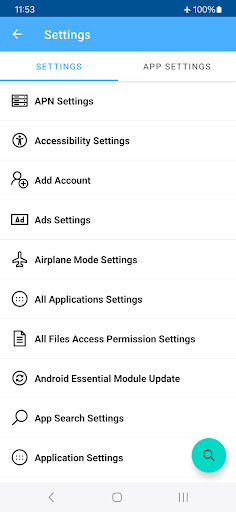


About Shortcut Maker
The description on the store listing
Shortcut Maker is a powerful app designed to make your Android experience faster and more efficient. With this tool, you can create custom shortcuts on your home screen, giving you instant access to the features and content you use most.
Key Features:
• App Shortcuts: Launch any installed app directly from your home screen.
• Activity Shortcuts: Access specific app functions (e.g., a particular chat, camera mode, or playlist).
• Folder & File Shortcuts: Pin frequently accessed folders or files for one-tap convenience.
• Settings Shortcuts: Jump to specific system settings like Wi-Fi, Bluetooth, or display options.
• Website Shortcuts: Create shortcuts to your favorite websites for …
Read the full description
Shortcut Maker is a powerful app designed to make your Android experience faster and more efficient. With this tool, you can create custom shortcuts on your home screen, giving you instant access to the features and content you use most. Key Features: • App Shortcuts: Launch any installed app directly from your home screen. • Activity Shortcuts: Access specific app functions (e.g., a particular chat, camera mode, or playlist). • Folder & File Shortcuts: Pin frequently accessed folders or files for one-tap convenience. • Settings Shortcuts: Jump to specific system settings like Wi-Fi, Bluetooth, or display options. • Website Shortcuts: Create shortcuts to your favorite websites for instant navigation. Why Use Shortcut Maker? • Save Time: Reduce navigation paths and get things done faster. • Customize Your Device: Make your home screen more functional and tailored to your needs. • Improve Productivity: Quickly access important apps, files, or settings. • Simple & Intuitive: A user-friendly interface ensures setup is quick and hassle-free. Shortcut Maker is perfect for anyone looking to simplify their digital routine, whether you’re a power user or simply want faster access to everyday tools. Download Shortcut Maker today and unlock the full potential of your Android device! Additionally, these are items supported from the Settings shortcut. ▷ The following are shortcuts to supported setting items. • Accessibility Settings • Add Account • Airplane Mode Settings • APN Settings • Developer Options Settings • Application Settings • App Search Settings • Auto Rotate Settings • Battery Saver Settings • Biometric Enroll • Bluetooth Settings • Video Captioning Settings • Video Cast Settings • Condition Provider Settings • Data Roaming Settings • Data Usage Settings • Date Settings • Device Information Settings • Display Settings • Screen Saver Settings • Fingerprint Enroll • Physical Keyboard Settings • Default Home App Settings • Input Method Settings • Input Method Subtype Settings • Storage Settings • Language Settings • Location Settings • All Applications Settings • All Files Access Permission Settings • SIM Profiles Settings • Applications Settings • Default Apps Settings • Overlay Permission Settings • Install Unknown Apps Settings • Modify System Settings • SD Card Storage Settings • Network Operator Settings • NFC Sharing Settings • NFC Payment Settings • NFC Settings • Night Display Settings • Notification Assistant Settings • Notification Access Settings • Notification Policy Access Settings • Print Settings • Privacy Settings • Quick Access Wallet Settings • Quick Launch Settings • Media File Permission Settings • Exact Alarm Scheduling Settings • Search Settings • Security Settings • System Settings • Regulatory Information Settings • Work Policy Information Settings • Sound Settings • Storage Volume Access Settings • Sync Settings • Usage Access Settings • Personal Dictionary Settings • Voice Input Settings • VPN Settings • VR Settings • WebView Settings • Wi-Fi IP Settings • Wi-Fi Settings • Wireless Settings • Zen Mode Priority Settings • Ads Settings • Android Essential Module Update ▷ Below are shortcuts to setting items for specific apps. • Application Details Settings • App Notification Bubble Settings • App Notification Settings • App Open By Default Settings • App Usage Settings • Background Data Restrictions Settings • Autofill Service Settings
Installs since 29 Aug 2026 Measured
Exact Google Play install counts, collected daily
Ratings
238 ratings, 9 reviews
- 5 ★33%
- 4 ★8.2%
- 3 ★8.2%
- 2 ★25%
- 1 ★25%
Recent reviews
Latest public reviews from the store
No reviews in our sample for this app yet.
Top chart positions
Latest Google Play chart ranks by country, last 10 days
Not in any tracked top chart in the last 10 days.
Shortcut Maker history
Release, install milestones, listing and store changes
- Reached 100,000+ installs 1 Apr 2026
- Reached 50,000+ installs 8 Mar 2025
- Reached 10,000+ installs 28 Nov 2024
- Reached 5,000+ installs 11 Nov 2024
- First released on the store 23 Oct 2024
Update frequency
How often Shortcut Maker ships a new version, month by month
3 updates in the last 12 months. More often than most similar apps: they shipped a median of 1 updates in the same year.
Recent versions
Current version 1.3.0
- Version 1.3.031 Oct 2026
Support for Android 16
- Version 1.1.220 Apr 2026
App stability has been improved.
- Version 1.1.114 Feb 2026
- Version 1.1.026 Oct 2025
Listing keywords
Words and phrases Shortcut Maker repeats most in its store listing
Top phrases: shortcut maker (6), access settings (4), home screen (3), information settings (3), permission settings (3).
Highlighted words also appear in the title. Counts cover the title, short description and description.
Business model and tech
From the store listing and declared permissions
- Business model
- Free to downloadShows ads
- Sensitive access
- No sensitive permission declared
Compliance
What the listing and the app package show
- Store status
- Live
- Upkeep
- Updated 31 Oct 2026
- Registered in
- South Korea
- Privacy policy
- Linked on the listing
- Advertising
- Shows ads
- In-app purchases
- None declared
- Age rating
- Everyone
Apps like Shortcut Maker
Fit Tolerance ISOYaşar Yücel Yeşilbağ151K installs★ 4.83
ADL DMX CalculatorKirill Trofimov62K installs★ 5.0
Screenshot Expert: Markup ToolTasakiApps12.2K installs★ 4.25
TV Remote - Control Roku & AllLyra mob110K installs★ 4.03
Battery barABC.21.1K installs★ 3.18
Bubble LevelCrydata13.2K installs★ 4.85
M Calendar(calendar, schedule)Sunguy257K installs★ 3.56
Easy Homescreen LauncherSimple Palace studio69.2K installs★ 3.94
Battery AlarmRHS.Dev25.3K installs★ 3.61
Shortcut Maker: questions and answers
How many downloads does Shortcut Maker have?
Shortcut Maker has 111,430 installs on Google Play, measured from the store's own count on 16 Nov 2026.
Who makes Shortcut Maker?
Shortcut Maker is published by Frandro, a developer based in KR.
When was Shortcut Maker last updated?
The latest version (1.3.0) was released on 31 Oct 2026.
Is Shortcut Maker free?
Yes. Shortcut Maker is free to download, and it shows ads.
Is Shortcut Maker still available?
Yes. Shortcut Maker is live on Google Play as of 16 Nov 2026.
Track Shortcut Maker and its competitors
Watch any app for new versions, rating drops, chart moves and removals. Free plan, no card.