Simple Bluetooth Printer
Print text and images with bluetooth thermal printer application!
- Installs
- 1.05M
- Measured
- Rating
- 3.68
- Ratings
- 8.5K
- 28 reviews
- Version
- 4.0.7
- Updated 21 Sep 2026
- Released
- 19 Aug 2017
- Tracked since 13 May 2026
- Size
- 3 MB
- Needs 4.1
Also on App Store: Simple Bluetooth Printer
Screenshots


About Simple Bluetooth Printer
The description on the store listing
Introducing our Simple Bluetooth Printer app, the ultimate solution for printing text and images from your Android phone to a thermal printer with ease. This app is designed to meet the needs of thousands of retailers, shop owners, wholesalers, and anyone who requires fast and efficient text printing.
Key Features:
1. Text / Image Printing: You can easily print text, images and QR codes with our app. Explore a new dimension of printing possibilities.
2. No Of Print: Print multiple copies at once by selecting the desired number of prints from 1 to 10. Save time and effort with just a few taps.
3. Current Date/Time Printing: Meet customer demands by printing the date and time on …
Read the full description
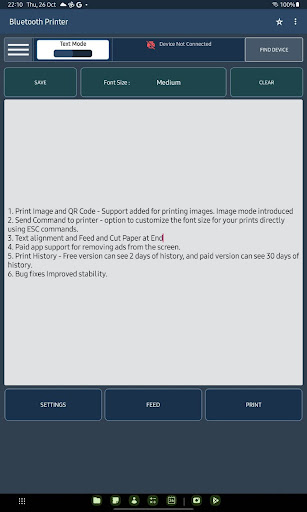
Introducing our Simple Bluetooth Printer app, the ultimate solution for printing text and images from your Android phone to a thermal printer with ease. This app is designed to meet the needs of thousands of retailers, shop owners, wholesalers, and anyone who requires fast and efficient text printing. Key Features: 1. Text / Image Printing: You can easily print text, images and QR codes with our app. Explore a new dimension of printing possibilities. 2. No Of Print: Print multiple copies at once by selecting the desired number of prints from 1 to 10. Save time and effort with just a few taps. 3. Current Date/Time Printing: Meet customer demands by printing the date and time on bills, vouchers, and more. Supported Date and Time Formats: ✔ dd-MM-yyyy hh:mm a ✔ dd-MM-yyyy HH:mm a ✔ dd/MM/yyyy hh:mm a ✔ dd/MM/yyyy HH:mm ✔ MM-dd-yyyy hh:mm a ✔ dd-MM-yyyy HH:mm ✔ MMM dd yyyy 4.Command Execution: Customize your print commands to achieve the desired output. Execute custom commands for greater flexibility. 5. Default Text: Add a default text that will be automatically included in every print. Customize the default text to include your store name, address, or any other information you want to appear on every printout. 6. Font Size : Adjust the font size of your printed text for optimal readability. Choose from small, medium, or large font sizes to suit your preferences. Text Alignment : Align your text as needed—choose from left, center, or right alignment for professional-looking prints. 7. Auto Connect: Our app now automatically connects to the previously paired printer, eliminating the need for manual reconnection. Enjoy a seamless printing experience without the hassle of repetitive setup. 8. Paste and Save Options: Copy and paste text directly into the app for quick and convenient printing. The save option allows you to store frequently printed text for future use, eliminating the need to retype it. 9. Print History: Keep track of your printed text and image history. Free version users can access the last two days of history, while paid version users can access up to 30 days of history. 10. Multi-language Support: We understand the global user base, so we've expanded language support to include English, Tamil, Spanish, Indonesian, Japanese, Malay, Portuguese, Bengali, Russian, Italian, and French. Now you can print text in your preferred language. 11. Feed and Cut Paper at End: Control the paper feed and cutting to optimize your prints. 12. Paid App Support for Ads-free Usage: Enjoy an ad-free experience by upgrading to the paid version. 13. RTL Support: We've added Right-to-Left (RTL) support for languages such as Arabic and Hebrew. The app's user interface and printed output will adapt to RTL layouts when the device is set to an RTL language, ensuring a smooth user experience. 14. AI Content generations - you can generate text content using the AI 15. Strict mode - You can Print the same content as same in the printer using the strict mode option - there are two modes medium and high, medium will convert text to image, and high will screenshots the text box and print them We strive to provide a seamless user experience with an intuitive interface for easy navigation and quick printing. Download the Simple Bluetooth Printer app now and unlock the power of printing text from your Android phone to a thermal printer effortlessly.
Installs, last 30 days Measured
Exact Google Play install counts, collected daily
Ratings
8,529 ratings, 28 reviews
- 5 ★55%
- 4 ★7.9%
- 3 ★6.6%
- 2 ★3.9%
- 1 ★26%
Recent reviews
Latest public reviews from the store
- 6 May 2026
excellent 👍
- 21 Apr 2026
good and easy to use but not sharp and the font are not dark enough
- 11 Feb 2026
Hi, I was just buying a year subcriptions. There is no different in function between free version and paid one, but the adv. I give star from 3 to 5 because the developers of this app is slowly but surely adds more functionalities to make this better.
- 24 Jan 2026
Best product for my daily use
What reviewers bring up
Topics mentioned in the latest 50 reviews, by how many reviews mention them
Liked in good reviews (26 reviews)
- wow 2
Raised in bad reviews (16 reviews)
- printer 5
- same 3
- showed 2
Top chart positions
Latest Google Play chart ranks by country, last 10 days
Not in any tracked top chart in the last 10 days.
Simple Bluetooth Printer history
Release, install milestones, listing and store changes
- Reached 100,000+ installs 12 Jul 2019
- Reached 50,000+ installs 18 Oct 2018
- Reached 10,000+ installs 29 Jan 2018
- Reached 5,000+ installs 3 Dec 2017
- Reached 1,000+ installs 17 Oct 2017
- Reached 500+ installs 3 Oct 2017
- Reached 50+ installs 19 Sep 2017
- Reached 10+ installs 3 Sep 2017
Update frequency
How often Simple Bluetooth Printer ships a new version, month by month
7 updates in the last 12 months. More often than most similar apps: they shipped a median of 2 updates in the same year.
Recent versions
Current version 4.0.7
- Version 4.0.721 Sep 2026
1. Multiple font sizes added for Strict Mode 2. Improved contrast for low-performance printers 3. Bug fixes
- Version 4.0.515 Jun 2026
Enhanced AI text generation and refinement experience. Improved print formatting support in Strict Mode. Better compatibility across 58mm, 80mm, and 4-inch paper sizes. Fixed printing, editing, and dialog-related crashes. Improved performance, stability, and memory usage. General bug fixes and enhancements.
- Version 4.0.425 Apr 2026
Handle continuous print jobs: execute auto-cut between copies and pause for user confirmation before proceeding
- Version 4.0.33 Apr 2026
Default Placeholder Bluetooth Connection fix,
Listing keywords
Words and phrases Simple Bluetooth Printer repeats most in its store listing
Top phrases: yyyy hh mm (6), hh mm (6), yyyy hh (6), dd mm yyyy (5), mm yyyy hh (5).
Highlighted words also appear in the title. Counts cover the title, short description and description.
Business model and tech
From the store listing, the SDKs in the app package and its declared permissions
- Business model
- Free to downloadIn-app purchasesShows ads
- Built with
- No cross-platform framework or game engine detected
- Ad networks (1)
- AdMob
- Subscriptions and payments
- Google Play billing
- Analytics and crash reports
- Firebase
- Sensitive access
- CameraNearby devicesAdvertising ID
2 ad, attribution and analytics SDKs detected. SDKs are read from the app package and permissions from the store listing, so code that loads later is not seen.
Technology
14 SDKs found in the app package
Ad networks
Advertising and install-attribution SDKs found in the app package
- AdMob
17 permissions
0 special access, 3 sensitive, 14 standard
- Take photos and videosSensitive
- Connect to paired Bluetooth devicesBLUETOOTH_CONNECTSensitive
- Find nearby Bluetooth devicesBLUETOOTH_SCANSensitive
- Ad attribution (Privacy Sandbox)ACCESS_ADSERVICES_ATTRIBUTIONStandard
- Ad topics (Privacy Sandbox)ACCESS_ADSERVICES_TOPICSStandard
- Read how it was installed (install referrer)BIND_GET_INSTALL_REFERRER_SERVICEStandard
- Read the advertising IDAD_IDStandard
- Read the advertising ID (Privacy Sandbox)ACCESS_ADSERVICES_AD_IDStandard
- Keep the phone awakeStandard
- Run a foreground serviceFOREGROUND_SERVICEStandard
- Access Bluetooth settingsStandard
- Pair with Bluetooth devicesStandard
Compliance
What the listing and the app package show
- Store status
- Live
- Upkeep
- Updated 21 Sep 2026
- Registered in
- India
- Privacy policy
- Linked on the listing
- Advertising
- Shows ads
- In-app purchases
- Offered
- Age rating
- Everyone
- Sensitive permissions
- 3 sensitive of 17
- Location access
- No
- Camera and microphone
- Camera
Apps like Simple Bluetooth Printer
MobileRecov - Data RecoveryStor Med Apps563K installs★ 4.69
WeBackGrit Technology949K installs★ 1.2
LED Scroller - text LED BannerCristools Simple Apps607K installs★ 4.75
Find My Bluetooth DeviceByteBox Inc.939K installs★ 3.9
Blue Speed VPNhelalik1.4M installs★ 4.51
Fibex Oficina MóvilSoluciones Medianet, C.A.632K installs★ 2.86
Electron: battery health infoMaher Safadi4M installs★ 3.81
CFMOTO RIDECFMOTO320K installs★ 3.77
Lag remover Lower Gaming PingNoLag Australia709K installs★ 4.38
Simple Bluetooth Printer: questions and answers
How many downloads does Simple Bluetooth Printer have?
Simple Bluetooth Printer has 1,052,263 installs on Google Play, measured from the store's own count on 20 Nov 2026.
Who makes Simple Bluetooth Printer?
Simple Bluetooth Printer is published by Techpuram Technology Private Limited, a developer based in IN.
When was Simple Bluetooth Printer last updated?
The latest version (4.0.7) was released on 21 Sep 2026.
Is Simple Bluetooth Printer free?
Yes. Simple Bluetooth Printer is free to download and offers in-app purchases, and it shows ads.
Is Simple Bluetooth Printer still available?
Yes. Simple Bluetooth Printer is live on Google Play as of 20 Nov 2026.
Track Simple Bluetooth Printer and its competitors
Watch any app for new versions, rating drops, chart moves and removals. Free plan, no card.