Simple Turtle LOGO
STEM coding app, easy and fun to learn turtle graphics code - tap out commands
- Installs
- 217K
- Measured
- Rating
- 3.22
- Ratings
- 858
- 6 reviews
- Version
- 2.11
- Updated 22 May 2024
- Released
- 4 Sep 2017
- Tracked since 12 May 2026
- Size
- 8 MB
- Needs 6.0
Screenshots



About Simple Turtle LOGO
The description on the store listing
<b>Learn to Code</b> with the Simple Turtle STEM coding app, create simple programming code with <b>Turtle LOGO</b> commands to control your Turtle and draw fun images and designs.
Learn the basic coding of LOGO and have fun.
<b>DRAWMODE </b> is used to Toggle INSTANT DRAW mode ON / OFF
<i>* New <b>Keyboard</b> feature added - Tap the cursor line to activate it *</i>
Learn & experiment to <b>create amazing Turtle Graphics</b>.
Ideal for <b>STEM</b> education & learning.
<b>How to use:</b> Perform drawing, repeat loops and 2D actions. No Procedures or Printing
Fast, Easy and Fun coding app for students <b>TAP the commands</b> you want, then <b>ADD COMMANDS</b> them to …
Read the full description
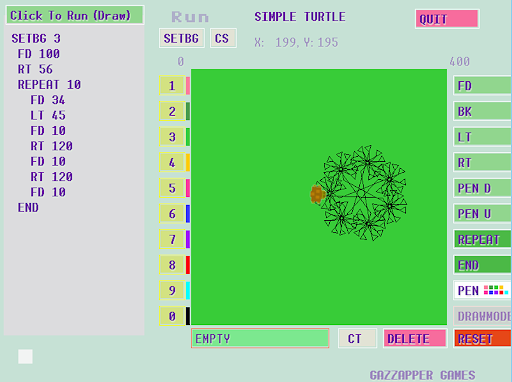
<b>Learn to Code</b> with the Simple Turtle STEM coding app, create simple programming code with <b>Turtle LOGO</b> commands to control your Turtle and draw fun images and designs. Learn the basic coding of LOGO and have fun. <b>DRAWMODE </b> is used to Toggle INSTANT DRAW mode ON / OFF <i>* New <b>Keyboard</b> feature added - Tap the cursor line to activate it *</i> Learn & experiment to <b>create amazing Turtle Graphics</b>. Ideal for <b>STEM</b> education & learning. <b>How to use:</b> Perform drawing, repeat loops and 2D actions. No Procedures or Printing Fast, Easy and Fun coding app for students <b>TAP the commands</b> you want, then <b>ADD COMMANDS</b> them to your program! Hit <b>RUN button</b> when done! Use REPEAT for more advanced designs. <b>Tips:</b> 1. <b>Tap commands (or use keyboard)</b>to appear in bottom, then hit <b>"Add Commands"</b>. 2. Your current program code is now displayed on the left. 3. Tap <b>"Run"</b> to execute If you make a mistake hit Clear Screen <b>(CS)</b> or <b>RESET</b> to start again. Key Features: - Simple Loops and Nested Loops. - Create great patterns and designs using code and mathematics. - Simple Tap GUI system for all commands. Educational STEM programming app for teaching coding to beginners, using the Point and Click commands. Useful for your Logo exams or STEM learning events. Ideal for early computing students and stem education projects. Helps improve math skills too. <b>Follows close to the Logo standard</b> Step 1. Press code Commands on right side, press number values on left e.g. FD 50 LF 35 <b>NEW!</b> Nested loops - recursive to multiple levels e.g. Nesting <b> REPEAT 5 ....another repeat...etc END </b> Step 2. Then Hit '< ADD COMMANDS' to add the current bottom line of code to your program listing shown on the left of the screen. (repeat 1 & 2 to add more lines to your program) Step 3. Hit 'Click to Run' to draw using your code <b><i>Remember to hit 'Click to RUN' when you want to execute your commands</i></b> <b>New since version 1.14</b> - Added DRAW MODE to toggle moving Turtle instantly after each single line of commands. Some users seem to expect this, so I have added it as an option. Hit <b>DRAWMODE</b> and then the "< ADD COMMANDS" to activate - do same again to deactivate. Turtle app for use with larger screens. Fun activity coding app for STEM and helping users to learn to code. Tap on code commands on the right and then the number values on the left, then tap 'Add Commands' after a line of commands is ready. Then press DELETE to reset line etc. NOTE: Pressing DELETE on an empty line deletes your program on the left. Example of Computer Programming with Logo: PEN 1 REPEAT 5 FD 10 LT 30 BK 5 LT 20 FD 20 END Sample Shapes ============ Triangle REPEAT 3 FD 50 RT 120 END Hexagon REPEAT 6 FD 50 RT 60 END <b>Programming / Code Commands:</b> FD x = Forward Turtle x pixels BK x = Backward x pixels RT x = Right Turn Turtle by x degrees LT x = Left Turn Turtle by x degrees PU = Pen Up (Do not draw while moving) PD = Pen Down (Draw as normal) REPEAT x = Creates a loop to run x times which runs any commands within the loop. Place END when closing loop. END = Closes a REPEAT loop. (Loops can be nested) PEN x = Color of pen (0 - 7) ENTER COMMAND = Adds current line to Actions List DRAWMODE = Toggles Turtle movement to be Instant OR to wait for Run command. DELETE = Clears the command line first, then the Deletes program Action list one command at a time. RESET = Clears commands and resets your Turtle QUIT = Exits the program
Installs since 29 Aug 2026 Measured
Exact Google Play install counts, collected daily
Ratings
858 ratings, 6 reviews
- 5 ★33%
- 4 ★22%
- 3 ★11%
- 2 ★0.0%
- 1 ★33%
Recent reviews
Latest public reviews from the store
- 26 Jul 2019
What a blast to play! Backgrounds are exceedingly old school, and so much fun to play! Especially love the Pause Button!! 😎 😎 😎 Thanks for the great game! U 🥊!!!
- 20 Apr 2017
Does not follow the current android permissions model. Apps are to declare permissions at runtime NOT on download from the play store. Needs work.
- 19 Apr 2017
Great old school fun.
- 19 Apr 2017
Great old school arcade game. The controls could be a little bigger for me, but I have large hands but the swipe feature was like 99% accurate. It's worth atleast a buck.
Top chart positions
Latest Google Play chart ranks by country, last 10 days
Not in any tracked top chart in the last 10 days.
Simple Turtle LOGO history
Release, install milestones, listing and store changes
- Reached 100,000+ installs 18 Jul 2021
- Reached 50,000+ installs 8 Oct 2020
- Reached 10,000+ installs 27 Nov 2018
- Reached 5,000+ installs 10 Apr 2018
- Reached 1,000+ installs 13 Jan 2018
- Reached 500+ installs 30 Dec 2017
- Reached 100+ installs 18 Nov 2017
- Reached 10+ installs 26 Sep 2017
Update frequency
How often Simple Turtle LOGO ships a new version, month by month
0 updates in the last 12 months. Less often than most similar apps: they shipped a median of 1 updates in the same year.
Recent versions
Current version 2.11
- Version 2.1122 May 2024
Auto-correcting some code New: Brackets mode [ ], PE Penerase, Hide / Show Turtle, Longform command support if users wish to use longer command names e.g. Forward = FD, Back = BK - Android 13 improvements
- Version 2.0514 Nov 2023
- Version 2.0211 Sep 2023
- Version 1.913 Feb 2022
Listing keywords
Words and phrases Simple Turtle LOGO repeats most in its store listing
Top phrases: add commands (5), code commands (3), repeat fd (3), click to run (2), fd rt end (2).
Highlighted words also appear in the title. Counts cover the title, short description and description.
Business model and tech
From the store listing, the SDKs in the app package and its declared permissions
- Business model
- Free to download
- Built with
- No cross-platform framework or game engine detected
- Ad networks (0)
- None detected
- Sensitive access
- Photos, videos and files
0 ad, attribution and analytics SDKs detected. SDKs are read from the app package and permissions from the store listing, so code that loads later is not seen.
Technology
2 SDKs found in the app package
Development tools
3 permissions
0 special access, 2 sensitive, 1 standard
- Change or delete shared storageSensitive
- Read shared storageSensitive
- Full internet accessStandard
Compliance
What the listing and the app package show
- Store status
- Live
- Upkeep
- No update since 22 May 2024
- Registered in
- Ireland
- Privacy policy
- Linked on the listing
- Advertising
- No ads declared
- In-app purchases
- None declared
- Age rating
- Everyone
- Sensitive permissions
- 2 sensitive of 3
- Location access
- No
- Camera and microphone
- Neither
Apps like Simple Turtle LOGO
Learn Greek - 50 languages50LANGUAGES LLC144K installs★ 4.25
Maths EquationsM&M Mobile Apps374K installs★ 2.33
Visual Math 4Dappnova180K installs★ 4.4
Korean listening daily - AwabeAWABE264K installs★ 4.48
FxlensSpillcode158K installs★ 4.06
Sherbo Assistantomarsherbeni52.3K installs★ 4.68
IACADIslamic Affairs And Charitable Activities Dubai52K installs★ 3.79
Learn Telugu From EnglishDevi Studios344K installs★ 3.6
ÇözMetin VideoFERNUS EĞİTİM TEKNOLOJİLERİ A.Ş.182K installs★ 2.0
Simple Turtle LOGO: questions and answers
How many downloads does Simple Turtle LOGO have?
Simple Turtle LOGO has 217,416 installs on Google Play, measured from the store's own count on 14 Nov 2026.
Who makes Simple Turtle LOGO?
Simple Turtle LOGO is published by Gazzapper Games, a developer based in IE.
When was Simple Turtle LOGO last updated?
The latest version (2.11) was released on 22 May 2024.
Is Simple Turtle LOGO free?
Yes. Simple Turtle LOGO is free to download.
Is Simple Turtle LOGO still available?
Yes. Simple Turtle LOGO is live on Google Play as of 14 Nov 2026.
Track Simple Turtle LOGO and its competitors
Watch any app for new versions, rating drops, chart moves and removals. Free plan, no card.