
Smart Control Panel Android
Smart control via Simple Panel Center app - Quick access to most-used apps
- Installs
- 561K
- Measured
- Rating
- —
- Ratings
- —
- Version
- Varies with device
- Updated 13 Apr 2026
- Released
- —
- Tracked since 12 May 2026
- Size
- —
Screenshots


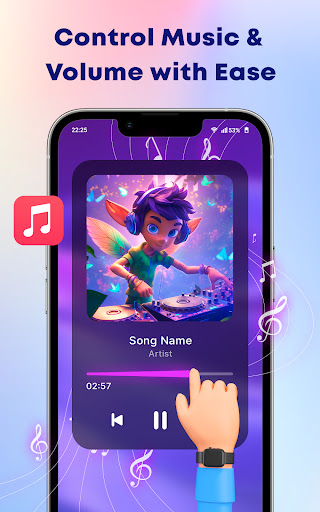


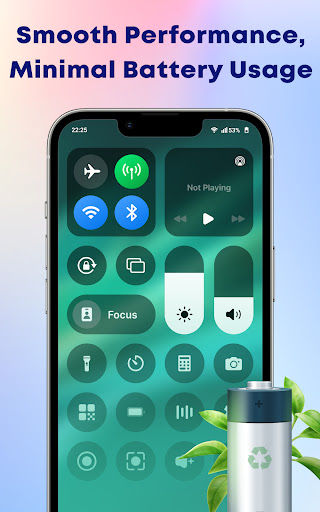

About Smart Control Panel Android
The description on the store listing
Make your phone smarter and more convenient with our <b><font color="#2E3FE9">Smart Control Panel Android</font></b>. No more searching through settings! All you need is now just one swipe away.
<h3>⚙️ MAIN FEATURES OF THE CONTROL CENTER</h3>
<b>📱 Quick Access to All Apps & Settings via the Quick Panel: </b>
✔ Sound & Brightness Control – Adjust volume and brightness in one tap
✔ Wi-Fi Settings – Quickly connect or switch Wi-Fi networks from the simple panel
✔ Dark Mode Toggle – Turn dark mode on/off to match your mood
✔ Bluetooth Settings – Connect to devices or manage Bluetooth settings through the smart control center
✔ Airplane Mode – Enable or disable in a second when you …
Read the full description
Make your phone smarter and more convenient with our <b><font color="#2E3FE9">Smart Control Panel Android</font></b>. No more searching through settings! All you need is now just one swipe away. <h3>⚙️ MAIN FEATURES OF THE CONTROL CENTER</h3> <b>📱 Quick Access to All Apps & Settings via the Quick Panel: </b> ✔ Sound & Brightness Control – Adjust volume and brightness in one tap ✔ Wi-Fi Settings – Quickly connect or switch Wi-Fi networks from the simple panel ✔ Dark Mode Toggle – Turn dark mode on/off to match your mood ✔ Bluetooth Settings – Connect to devices or manage Bluetooth settings through the smart control center ✔ Airplane Mode – Enable or disable in a second when you travel ✔ Do Not Disturb Mode – Keep things quiet when you need peace ✔ Screen Rotation Lock – Choose to lock or unlock screen rotation ✔ Flashlight Control – Use your flashlight easily anytime ✔ Screen Recording – Record your screen using the smart control center ✔ Screenshot Capture – Instantly take screenshots without any hassle <b>🌟 Dynamic Island</b> Access your favorite features faster than ever! The Dynamic bar gives you a floating, stylish bar that stays close wherever you are on the screen. It’s a part of the smart control center that helps you manage your settings smoothly without interrupting what you’re doing. <b>🎨 Customize & Design Your Own Control Center </b> ✔ Personalize the Layout – Choose toggle order, icon size, button shape, background color, and position. ✔ Add Shortcuts to Favorite Apps – Arrange the order of shortcuts to prioritize your most-used controls. ✔ Change Font, Transparency & Layout – Adjust the look for your perfect style. Try the Smart Control Panel Android app now for easy and quick access to your phone’s essential apps. If you have any questions about the Control Center Simple app, don’t hesitate to contact us immediately. We will reply as soon as possible. Thank you for using the Smart Control Panel Android app! NOTE ABOUT APPLICATION ACCESS This application uses the ACCESSIBILITY SERVICES to enable essential features such as assistive touch, floating controls, gesture shortcuts (Home, Back, Lock), and control panel overlays. These features improve user experience by simplifying access to device settings. No data is collected or stored via the Accessibility API. All interactions stay on your device and are used only to perform visible actions with your consent.
Installs since 27 Aug 2026 Measured
Exact Google Play install counts, collected daily
Ratings
- 5 ★0.0%
- 4 ★0.0%
- 3 ★0.0%
- 2 ★0.0%
- 1 ★0.0%
Recent reviews
Latest public reviews from the store
- 27 Aug 2021
This is an invaluable resource when you are a Control4 dealer. I have fixed clients problems while on the chair lift at the luge in Rotorua. That's pretty awesome. Fast connection for diagnosis and minor changes. More dealers need to use this!
- 29 May 2019
I am pleased by the ease of use and sheer convenience this app presents. However, the lack of custom programming capability harms the usability of this app, and relagates it to the most basic of tasks. This app alone could be used as the reason to become a Control 4 dealer, and what the app does, it does extremely well. But I suppose Control 4 holds it back because of Composer Pro's exsistance, and the fact that if you could custom program on this app, there would be little reason to use pro.
- 13 Nov 2018
Works fine for me on android 8 / lg v30 phone. Typically never bring my laptop any more to service calls, love this app! So far it seems that I only need my laptop for editing/creating custom drivers and initial set up. Pros Literally like zero pop ups asking me to renew, register, verify, incorrect firmware alerts, etc. It's a convenience and a half. Surely a laptop will be faster but if you forget your laptop or psu in the truck/shop this handy app saves you! Sometimes this app is actually better ! You get to avoid all the firmware version difference alerts and notifications composer pops up with. When you get to hundreds of customers you'll see what I mean. Cons 1) relocate the save/refresh navigator button to the same page as the device you are editing. 2) Possible issue with network discovery with older controller firmware? 3) Edit driver option Never really set up a controller start to finish on this app, so I can't comment on the registration process using this app. But this app is awesome for service calls.
What reviewers bring up
Topics mentioned in the latest 10 reviews, by how many reviews mention them
Liked in good reviews (3 reviews)
- control dealer 2
- convenience 2
- composer 2
- custom 2
Raised in bad reviews (7 reviews)
- android 4
- error 4
- frustrating 2
- constantly 2
- crashes 2
- stable 2
- guys 2
- java 2
Top chart positions
Latest Google Play chart ranks by country, last 10 days
Not in any tracked top chart in the last 10 days.
Smart Control Panel Android history
Release, install milestones, listing and store changes
- Reached 500,000+ installs 9 Apr 2026
Update frequency
How often Smart Control Panel Android ships a new version, month by month
1 updates in the last 12 months. More often than most similar apps: they shipped a median of 0 updates in the same year.
Recent versions
Current version Varies with device
- Version 2.813 Apr 2026
- Version 2.627 Aug 2025
- Version 2.521 Aug 2025
Listing keywords
Words and phrases Smart Control Panel Android repeats most in its store listing
Top phrases: smart control (8), control center (6), control panel (5), control panel android (4), smart control panel (4).
Highlighted words also appear in the title. Counts cover the title, short description and description.
Business model and tech
From the store listing and declared permissions
- Business model
- Free to downloadIn-app purchasesShows ads
- Subscriptions and payments
- Google Play billing
- Sensitive access
- CameraNearby devicesAdvertising ID
31 permissions
4 special access, 4 sensitive, 23 standard
- Act as an accessibility serviceBIND_ACCESSIBILITY_SERVICESpecial access
- Change Do Not DisturbACCESS_NOTIFICATION_POLICYSpecial access
- Change system settingsSpecial access
- Read all notificationsBIND_NOTIFICATION_LISTENER_SERVICESpecial access
- Take photos and videosSensitive
- Connect to paired Bluetooth devicesBLUETOOTH_CONNECTSensitive
- Find nearby Bluetooth devicesBLUETOOTH_SCANSensitive
- Show notificationsPOST_NOTIFICATIONSSensitive
- Ad attribution (Privacy Sandbox)ACCESS_ADSERVICES_ATTRIBUTIONStandard
- Ad topics (Privacy Sandbox)ACCESS_ADSERVICES_TOPICSStandard
- Read how it was installed (install referrer)BIND_GET_INSTALL_REFERRER_SERVICEStandard
- Read the advertising IDAD_IDStandard
Compliance
What the listing and the app package show
- Store status
- Live
- Upkeep
- Updated 13 Apr 2026
- Privacy policy
- Linked on the listing
- Advertising
- Shows ads
- In-app purchases
- None declared
- Age rating
- Everyone
- Sensitive permissions
- 4 sensitive, 4 special access of 31
- Location access
- No
- Camera and microphone
- Camera
Apps like Smart Control Panel Android
Shani Dev Cube Live WallpaperNext Live Wallpapers29K installs★ 4.6
タクト キーボード - 日本語入力takt.keyboard23.9K installs★ 4.0
Star Photo IdentificationW.T21.1K installs★ 3.33
Digital Clock Live WallpaperXoxoi6.9K installs★ 3.57
Realme C71 Video WallpapersYes Themes50.8K installs★ 3.8
3D Valentine Hearts WatchFaceFilmmotion Studio7.7K installs★ 4.54
10000+ Nature WallpaperVariable Expression9K installs★ 4.17
Wayfinder - Analog Watch FaceLuka Kilic - Watch Faces1.9K installs★ 5.0
SXZ Sport Lum Watch FaceSXZ Universe2.7K installs★ 4.2
Smart Control Panel Android: questions and answers
How many downloads does Smart Control Panel Android have?
Smart Control Panel Android has 560,998 installs on Google Play, measured from the store's own count on 19 Nov 2026.
Who makes Smart Control Panel Android?
Smart Control Panel Android is published by Techvio.
When was Smart Control Panel Android last updated?
The latest version (Varies with device) was released on 13 Apr 2026.
Is Smart Control Panel Android free?
Yes. Smart Control Panel Android is free to download, and it shows ads.
Is Smart Control Panel Android still available?
Yes. Smart Control Panel Android is live on Google Play as of 19 Nov 2026.
Track Smart Control Panel Android and its competitors
Watch any app for new versions, rating drops, chart moves and removals. Free plan, no card.