
Smart lock screen
Lock screen with password - fingerprint - many types of lock passwords
- Installs
- 9.56M
- Measured
- Rating
- 3.82
- Ratings
- 12.3K
- 157 reviews
- Version
- 1.5.3
- Updated 5 Nov 2026
- Released
- 19 Dec 2023
- Tracked since 13 May 2026
- Size
- —
Screenshots




About Smart lock screen
The description on the store listing
<b>Lock screen</b> with many types of lock passwords, auto-change wallpaper
★ <b>Lock Screen</b> is a smart application that prevents unauthorized users from accessing your device and protects your personal information on the phone in the safest way. Lock Screen provides many different lock types such as <b>passcode - fingerprint - timed password</b> to meet personal security needs, and suitable for all users of different ages.
★ Lock password up to<b> 6 characters </b>in combination with fingerprint lock feature which can bring you maximum security and convenient experience. Moreover, the advanced fingerprint recognition technology will protect your phone's privacy the best today. …
Read the full description
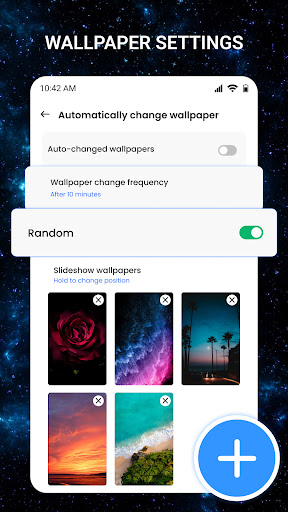
<b>Lock screen</b> with many types of lock passwords, auto-change wallpaper ★ <b>Lock Screen</b> is a smart application that prevents unauthorized users from accessing your device and protects your personal information on the phone in the safest way. Lock Screen provides many different lock types such as <b>passcode - fingerprint - timed password</b> to meet personal security needs, and suitable for all users of different ages. ★ Lock password up to<b> 6 characters </b>in combination with fingerprint lock feature which can bring you maximum security and convenient experience. Moreover, the advanced fingerprint recognition technology will protect your phone's privacy the best today. 👉<b>Password management:</b> - Is a password management feature, which provides many different lock types that you can install to enhance privacy security, device security, and also make it more convenient for users. - Change your password easily - With Lock Screen, you can set many types of passwords at the same time such as <b>master lock screen, screen lock with current time,</b> screen lock in combination with your password with the current hour-minute - date, or <b>lock screen with a temporary password. </b> - <b>Time-based lock screen</b> types help you still have high security without needing to remember too many numbers. Different device access times require entering a different password on the lock screen. Because even if someone sees the password you entered during that time, they cannot access your device, which will increase the security. - <b>Lock screen with a temporary password</b> is when you want to let someone use your device for a short time, set up and provide a temporary password for them to make it more convenient when they use your device. After a certain time, the temporary password will be ineffective and that person will not be able to access your device any more. This function is suitable for parents who often let their children use their phones for a whike. The app will help you manage and control your device and your child's phone usage time. 👉<b>Lock screen wallpapers – Auto-change wallpapers:</b> - You can optionally change the wallpaper from the available photo library or upload your own photo, creating interesting experiences and feelings when unlocking the screen. - With the auto-change wallpaper feature, it will stimulate your vision every time you unlock the screen because each time you open it, there will be a different image, giving you a feeling of fresh. - The lock screen provides many beautiful wallpapers with themes of Nature, Landscapes, Galaxy, Space, etc., you can freely choose what you like. 👉<b>Fake icon:</b> - Use fake icons to replace the regular lock icons so that others don't recognize that it is a lock screen application. - There are many different fake icons such as camera, music, clock, weather, etc. All are familiar icons that will make no suspiciousness or curiosity. - Screen lock provides a fake-icon-feature to maximize the security in case someone knows your screen lock password but cannot access the application to change the lock password. ★The lock screen application is a perfect combination of security and user experience, helping to protect your important information in the most effective way and giving users a feeling of flexibility and fun with its feature of the incognito and secrecy of the unique fake icon feature.
Installs, last 30 days Measured
Exact Google Play install counts, collected daily
Ratings
12,342 ratings, 157 reviews
- 5 ★77%
- 4 ★0.9%
- 3 ★4.0%
- 2 ★2.9%
- 1 ★15%
Recent reviews
Latest public reviews from the store
- 24 Apr 2026
kinda like drawing anything
- 24 Mar 2026
so cutee
- 7 Mar 2026
so much fun I love the pictures. n hardly any ads. great game guys.
- 21 Feb 2026
Very relaxing! I like it a lot.
What reviewers bring up
Topics mentioned in the latest 50 reviews, by how many reviews mention them
Liked in good reviews (48 reviews)
- cute 7
- relaxing 5
- ads 5
- art 5
- pixel 3
- pictures 2
- coloring 2
- already 2
Raised in bad reviews (2 reviews)
No topic comes up twice.
Top chart positions
Latest Google Play chart ranks by country, last 10 days
Not in any tracked top chart in the last 10 days.
Smart lock screen history
Release, install milestones, listing and store changes
- Reached 5,000,000+ installs 7 Feb 2026
- Reached 1,000,000+ installs 3 Jun 2024
- Reached 500,000+ installs 23 Mar 2024
- Reached 100,000+ installs 9 Jan 2024
- Reached 50,000+ installs 3 Jan 2024
- Reached 10,000+ installs 26 Dec 2023
- Reached 5,000+ installs 24 Dec 2023
- First released on the store 19 Dec 2023
Update frequency
How often Smart lock screen ships a new version, month by month
11 updates in the last 12 months. More often than most similar apps: they shipped a median of 2 updates in the same year.
Recent versions
Current version 1.5.3
- Version 1.5.25 Nov 2026
Bug Fixes & Performance Improvements
- Version 1.4.312 Aug 2026
Bug Fixes & Performance Improvements
- Version 1.4.25 Jun 2026
Bug Fixes & Performance Improvements
- Version 1.4.021 May 2026
Bug Fixes & Performance Improvements
Listing keywords
Words and phrases Smart lock screen repeats most in its store listing
Top phrases: lock screen (15), screen lock (4), temporary password (4), auto change (3), fake icon (3).
Highlighted words also appear in the title. Counts cover the title, short description and description.
Business model and tech
From the store listing, the SDKs in the app package and its declared permissions
- Business model
- Free to downloadIn-app purchasesShows ads
- Built with
- No cross-platform framework or game engine detected
- Ad networks (1)
- AdMob
- Subscriptions and payments
- Google Play billing
- Analytics and crash reports
- Firebase
- Sensitive access
- CameraPhone and callsPhotos, videos and filesDraws over other appsAdvertising ID
2 ad, attribution and analytics SDKs detected. SDKs are read from the app package and permissions from the store listing, so code that loads later is not seen.
Technology
22 SDKs found in the app package
Ad networks
Advertising and install-attribution SDKs found in the app package
- AdMob
27 permissions
2 special access, 4 sensitive, 21 standard
- Change system settingsSpecial access
- Draw over other appsSpecial access
- Take photos and videosSensitive
- Change or delete shared storageSensitive
- Read shared storageSensitive
- Read phone status and identitySensitive
- Read how it was installed (install referrer)BIND_GET_INSTALL_REFERRER_SERVICEStandard
- Read the advertising IDAD_IDStandard
- Add home screen shortcutsStandard
- Control vibrationStandard
- Foreground service (special use)FOREGROUND_SERVICE_SPECIAL_USEStandard
- Keep the phone awakeStandard
Compliance
What the listing and the app package show
- Store status
- Live
- Upkeep
- Updated 5 Nov 2026
- Registered in
- Vietnam
- Privacy policy
- Linked on the listing
- Advertising
- Shows ads
- In-app purchases
- Offered
- Age rating
- Everyone
- Sensitive permissions
- 4 sensitive, 2 special access of 27
- Location access
- No
- Camera and microphone
- Camera
Apps like Smart lock screen
Tree Capitator ModMaps Mods Addons1M installs★ 3.46
Simple Clock - Alarm & TimerSimple Mobile Tool2M installs★ 4.22
Basic Web BrowserAPG Solutions, LLC12.6M installs★ 3.59
USB OTG CHECKERbubble shooter game2.2M installs★ 4.38
5G 4G FORCE LTE MODERK AppZia4.1M installs★ 3.84
ALFAISAL vpnALFAISALVPN2.1M installs★ 3.45
Simple Auto ClickerXIAOYANG3.7M installs★ 4.04
zFont Tool - Android Font ToolKhun Htetz Naing9.2M installs★ 3.04
analiti - Speed & WiFianaliti Networking Experts4.3M installs★ 4.27
Smart lock screen: questions and answers
How many downloads does Smart lock screen have?
Smart lock screen has 9,556,214 installs on Google Play, measured from the store's own count on 19 Nov 2026.
Who makes Smart lock screen?
Smart lock screen is published by highsecure, a developer based in VN.
When was Smart lock screen last updated?
The latest version (1.5.3) was released on 5 Nov 2026.
Is Smart lock screen free?
Yes. Smart lock screen is free to download and offers in-app purchases, and it shows ads.
Is Smart lock screen still available?
Yes. Smart lock screen is live on Google Play as of 19 Nov 2026.
Track Smart lock screen and its competitors
Watch any app for new versions, rating drops, chart moves and removals. Free plan, no card.