Smart Tools Laser Level 📷🔦🔧
Laser Level app with records, gallery, charts and more features
- Installs
- 627K
- Measured
- Rating
- 4.0
- Ratings
- 960
- 8 reviews
- Version
- 2.1.0
- Updated 18 Oct 2026
- Released
- 10 Dec 2017
- Tracked since 13 May 2026
- Size
- 8 MB
- Needs 4.1
Screenshots



About Smart Tools Laser Level 📷🔦🔧
The description on the store listing
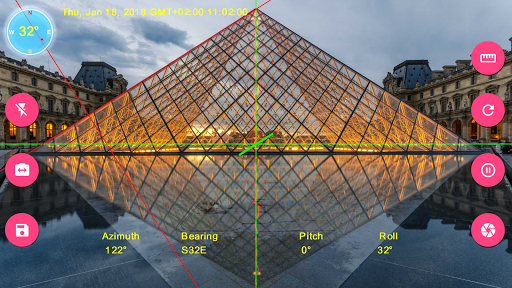
<b>Smart Tools Laser Level</b> is augmented reality app for computing inclination, slopes, angle, compass and elevation and rotation values using sensors and drawings on camera.
<h2>Features</h2>
•3 different measurement modes(Laser level, angle by dragging with your finger or drawing angle with your finger)
•Touch screen to set point of measurement or touch reset button to reset it to origin.
•Display azimuth, direction, inclination or rotation angles.(Magnetic Field Sensor is required)
•Fast and accurate calibration option.
•Freeze screen to have more precise and robust readings.
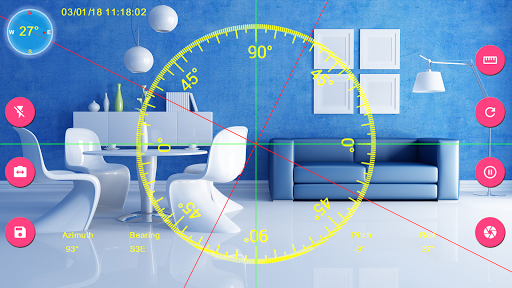
•Leveling option displays pitch and roll angles as line, square or circle which makes it easier …
Read the full description
<b>Smart Tools Laser Level</b> is augmented reality app for computing inclination, slopes, angle, compass and elevation and rotation values using sensors and drawings on camera. <h2>Features</h2> •3 different measurement modes(Laser level, angle by dragging with your finger or drawing angle with your finger) •Touch screen to set point of measurement or touch reset button to reset it to origin. •Display azimuth, direction, inclination or rotation angles.(Magnetic Field Sensor is required) •Fast and accurate calibration option. •Freeze screen to have more precise and robust readings. •Leveling option displays pitch and roll angles as line, square or circle which makes it easier to align your device and results more accurate measurements. •Option to toggle between back and front(if available) camera. •Flashlight for situations more light needed •Option to visualize your progress using charts. •Image gallery with details, Exif info(Some Exif data requires Android 7.0 and above), and other features such as image sharing and editing •Highly customizable app settings and user interface <h2>Instructions</h2> <h3>Measurement Screen</h3> Rotate your device on laser level measurement mode or align with object you want get readings from. To get more precise reading make sure that leveling line is aligned with laser level. You can freeze preview and measure any slope or angle easily. Swipe your screen right to open Navigation Menu <h2>Records Screen You can review your recorded measurements and get xls file using diskette button. Excel files are stored in selected directory. <h3>Charts Screen</h3> Records can be reviewed via charts using Charts section. It's possible to get image of the charts in JPG format using camera icon. <h3> Gallery Screen</h3> Gallery screen displays images inside the image directory selected using Settings screen. Touch an image to display details. Important: To display some of the Exif data your device must be Android 7.0 and above. Touching image on gallery opens zoomable version of image an <b>IMPORTANT:</b> If you find a bug using the application, PLEASE write to [email protected] with your phone model name and the description of the problem, before writing a negative comment. 🤝 ✅ 👍Customer satisfaction is our priority, and we will do our best to fix the issues as soon as possible!</h2>
Installs since 29 Aug 2026 Measured
Exact Google Play install counts, collected daily
Ratings
960 ratings, 8 reviews
- 5 ★61%
- 4 ★11%
- 3 ★8.3%
- 2 ★5.5%
- 1 ★14%
Recent reviews
Latest public reviews from the store
- 21 Sep 2023
Top match 3 experience
Top chart positions
Latest Google Play chart ranks by country, last 10 days
Not in any tracked top chart in the last 10 days.
Smart Tools Laser Level 📷🔦🔧 history
Release, install milestones, listing and store changes
- Reached 500,000+ installs 25 Dec 2020
- Reached 100,000+ installs 17 Jun 2018
- Reached 50,000+ installs 2 May 2018
- Reached 10,000+ installs 19 Mar 2018
- Reached 5,000+ installs 19 Feb 2018
- Reached 1,000+ installs 21 Jan 2018
- Reached 500+ installs 7 Jan 2018
- Reached 100+ installs 23 Dec 2017
Update frequency
How often Smart Tools Laser Level 📷🔦🔧 ships a new version, month by month
1 updates in the last 12 months. About as often as similar apps, which shipped a median of 1 updates in the same year.
Recent versions
Current version 2.1.0
- Version 2.1.018 Oct 2026
Improved camera measurements, calibration and decimal precision settings. Updated welcome screens, feedback, translations and Help.
- Version 1.2.1024 Nov 2018
Hide/show button for displaying menu buttons Navigation View menu shadow issue fixed Protractor is design is renewed Protractor is improved New customization options Bug fixes Measurement from Image(Still in Beta)
- Version 1.2.919 Nov 2018
- Version 1.2.55 Jun 2018
Listing keywords
Words and phrases Smart Tools Laser Level 📷🔦🔧 repeats most in its store listing
Top phrases: laser level (6), screen h3 (3), android and above (2), h3 gallery screen (2), smart tools laser (2).
Highlighted words also appear in the title. Counts cover the title, short description and description.
Business model and tech
From the store listing, the SDKs in the app package and its declared permissions
- Business model
- Free to downloadShows ads
- Built with
- libGDX
- Ad networks (1)
- AdMob
- Analytics and crash reports
- Firebase
- Sensitive access
- CameraPhotos, videos and files
2 ad, attribution and analytics SDKs detected. SDKs are read from the app package and permissions from the store listing, so code that loads later is not seen.
Technology
9 SDKs found in the app package
Ad network libraries
Ad networks
Advertising and install-attribution SDKs found in the app package
- AdMob
6 permissions
0 special access, 3 sensitive, 3 standard
- Take photos and videosSensitive
- Change or delete shared storageSensitive
- Read shared storageSensitive
- Keep the phone awakeStandard
- Full internet accessStandard
- See network connectionsStandard
Compliance
What the listing and the app package show
- Store status
- Live
- Upkeep
- Updated 18 Oct 2026
- Privacy policy
- Linked on the listing
- Advertising
- Shows ads
- In-app purchases
- None declared
- Age rating
- Everyone
- Sensitive permissions
- 3 sensitive of 6
- Location access
- No
- Camera and microphone
- Camera
Apps like Smart Tools Laser Level 📷🔦🔧
Graffiti Battery Meter [WidgetTomoyuki Ono135K installs★ 4.46
Authenticator App - 2FAHoniry Xidoa799K installs★ 1.77
EasyBattery - Battery Managersteven he188K installs★ 4.44
Plant Identifier AI - CareAI Identifier Apps133K installs★ 4.32
How Long Widget - Time CounterRubén Mayayo195K installs★ 3.68
Aranet HomeSAF Tehnika A/S68.8K installs★ 4.79
RF Signal Tracker & DetectorMove More Solutions328K installs★ 2.68
LED Text ScrollerBlue Wave203K installs★ 3.5
Check VIN Number Lookup SearchCriminal Search Background4.6K installs★ 5.0
Smart Tools Laser Level 📷🔦🔧: questions and answers
How many downloads does Smart Tools Laser Level 📷🔦🔧 have?
Smart Tools Laser Level 📷🔦🔧 has 626,724 installs on Google Play, measured from the store's own count on 12 Nov 2026.
Who makes Smart Tools Laser Level 📷🔦🔧?
Smart Tools Laser Level 📷🔦🔧 is published by Smart Tool Factory.
When was Smart Tools Laser Level 📷🔦🔧 last updated?
The latest version (2.1.0) was released on 18 Oct 2026.
Is Smart Tools Laser Level 📷🔦🔧 free?
Yes. Smart Tools Laser Level 📷🔦🔧 is free to download, and it shows ads.
Is Smart Tools Laser Level 📷🔦🔧 still available?
Yes. Smart Tools Laser Level 📷🔦🔧 is live on Google Play as of 12 Nov 2026.
Track Smart Tools Laser Level 📷🔦🔧 and its competitors
Watch any app for new versions, rating drops, chart moves and removals. Free plan, no card.