Solid Explorer File Manager
A powerful dual-pane file manager for local, cloud & network storage.
- Installs
- 14.13M
- Measured
- Rating
- 4.47
- Ratings
- 160K
- 6.7K reviews
- Version
- 3.6.3
- Updated 9 Nov 2026
- Released
- 1 Jul 2015
- Tracked since 14 May 2026
- Size
- 17 MB
- Needs 4.1
Screenshots




About Solid Explorer File Manager
The description on the store listing
Solid Explorer is a powerful file manager that gives you full control over files on your device, in the cloud, and across your network.
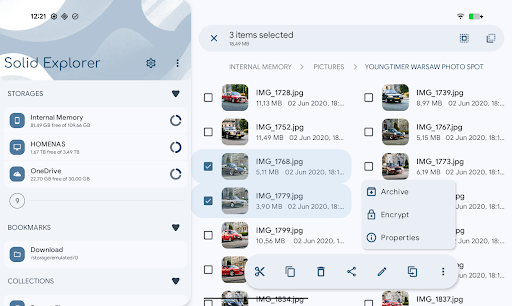
🗄️ <b>Dual-pane layout</b> — drag and drop files between two panels
🔐 <b>AES-256 encryption</b> — lock files with password or fingerprint
🖥️ <b>Cloud & network access</b> — Google Drive, OneDrive, Dropbox, SMB, SFTP, FTP & more
🌐 <b>Web file sharing</b> — send files to any device with a web browser
<b>Manage files your way</b>
Navigate two folders side by side and drag files between panels — the fastest way to organize storage. Use indexed search to find anything instantly, batch rename files with patterns, and browse collections that …
Read the full description
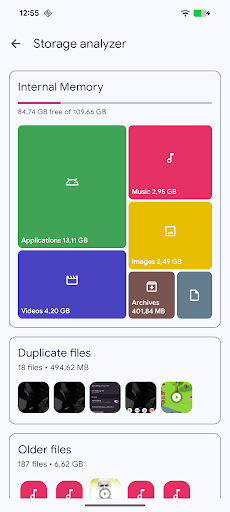
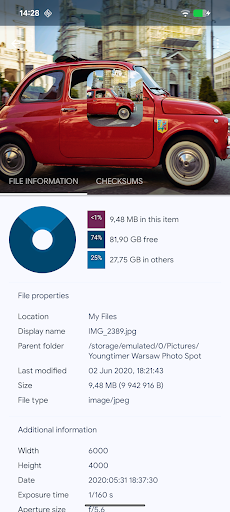
Solid Explorer is a powerful file manager that gives you full control over files on your device, in the cloud, and across your network. 🗄️ <b>Dual-pane layout</b> — drag and drop files between two panels 🔐 <b>AES-256 encryption</b> — lock files with password or fingerprint 🖥️ <b>Cloud & network access</b> — Google Drive, OneDrive, Dropbox, SMB, SFTP, FTP & more 🌐 <b>Web file sharing</b> — send files to any device with a web browser <b>Manage files your way</b> Navigate two folders side by side and drag files between panels — the fastest way to organize storage. Use indexed search to find anything instantly, batch rename files with patterns, and browse collections that automatically sort your Downloads, Photos, Videos, Music, Documents, and Apps. <b>Access all your storage in one app</b> Connect to Google Drive, OneDrive, Dropbox, Box, Mega*, MediaFire, Yandex, Owncloud and SugarSync. Access NAS drives and servers over SMB/CIFS (Samba), SFTP, FTP, and WebDAV. Transfer files between any two locations — cloud to cloud, server to phone, or SD card to NAS — just drag between panels. <b>Share files with any device</b> Start the built-in web server and share files with any phone, tablet, or computer on your network — the other device just needs a web browser. No app install needed on the receiving end. <b>Keep your files private</b> Encrypt sensitive files with AES-256 and lock them behind a password or fingerprint. Encrypted files stay protected even if you uninstall the app — no account required. <b>Clean up and free storage</b> Analyze what takes up space, find duplicate and large files, and clean up junk — similar to dedicated cleaner apps, but built right into your file manager. Works across internal storage, SD cards, USB OTG drives, and even cloud storage like Google Drive, OneDrive, and Dropbox. <b>Full feature list:</b> • <b>Dual-pane layout</b> — manage two folders side by side • <b>Cloud storage</b> — Google Drive, OneDrive, Dropbox, Box, NextCloud, SugarSync, MediaFire, Yandex, Mega* • <b>Network protocols</b> — FTP, SFTP, SMB/CIFS (Samba), WebDAV • <b>Web file sharing</b> — share files with any device via browser • <b>Storage analyzer</b> — find duplicates, large files, and junk to clean up • <b>File encryption</b> — AES-256 with password and fingerprint • <b>Archives</b> — create and extract ZIP, 7ZIP, RAR, TAR • <b>Root explorer</b> — browse system files on rooted devices • <b>Indexed search</b> — find files instantly with filters • <b>Collections</b> — Downloads, Recent, Photos, Videos, Music, Documents, Apps • <b>Built-in media</b> — image viewer, music player, video player, text editor • <b>Batch rename</b> — rename multiple files with patterns • <b>FTP Server</b> — access your phone's files from PC • <b>Themes and icon sets</b> — rich customization • <b>Chromebook & tablet support</b> — mouse, keyboard and trackpad input Follow us on <b>Reddit</b>: https://www.reddit.com/r/NeatBytes/ * with paid add-on
Installs, last 30 days Measured
Exact Google Play install counts, collected daily
Ratings
159,670 ratings, 6,700 reviews
- 5 ★77%
- 4 ★6.6%
- 3 ★3.3%
- 2 ★2.3%
- 1 ★10%
Recent reviews
Latest public reviews from the store
- 20 Mar 2023
Does not connect or if it does it freezes
Top chart positions
Latest Google Play chart ranks by country, last 10 days
- Countries ranked
- 2
- Best rank
- #108
- Top 10 placements
- 0
- of 2 chart placements
- Average rank
- #153
Best countries on Google Play
- 🇩🇪 Germany · Top grossing, Productivity#108
- 🇺🇸 United States · Top grossing, Productivity#198
| Country | Chart | Category | Rank | Best (10 days) | Date |
|---|---|---|---|---|---|
| 🇩🇪 Germany | Top grossing | Productivity | #108 | #100 | 18 Nov 2026 |
| 🇺🇸 United States | Top grossing | Productivity | #198 | #190 | 19 Nov 2026 |
Solid Explorer File Manager history
Release, install milestones, listing and store changes
- Reached 10,000,000+ installs 8 May 2023
- First released on the store 1 Jul 2015
Update frequency
How often Solid Explorer File Manager ships a new version, month by month
25 updates in the last 12 months. More often than most similar apps: they shipped a median of 9 updates in the same year.
Recent versions
Current version 3.6.3
- Version 3.6.330 Oct 2026
v3.6.3 • WebFS: reading encrypted files, collections • option to open target folder after "Save to" • fixed licensing issues v3.6.2 • file encryption improvements • improved image viewer performance • fixed sharing unknown files v3.5.X - New system of resumable file operations - great increase in file transfer reliability
- Version 3.6.230 Oct 2026
v3.6.2 • file encryption improvements • improved image viewer performance • fixed sharing unknown files v3.6.1 • FTP server requires user/pwd to start; anonymous off by default • fixed cast playback on screen off • file transfer improvements v3.5.X - New system of resumable file operations - great increase in file transfer reliability
- Version 3.5.1919 Aug 2026
v3.5.19 • fixed OneDrive access & Google Drive upload • fixed opening files with third party apps • fixed reading files from archives v3.5.18 • new guided setup for first-time users • fixed repeated password prompts for network connections • fixed opening two encrypted containers at once • stability fixes v3.5.X - New system of resumable file operations - great increase in file transfer reliability
- Version 3.5.185 Aug 2026
v3.5.18 • new guided setup for first-time users • fixed repeated password prompts for network connections • fixed opening two encrypted containers at once • stability fixes v3.5.17 - home screen shortcuts fix - video playback fixes - fixed FTP server shortcuts v3.5.X - New system of resumable file operations - great increase in file transfer reliability
Listing keywords
Words and phrases Solid Explorer File Manager repeats most in its store listing
Top phrases: google drive onedrive (4), drive onedrive (4), file manager (4), google drive (4), drive onedrive dropbox (3).
Highlighted words also appear in the title. Counts cover the title, short description and description.
Business model and tech
From the store listing and declared permissions
- Business model
- Free to downloadIn-app purchasesShows ads
- Sensitive access
- No sensitive permission declared
Compliance
What the listing and the app package show
- Store status
- Live
- Upkeep
- Updated 9 Nov 2026
- Registered in
- Poland
- Privacy policy
- Linked on the listing
- Advertising
- Shows ads
- In-app purchases
- Offered
- Age rating
- Everyone
Apps like Solid Explorer File Manager
Document Reader : PDF CreatorSolo Tech Apps13.6M installs★ 4.24
TickTick:To Do List & CalendarTickTick Limited11.8M installs★ 4.61
PDF Reader, Editor & ScannerEAGLE APPS17.5M installs★ 4.36
Mi Movistar EcuadorMovistar Ecuador6M installs★ 4.41
FlashVPN Fast VPN ProxyFlashSoftware14.2M installs★ 4.7
Status Saver - Download StatusOffice Tools.49.1M installs★ 4.28
CoxCox Communications, Inc.3.6M installs★ 4.46
Office App-Edit Word, PDF fileA1 Office Apps52.1M installs★ 4.39
Blazar VPN: Super Fast ConnectAibern CO8M installs★ 4.22
Solid Explorer File Manager: questions and answers
How many downloads does Solid Explorer File Manager have?
Solid Explorer File Manager has 14,127,172 installs on Google Play, measured from the store's own count on 19 Nov 2026.
Who makes Solid Explorer File Manager?
Solid Explorer File Manager is published by NeatBytes, a developer based in PL.
When was Solid Explorer File Manager last updated?
The latest version (3.6.3) was released on 9 Nov 2026.
Is Solid Explorer File Manager free?
Yes. Solid Explorer File Manager is free to download and offers in-app purchases, and it shows ads.
Is Solid Explorer File Manager still available?
Yes. Solid Explorer File Manager is live on Google Play as of 19 Nov 2026.
Track Solid Explorer File Manager and its competitors
Watch any app for new versions, rating drops, chart moves and removals. Free plan, no card.