Solocator - GPS Field Camera
Solocator stamps photos you take with GPS location, Compass Direction, Date/Time
- Installs
- 125K
- Measured
- Rating
- 3.64
- Ratings
- 1K
- 231 reviews
- Version
- 2.8.6
- Updated 30 Oct 2026
- Released
- 17 Dec 2012
- Tracked since 13 May 2026
- Size
- 5 MB
- Needs 4.1
Also on App Store: Solocator - GPS Field Camera (425 ratings)
Screenshots



About Solocator - GPS Field Camera
The description on the store listing
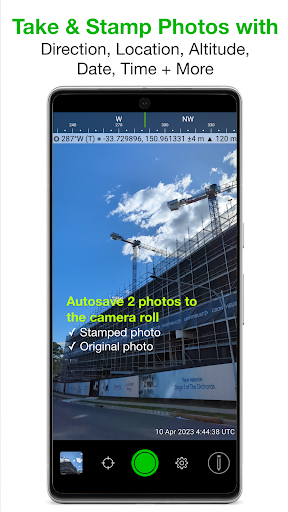
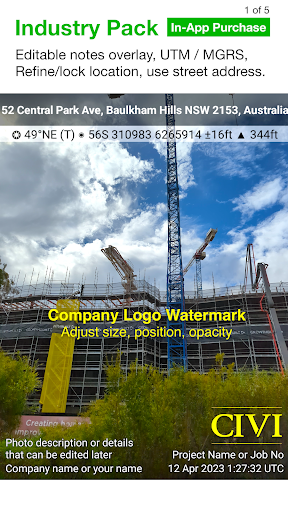
Solocator is a GPS camera for fieldwork or when you need photos for proof. Overlay and stamp photos with location, direction, altitude, date & time taken. With the Industry Pack (In-App Purchase), capture field notes such as project name, photo description, company or username.
Solocator is used by many industries, government agencies and professionals across the globe for photo documentation.
TAILOR OVERLAY INFORMATION TO YOUR NEEDS
Select the information you need to capture & stamp on your photos:
+ GPS position (Latitude & Longitude in various formats) ± Accuracy
+ UTM/MGRS coordinate formats (Industry Pack)
+ Compass direction–bearing
+ Altitude (Metric & Imperial units)
+ …
Read the full description
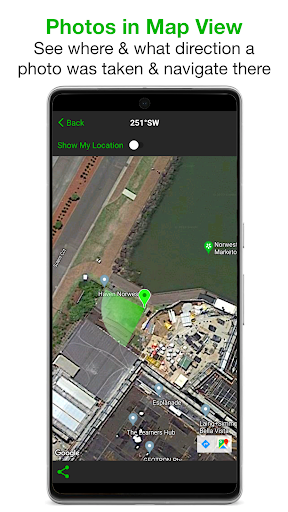
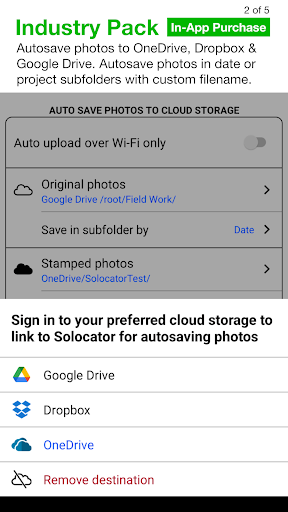
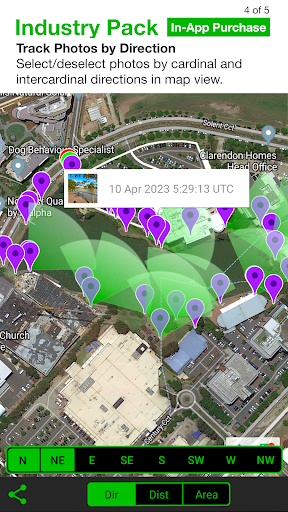
Solocator is a GPS camera for fieldwork or when you need photos for proof. Overlay and stamp photos with location, direction, altitude, date & time taken. With the Industry Pack (In-App Purchase), capture field notes such as project name, photo description, company or username. Solocator is used by many industries, government agencies and professionals across the globe for photo documentation. TAILOR OVERLAY INFORMATION TO YOUR NEEDS Select the information you need to capture & stamp on your photos: + GPS position (Latitude & Longitude in various formats) ± Accuracy + UTM/MGRS coordinate formats (Industry Pack) + Compass direction–bearing + Altitude (Metric & Imperial units) + Tilt & Roll angles + Crosshair + Local date & time based on your GPS location + Local time zone + UTC time + Show compass + Street address (Industry Pack) + Show cardinal direction in Building mode, e.g. North elevation of a building face. + Option to use abbreviations or Unicode characters for direction, position and altitude. CAMERA Overlays are designed for both back and front selfie cameras. Supports pinch zoom, plus other standard camera controls, including self-timer, flash and exposure. AUTOSAVE PHOTOS TO CAMERA ROLL Take and autosave two photos at once: one stamped with the selected overlays and the original photo with no overlays. SORT, SHARE OR EMAIL + Photos are sorted by time, location, distance from current location and project name if using the Industry Pack. + View photo direction and location in map view and navigate there. + Share photos individually or as a zip file via the share sheet. + Email photos including the following information: - Exif metadata - Compass direction - GPS position ± accuracy - Altitude - Tilt & Roll - Date & time taken - Street address (Industry Pack) - Elevation of building face viewed - Link to maps so the receiver can navigate there easily INDUSTRY PACK (In-App Purchase) “One-time charge” EDITABLE NOTES OVERLAY Stamp your photos with "Project name", "Description" & “Watermark”. The Project Name field could be used as a job or ticket number. The Watermark field is typically used for company or username. You can also edit these fields later. CUSTOM EXPORT FILENAME Define your photo export filename from a selection of fields: Project Name, Description, Watermark, Street Address, Date/Time, Number# and the Custom text field. BATCH EDIT NOTES OVERLAY FIELDS Select multiple photos from the library and edit Project Name, Description & Watermark fields in one go. STREET ADDRESS & UTM/MGRS Add street address to your overlay or use UTM/, UTM Bands & MGRS coordinate formats instead of Lat/Long. AUTOSAVE OR EXPORT PHOTOS TO CLOUD STORAGE Autosave original and stamped photos to Google Drive, Dropbox, and OneDrive (Personal & For Business), including SharePoint Sites and Teams. You can also save photos in date or project name subfolders - automatically. Or select and export photos later. PHOTO DATA in KML, KMZ & CSV Along with photos, email or export photo data and notes in KML, KMZ or CSV formats. Both email and export buttons are customisable to suit your data requirements. TRACK PHOTOS IN MAP VIEW View photos by direction, the distance between photos, and the area of photos taken. REFINE & LOCK GPS LOCATION Ideal for those working in and around buildings; to improve your GPS location. You can also use it to lock the asset position you're photographing. COMPACT VIEW Switch off Compass, Building and Street modes and only show the GPS info bar on top of photos for a more compact view. IMPORTANT NOTE - DEVICES WITHOUT A COMPASS From v2.18, we have made Solocator accessible for incompatible devices that do not have a compass. These devices are without a magnetometer (magnetic sensor), which means the compass and some direction features in the app won’t function as designed. However, when you change/update to a device with a compass, all directional features will be enabled to work as intended.
Installs since 29 Aug 2026 Measured
Exact Google Play install counts, collected daily
Ratings
1,027 ratings, 231 reviews
- 5 ★53%
- 4 ★8.7%
- 3 ★14%
- 2 ★8.7%
- 1 ★15%
Recent reviews
Latest public reviews from the store
No reviews in our sample for this app yet.
Top chart positions
Latest Google Play chart ranks by country, last 10 days
- Countries ranked
- 37
- Best rank
- #2
- Top 10 placements
- 4
- of 41 chart placements
- Average rank
- #90.8
Best countries on Google Play
- 🇺🇸 United States · Top paid, Photography#2
- 🇮🇩 Indonesia · Top paid, Photography#5
- 🇲🇽 Mexico · Top paid, Photography#5
- 🇮🇳 India · Top paid, Photography#5
- 🇬🇧 United Kingdom · Top grossing, Photography#77
- 🇭🇰 Hong Kong SAR China · Top paid#101
| Country | Chart | Category | Rank | Best (10 days) | Date |
|---|---|---|---|---|---|
| 🇺🇸 United States | Top paid | Photography | #2 | #2 | 19 Nov 2026 |
| 🇮🇩 Indonesia | Top paid | Photography | #5 | #4 | 19 Nov 2026 |
| 🇲🇽 Mexico | Top paid | Photography | #5 | #4 | 19 Nov 2026 |
| 🇮🇳 India | Top paid | Photography | #5 | #4 | 19 Nov 2026 |
| 🇺🇸 United States | Top paid | All apps | #44 | #31 | 19 Nov 2026 |
| 🇬🇧 United Kingdom | Top grossing | Photography | #77 | #77 | 18 Nov 2026 |
| 🇭🇰 Hong Kong SAR China | Top paid | All apps | #101 | #77 | 19 Nov 2026 |
| 🇮🇩 Indonesia | Top paid | All apps | #101 | #77 | 19 Nov 2026 |
| 🇵🇭 Philippines | Top paid | All apps | #102 | #77 | 19 Nov 2026 |
| 🇪🇬 Egypt | Top paid | All apps | #102 | #77 | 19 Nov 2026 |
Solocator - GPS Field Camera history
Release, install milestones, listing and store changes
- Reached 100,000+ installs 20 Sep 2025
- Reached 50,000+ installs 15 Jan 2022
- First released on the store 17 Dec 2012
Update frequency
How often Solocator - GPS Field Camera ships a new version, month by month
4 updates in the last 12 months. More often than most similar apps: they shipped a median of 0 updates in the same year.
Recent versions
Current version 2.8.6
- Version 2.8.630 Oct 2026
- Fixed missing EXIF metadata on photos saved to the selected internal storage folder. - Re-enabled viewing a single photo on the map in the standard app, as before. - Made the camera switch button flip between the last used back and front cameras instead of cycling through all cameras.
- Version 2.8.522 Jun 2026
- Refined the notes overlay UI and brought back the requested “Clear Text” button in input fields. - The app now remembers your preferred sort order for each field type preset notes. - Improved UI experience when navigating and editing photos within your photo library. - Various bug fixes & metadata improvements.
- Version 2.8.211 Mar 2026
Standard App - Option to autosave photos to internal storage instead of the camera roll. - UI updates, crash and bug fixes. Industry Pack - New Preset Notes! Save time by selecting from custom or auto-saved lists for Project Names, Descriptions, or Watermarks. No more repetitive typing! Learn more: https://solocator.com/article/how-to-add-select-preset-notes/ - When enabled, tap the watermark field in the camera to change it. - Street address font size is now consistent in landscape/portrait.
- Version 2.7.718 Dec 2025
Listing keywords
Words and phrases Solocator - GPS Field Camera repeats most in its store listing
Top phrases: project name (7), industry pack (6), street address (5), gps location (4), name description watermark (3).
Highlighted words also appear in the title. Counts cover the title, short description and description.
Business model and tech
From the store listing, the SDKs in the app package and its declared permissions
- Business model
- Paid, $0.99In-app purchases
- Built with
- No cross-platform framework or game engine detected
- Ad networks (0)
- None detected
- Subscriptions and payments
- Google Play billing
- Analytics and crash reports
- Firebase
- Sensitive access
- LocationCameraPhotos, videos and filesAdvertising ID
1 ad, attribution and analytics SDKs detected. SDKs are read from the app package and permissions from the store listing, so code that loads later is not seen.
Technology
25 SDKs found in the app package
23 permissions
0 special access, 7 sensitive, 16 standard
- Take photos and videosSensitive
- Change or delete shared storageSensitive
- Read shared storageSensitive
- Approximate locationSensitive
- Location stored in photosACCESS_MEDIA_LOCATIONSensitive
- Precise locationSensitive
- Show notificationsPOST_NOTIFICATIONSSensitive
- Ad attribution (Privacy Sandbox)ACCESS_ADSERVICES_ATTRIBUTIONStandard
- Read how it was installed (install referrer)BIND_GET_INSTALL_REFERRER_SERVICEStandard
- Read the advertising IDAD_IDStandard
- Read the advertising ID (Privacy Sandbox)ACCESS_ADSERVICES_AD_IDStandard
- Control the flashlightStandard
Compliance
What the listing and the app package show
- Store status
- Live
- Upkeep
- Updated 30 Oct 2026
- Registered in
- Australia
- Privacy policy
- Linked on the listing
- Advertising
- No ads declared
- In-app purchases
- Offered
- Age rating
- Everyone
- Sensitive permissions
- 7 sensitive of 23
- Location access
- Yes, while in use
- Camera and microphone
- Camera
Apps like Solocator - GPS Field Camera
AI Headshot GeneratorDmitrii Solovev39.2K installs★ 4.39
- Injury on Face Photo MakerUtility Tools Inc1.1M installs★ 4.0
Morning and Night Wishesprotsakira594K installs★ 4.21
Blur image - Blur backgroundPixasense113K installs★ 4.14
HiTi相片立可得HiTi Digital, Inc.281K installs★ 2.3
iWatermark+ Logo Photos &VideoPlum Amazing247K installs★ 4.15
Halloween photo FramesPalmera Labs63.4K installs★ 4.22
Maps CameraOne Photo App137K installs★ 4.29
Face Swap - AI Photo Editliuxingwei42.3K installs★ 4.3
Solocator - GPS Field Camera: questions and answers
How many downloads does Solocator - GPS Field Camera have?
Solocator - GPS Field Camera has 125,128 installs on Google Play, measured from the store's own count on 14 Nov 2026.
Who makes Solocator - GPS Field Camera?
Solocator - GPS Field Camera is published by Civi Corp, a developer based in AU.
When was Solocator - GPS Field Camera last updated?
The latest version (2.8.6) was released on 30 Oct 2026.
Is Solocator - GPS Field Camera free?
No. Solocator - GPS Field Camera is a paid app priced at $0.99.
Is Solocator - GPS Field Camera still available?
Yes. Solocator - GPS Field Camera is live on Google Play as of 14 Nov 2026.
Track Solocator - GPS Field Camera and its competitors
Watch any app for new versions, rating drops, chart moves and removals. Free plan, no card.