
Spark Pixels
LED Light Remote Control for addressable Neopixels and Particle Photon micro
- Installs
- 5.75K
- Measured
- Rating
- 4.67
- Ratings
- 30
- 5 reviews
- Version
- 0.4.3
- Updated 11 Jun 2024
- Released
- 20 Jul 2015
- Tracked since 13 May 2026
- Size
- 3 MB
- Needs 4.0
Screenshots




About Spark Pixels
The description on the store listing
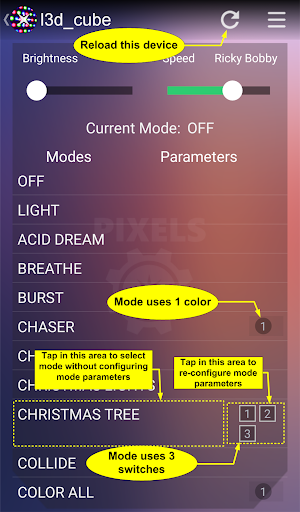
This app allows you to control a WS2812B Neopixel LED strip from your Android device over your WiFi network. You need to have a Spark Core or Particle Photon device properly connected to a Neopixel strip and the SparkPixels firmware loaded on the device. Get the firmware and see schematic and additional documentation at https://github.com/sparcules/Spark_Pixels.
Spark Pixels is a mode selector remote for your Neopixels. Select a mode, adjust brightness, adjust speed.
Spark Pixels is NOT a mode/LED sequencer creator. All modes are coded in the Particle sketch.
Why Spark Pixels?
Spark Pixels is expandable. Make your own modes - add your mode code to the sketch on Particle’s web IDE. …
Read the full description
This app allows you to control a WS2812B Neopixel LED strip from your Android device over your WiFi network. You need to have a Spark Core or Particle Photon device properly connected to a Neopixel strip and the SparkPixels firmware loaded on the device. Get the firmware and see schematic and additional documentation at https://github.com/sparcules/Spark_Pixels. Spark Pixels is a mode selector remote for your Neopixels. Select a mode, adjust brightness, adjust speed. Spark Pixels is NOT a mode/LED sequencer creator. All modes are coded in the Particle sketch. Why Spark Pixels? Spark Pixels is expandable. Make your own modes - add your mode code to the sketch on Particle’s web IDE. See the github repo for instructions on how to add a new mode. Hit the reload icon in the app and watch your new mode magically appear in the mode list. The Particle Photon is a nifty little WiFi connected micro controller. It's easy to use and it's connected to Particle’s free cloud! If you’re familiar to Arduino, you’d feel right at home with the Photon. See additional info at: https://www.particle.io/ New Features: - Auto detect your devices that are online and loaded with the Spark Pixels firmware. - Expandable Aux Switch Panel - add your own switches (boolean flags) to turn things on or off or toggle between two options. i.e. switch between using a light sensor or the app to set LED brightness. Your sketch must be updated with the latest firmware to enable this option. - Auto Sync the Time Zone Offset on app start. No more manual re-setting for Daylight Savings Time. (As long as your Android device auto updates itself). Old (but still fly) Features: - Get Cloud Variable option in the menu for debugging or other configurable cloud variables. The dialog will populate a drop down box with all of your published cloud variables. Instructions: > Connect your Spark Core or Photon device to your home WiFi network. - Spark Core users: Use this app to connect your Core - Photon users: Use the Particle app found here: https://play.google.com/store/apps/details?id=io.particle.android.app > Get the SparkPixels.ino firmware from github - For simple Neopixel strips get it here: https://github.com/sparcules/Spark_Pixels - For the L3D Cube get it here: https://github.com/wmoecke/Spark_Pixels > Copy and paste the code to a new app in Particle’s wed IDE: https://build.particle.io/build > Flash the Particle device. - For more info on navigating Particle’s web IDE, visit: https://docs.particle.io/guide/getting-started/build/photon/ - For more info on how to setup Spark Pixels or to add your own mode, visit the github repo > Configure the Android app with the Spark Core (or Photon) Neopixel Driver in its settings page. > You're all set! You can now enjoy controlling your Neopixels from your Android device. *Notice* The full list view of the modes will not populate unless the firmware has been loaded on the Particle device and the device is online. Community: Visit the Facebook page to: - Post Pictures and/or Videos of your setup - Share new modes that you've created - Post any troubleshooting help you may need - Suggestions or improvements to the app or firmware Link: https://www.facebook.com/Spark-Pixels-1716703048549907/timeline/ Acknowledgements: This app was based off of the (open source) SparkCore app.
Installs since 31 Aug 2026 Measured
Exact Google Play install counts, collected daily
Ratings
30 ratings, 5 reviews
- 5 ★72%
- 4 ★28%
- 3 ★0.0%
- 2 ★0.0%
- 1 ★0.0%
Recent reviews
Latest public reviews from the store
- 4 Dec 2020
Nice golf game ever
- 29 Oct 2018
👌
- 9 Jul 2018
Super nice app and accompanying code. It is obvious that a lot of work went into getting this right. It took me all of five minutes to get my Photon flashed, install the app, and have my Neopixels doing all sorts of patterns. The UX is also very well-designed. Navigating around is straightforward, and there are several customizable features. Some quite humorous touches as well :-). Great job, Sparcules!
- 13 Dec 2017
Excellent
What reviewers bring up
Topics mentioned in the latest 13 reviews, by how many reviews mention them
Liked in good reviews (11 reviews)
- photon 3
- cube 2
Raised in bad reviews (2 reviews)
No topic comes up twice.
Top chart positions
Latest Google Play chart ranks by country, last 10 days
Not in any tracked top chart in the last 10 days.
Spark Pixels history
Release, install milestones, listing and store changes
- First released on the store 20 Jul 2015
Recent versions
Current version 0.4.3
- Version 0.4.311 Jun 2024
Add verbosity to error messages.
Listing keywords
Words and phrases Spark Pixels repeats most in its store listing
Top phrases: spark pixels (7), spark core (4), android device (3), particle photon (3), core or photon (2).
Highlighted words also appear in the title. Counts cover the title, short description and description.
Business model and tech
From the store listing and declared permissions
- Business model
- Free to download
- Sensitive access
- No sensitive permission declared
Compliance
What the listing and the app package show
- Store status
- Live
- Upkeep
- No update since 11 Jun 2024
- Registered in
- United States
- Privacy policy
- Linked on the listing
- Advertising
- No ads declared
- In-app purchases
- None declared
- Age rating
- Everyone
Apps like Spark Pixels
들어서 화면켜기Won3.5K installs★ 4.0
Height PredictionEcliptic App Ventures45.9K installs★ 2.4
Speicers`Pro VPNEldiablolucifer202021.2K installs★ 4.14
Lightning Tracker with AlertsYaksh Software4.3K installs★ 3.0
Mana Pathi (Unit Converter)Shirish Koirala2.2K installs★ 4.6
Multi-tab Calc - A simple app.Naoyuki Rikiji1.3K installs★ 5.0
Just Silence. Scheduled.Akid Soft1.6K installs★ 5.0
- WoWp AssistantВиталий Робиновский2K installs★ 4.2
LINKa: напишиLINKa7.9K installs★ 4.4
Spark Pixels: questions and answers
How many downloads does Spark Pixels have?
Spark Pixels has 5,750 installs on Google Play, measured from the store's own count on 9 Nov 2026.
Who makes Spark Pixels?
Spark Pixels is published by Sparcules, a developer based in US.
When was Spark Pixels last updated?
The latest version (0.4.3) was released on 11 Jun 2024.
Is Spark Pixels free?
Yes. Spark Pixels is free to download.
Is Spark Pixels still available?
Yes. Spark Pixels is live on Google Play as of 9 Nov 2026.
Track Spark Pixels and its competitors
Watch any app for new versions, rating drops, chart moves and removals. Free plan, no card.