
SPDQ
Mobile Ordering For Stadiums and large Venues
- Installs
- 8.95K
- Measured
- Rating
- 3.2
- Ratings
- 51
- Version
- Varies with device
- Updated 12 Mar 2025
- Released
- 7 Dec 2016
- Tracked since 12 May 2026
- Size
- 6 MB
- Needs 5.0
Also on App Store: SPDQ
Screenshots

About SPDQ
The description on the store listing
The SPDQ App is a mobile ordering service aimed at stadiums, festivals and other large scale events.
The app enables fans to ‘Click & Collect’ their order or have it delivered to their seat (NB this is the choice of the caterer. Not all users will be offered both).
Once you have downloaded the app you can Click & Collect WITHOUT an internet connection. The app works in ‘airplane mode’, so it can be used anywhere in the world - even a busy stadium!
How does SPDQ ‘Click & Collect’ speed up the queues?
By the time you've got to the bar you have already chosen, ordered and paid for your drinks. This has been proven to reduce service time to under 15 seconds.
How does SPDQ …
Read the full description
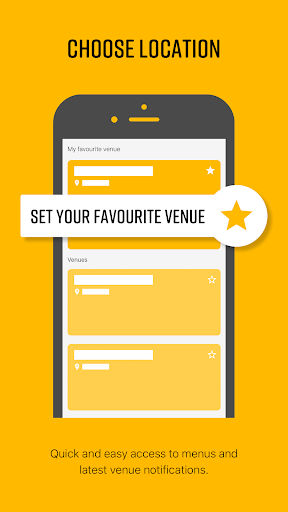
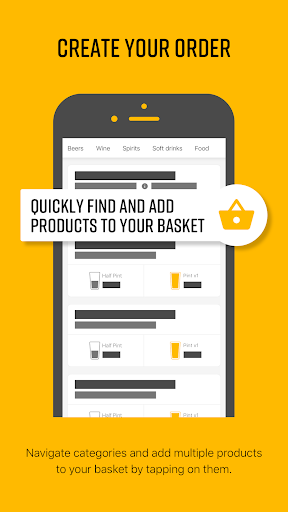
The SPDQ App is a mobile ordering service aimed at stadiums, festivals and other large scale events. The app enables fans to ‘Click & Collect’ their order or have it delivered to their seat (NB this is the choice of the caterer. Not all users will be offered both). Once you have downloaded the app you can Click & Collect WITHOUT an internet connection. The app works in ‘airplane mode’, so it can be used anywhere in the world - even a busy stadium! How does SPDQ ‘Click & Collect’ speed up the queues? By the time you've got to the bar you have already chosen, ordered and paid for your drinks. This has been proven to reduce service time to under 15 seconds. How does SPDQ ‘Click & Collect’ work? - You enter your order on the SPDQ app, which will convert into a unique QR code. - You then scan this QR code at a SPDQ Unit, situated near the bar. The SPDQ Unit is hardwired to the internet, so is able to process your transaction swiftly and securely. - The SPDQ Unit will print off a piece of paper showing your order, which you take to a dedicated Fast Lane or Bar and exchange for your drinks and food. How does “Stand & Deliver” the in-seat delivery system work? - Customers input their seat number and select a bar. They then create their order and select a time slot for delivery. These time slots can be adjusted by the venue manager according to capacity and demand. - The information is sent to the relevant bar and gets printed off at a SPDQ Unit behind the counter - for a staff member to fulfil. - The food and drink is placed on a tray and delivered directly to the customer’s seat, table or standing area. The SPDQ App enables you to: - Choose Venues (or the app will detect your location) - View and choose from each venue's menu - View a map of the venue - Create orders for ‘Click and Collect’ and/or in seat delivery - View previous orders
Installs since 29 Aug 2026 Measured
Exact Google Play install counts, collected daily
Ratings
51 ratings
- 5 ★0.0%
- 4 ★0.0%
- 3 ★0.0%
- 2 ★0.0%
- 1 ★0.0%
Recent reviews
Latest public reviews from the store
- 14 Apr 2020
Connects to home WiFi. App is great and supports multiple languages.
- 14 Apr 2020
No problem in connecting to device. Remote control using app works great.
- 22 Aug 2016
Great app
What reviewers bring up
Topics mentioned in the latest 13 reviews, by how many reviews mention them
Liked in good reviews (3 reviews)
No topic comes up twice.
Raised in bad reviews (10 reviews)
- register 4
- connect 3
- oven 3
- next 3
- microwave 2
- another 2
- address 2
- account 2
Top chart positions
Latest Google Play chart ranks by country, last 10 days
Not in any tracked top chart in the last 10 days.
SPDQ history
Release, install milestones, listing and store changes
- Reached 5,000+ installs 16 Feb 2020
- Reached 1,000+ installs 21 Feb 2018
- Reached 500+ installs 10 Sep 2017
- Reached 100+ installs 26 Apr 2017
- Reached 10+ installs 23 Mar 2017
- Reached 1+ installs 19 Dec 2016
- First released on the store 7 Dec 2016
Recent versions
Current version Varies with device
- Version 7.4.112 Mar 2025
- Version 7.2.028 Apr 2023
- Version 5.2.315 Mar 2022
- Version 5.1.119 Jan 2022
Listing keywords
Words and phrases SPDQ repeats most in its store listing
Top phrases: click collect (4), spdq unit (4), spdq click collect (2), mobile ordering (2), qr code (2).
Highlighted words also appear in the title. Counts cover the title, short description and description.
Business model and tech
From the store listing, the SDKs in the app package and its declared permissions
- Business model
- Free to download
- Built with
- CordovaIonic
- Ad networks (0)
- None detected
- Analytics and crash reports
- FirebaseGoogle AnalyticsCrashlyticsSentryfabric
- Sensitive access
- LocationAdvertising ID
2 ad, attribution and analytics SDKs detected. SDKs are read from the app package and permissions from the store listing, so code that loads later is not seen.
Technology
16 SDKs found in the app package
19 permissions
1 special access, 3 sensitive, 15 standard
- Change system settingsWRITE_SETTINGSSpecial access
- Approximate locationSensitive
- Precise locationSensitive
- Show notificationsPOST_NOTIFICATIONSSensitive
- Ad attribution (Privacy Sandbox)ACCESS_ADSERVICES_ATTRIBUTIONStandard
- Read how it was installed (install referrer)BIND_GET_INSTALL_REFERRER_SERVICEStandard
- Read the advertising IDAD_IDStandard
- Read the advertising ID (Privacy Sandbox)ACCESS_ADSERVICES_AD_IDStandard
- App icon badge countsBADGE_COUNT_READStandard
- Control vibrationStandard
- Keep the phone awakeStandard
- Run a foreground serviceFOREGROUND_SERVICEStandard
Compliance
What the listing and the app package show
- Store status
- Live
- Upkeep
- Updated 12 Mar 2025
- Registered in
- United Kingdom
- Privacy policy
- Linked on the listing
- Advertising
- No ads declared
- In-app purchases
- None declared
- Age rating
- Everyone
- Sensitive permissions
- 3 sensitive, 1 special access of 19
- Location access
- Yes, while in use
- Camera and microphone
- Neither
Apps like SPDQ
Elvington MasalaHungrrr1.3K installs★ 4.8
Toast TablesToast, Inc.34.3K installs★ 3.35
Shahs The American GyroPer Diem Subscriptions, Inc.577 installs★ 4.93
Cucina per Te: le RicetteGlesius828 installs★ 4.7
ANDYS Pizzaspeedlo s.r.o.8.3K installs★ 4.2
Shrimp RecipesDIL Studio21.6K installs★ 4.93
Tijgerkop ReceptenJ.A. van Dillen11.8K installs★ 4.5
Penny Black PubVelocissimo12.5K installs★ 4.8
Smoothie Factory + KitchenLunchbox Technologies Inc3K installs★ 4.24
SPDQ: questions and answers
How many downloads does SPDQ have?
SPDQ has 8,954 installs on Google Play, measured from the store's own count on 21 Nov 2026.
Who makes SPDQ?
SPDQ is published by Clock Ltd, a developer based in GB.
When was SPDQ last updated?
The latest version (Varies with device) was released on 12 Mar 2025.
Is SPDQ free?
Yes. SPDQ is free to download.
Is SPDQ still available?
Yes. SPDQ is live on Google Play as of 21 Nov 2026.
Track SPDQ and its competitors
Watch any app for new versions, rating drops, chart moves and removals. Free plan, no card.