Speaking Alarm Clock
Hourly and interval chime with TTS voices, speaking stopwatch, speaking timer
- Installs
- 8.20M
- Measured
- Rating
- 4.42
- Ratings
- 95.7K
- 1.5K reviews
- Version
- 0.9.186
- Updated 30 Aug 2026
- Released
- 10 Mar 2012
- Tracked since 14 May 2026
- Size
- 5 MB
- Needs 4.1
Screenshots



About Speaking Alarm Clock
The description on the store listing
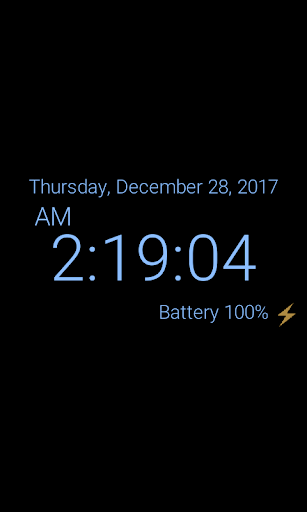
<b> (1) Table clock</b>
☆ You can easily check the date, time, and battery status by using a table clock.
▷ It is easy to adjust the brightness by touch.
▷ You can use burn-in prevention function.
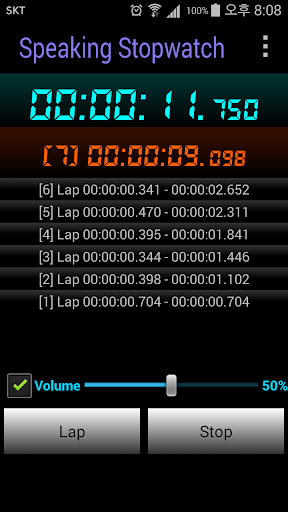
<b>(2) Speaking stopwatch and timer</b>
☆ Voice has been added to the stopwatch and timer.
▷ It informs by voice at each set time conveniently.
▷ It is also possible to share recorded contents.
<b>(3) Tell me what time is it now</b>
☆ You can easily check the current time without watching your mobile device.
▷ While listening to music, watching movies or playing games, you may wonder what time is it now. At that time, just shake the device, then clock will tell you the current time …
Read the full description
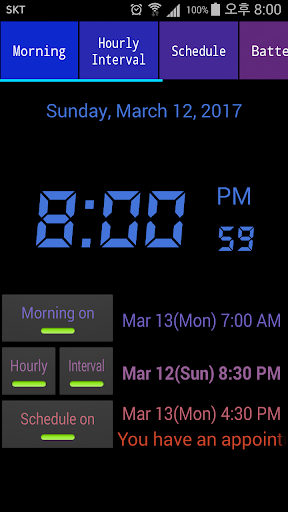
<b> (1) Table clock</b> ☆ You can easily check the date, time, and battery status by using a table clock. ▷ It is easy to adjust the brightness by touch. ▷ You can use burn-in prevention function. <b>(2) Speaking stopwatch and timer</b> ☆ Voice has been added to the stopwatch and timer. ▷ It informs by voice at each set time conveniently. ▷ It is also possible to share recorded contents. <b>(3) Tell me what time is it now</b> ☆ You can easily check the current time without watching your mobile device. ▷ While listening to music, watching movies or playing games, you may wonder what time is it now. At that time, just shake the device, then clock will tell you the current time using TTS (Text to speech). To activate this function, you can also use other options like turning screen on and off, etc. <b>(4) Morning wake-up alarm</b> ☆ Wake-up time for weekdays and weekends can be set separated ☆ The volume of wake-up alarm can be increased automatically from the lowest to the highest level. This function makes you wake up without the shock of loud alarm. ☆ You can set internal ringtone sound or your music files(like MP3 or OGG) as alarm sound. ☆ If you want more sleep, just use the countdown snooze function. ☆ If you want to use puzzle lock to close alarm, you can choose math problem or number sequences problem. <b>(5) Hourly chime (on time alarm) and Interval (10, 20, 30, 40, 50 minutes, and more) alarm</b> ☆ You can choose various voices or sounds for hourly chime. ☆ You can change the time and sound for each interval alarm. <b>(6) Scheduled alarms with voices</b> ☆ The clock will tell you the schedule with TTS voices. You can change the time of each schedule. <b>(7) Battery full warning alarm</b> ☆ If your device has fully charged, the clock will tell you that battery is fully charged. <b>(8) Battery low warning alarm</b> ☆ If your device needs to be charged, the clock will tell you that battery is needed charging. The level of low battery can be changed as you want. <b>(9) TTS voice battery alarm</b> ☆ When the charging cable is conntected or disconnected, the current battery level is announced by voice. ☆ If you set the battery interval notification, the battery level will be continuously announced in a TTS voice. <b>(10) Analog and digital clock widget</b> ☆ You can use various analog clock widgets with cute characters. ☆ You can use a digital clock widget that includes hours, minutes and seconds. <b>[Information about permission]</b> 1) Wi-Fi connection (not mandatory) → used for advertising. 2) Photos/Media/Files (not mandatory) → used for setting sound files of device as alarms. 3) Device ID & call information (not mandatory) → used to check whether the device is the duding a call when set alarm time. This alarm does not work when the device is during call. ☆ Permissions are used only these purposes. Please use this app at ease.
Installs, last 30 days Measured
Exact Google Play install counts, collected daily
Ratings
95,651 ratings, 1,496 reviews
- 5 ★76%
- 4 ★8.9%
- 3 ★5.3%
- 2 ★2.8%
- 1 ★6.7%
Recent reviews
Latest public reviews from the store
- 18 May 2026
super
- 14 May 2026
I like this app for its excellent work .
- 1 May 2026
I found it very ok and correctly speaking at the right time.
- 21 Apr 2026
the best
What reviewers bring up
Topics mentioned in the latest 50 reviews, by how many reviews mention them
Liked in good reviews (36 reviews)
- speaking 3
- clock 3
- tried 3
- far 3
- correctly 2
- settings 2
- telling 2
- options 2
Raised in bad reviews (9 reviews)
- background 2
Top chart positions
Latest Google Play chart ranks by country, last 10 days
Not in any tracked top chart in the last 10 days.
Speaking Alarm Clock history
Release, install milestones, listing and store changes
- Reached 5,000,000+ installs 16 Jun 2019
- First released on the store 10 Mar 2012
Update frequency
How often Speaking Alarm Clock ships a new version, month by month
2 updates in the last 12 months. More often than most similar apps: they shipped a median of 1 updates in the same year.
Recent versions
Current version 0.9.186
- Version 0.9.18630 Aug 2026
* Ver. 0.9.186 - Updated for Android 16. - Added cloud backup and restore feature for settings * Ver. 0.9.182 - Updated for Android 15. * Ver. 0.9.181 - Added : Various ready sounds before the alarm working
- Version 0.9.18426 Aug 2026
* Ver. 0.9.184 - Updated for Android 16. * Ver. 0.9.182 - Updated for Android 15. * Ver. 0.9.181 - Added : Various ready sounds before the alarm working
- Version 0.9.18212 Jun 2025
* Ver. 0.9.182 - Updated for Android 15. * Ver. 0.9.181 - Added : Various ready sounds before the alarm working
- Version 0.9.18114 Nov 2024
Listing keywords
Words and phrases Speaking Alarm Clock repeats most in its store listing
Top phrases: clock will tell (4), charged the clock (2), digital clock widget (2), stopwatch and timer (2), wake up alarm (2).
Highlighted words also appear in the title. Counts cover the title, short description and description.
Business model and tech
From the store listing and declared permissions
- Business model
- Free to downloadShows ads
- Sensitive access
- No sensitive permission declared
Compliance
What the listing and the app package show
- Store status
- Live
- Upkeep
- Updated 30 Aug 2026
- Registered in
- South Korea
- Privacy policy
- Linked on the listing
- Advertising
- Shows ads
- In-app purchases
- None declared
- Age rating
- Everyone
Apps like Speaking Alarm Clock
HTTP Custom - AIO Tunnel VPNePro Dev. Team27.3M installs★ 4.11
vConnectVodafone Idea Ltd.6.8M installs★ 4.0
Clickmate - Auto Clicker MacroBattery Stats Saver17.7M installs★ 4.22
VirusBuster MobileTrend Micro Inc. / トレンドマイクロ株式会社13.1M installs★ 4.0
Send files to TVYablio43.6M installs★ 4.2
My FilesColorOS1.4B installs★ 3.75
Tube Video Downloader & Videovideo download.11.1M installs★ 3.49
Skins for Minecraft PERemoro Studios22.3M installs★ 4.26
Satoshi App: Get AirdropsAimee Han9.3M installs★ 3.3
Speaking Alarm Clock: questions and answers
How many downloads does Speaking Alarm Clock have?
Speaking Alarm Clock has 8,199,702 installs on Google Play, measured from the store's own count on 19 Nov 2026.
Who makes Speaking Alarm Clock?
Speaking Alarm Clock is published by Wansoft, a developer based in KR.
When was Speaking Alarm Clock last updated?
The latest version (0.9.186) was released on 30 Aug 2026.
Is Speaking Alarm Clock free?
Yes. Speaking Alarm Clock is free to download, and it shows ads.
Is Speaking Alarm Clock still available?
Yes. Speaking Alarm Clock is live on Google Play as of 19 Nov 2026.
Track Speaking Alarm Clock and its competitors
Watch any app for new versions, rating drops, chart moves and removals. Free plan, no card.