
Specops Authenticator
Specops Authenticator allows one time password authentication to Specops uReset
- Installs
- 10.05K
- Measured
- Rating
- —
- Ratings
- —
- Version
- Varies with device
- Updated 11 Jul 2024
- Released
- 30 Jun 2015
- Tracked since 13 May 2026
- Size
- 21 MB
- Needs 4.0
Also on App Store: Specops Authenticator (1 ratings)
Screenshots



About Specops Authenticator
The description on the store listing
<b>Note! This is a corporate app that can be used only if your organization uses Specops uReset. It will NOT work for personal use.</b>
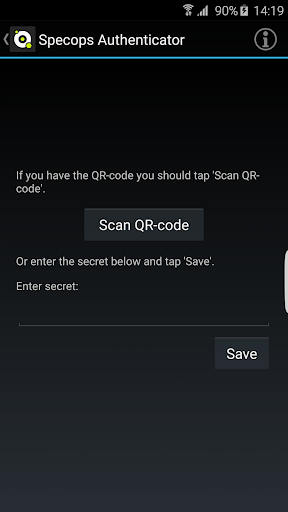
Specops Authenticator allows users to authenticate with one time passwords to the Specops uReset self-service password reset service. The application generates a secret code that users must provide in addition to their username when authenticating their identity during a password reset.
Before a user can use the Specops Authenticator app, they must enroll in the service by completing the set-up operation.
1. Install the Specops Authenticator and start it
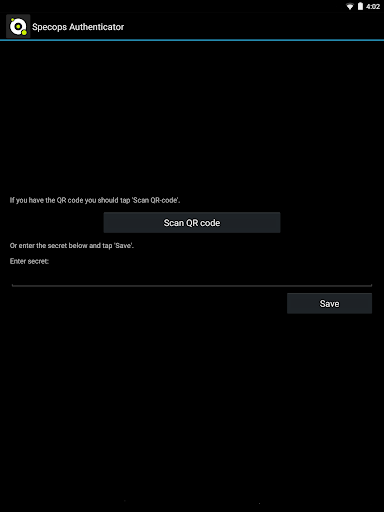
2. Select scan QR code button from the Specops Authenticator application
3. From the …
Read the full description
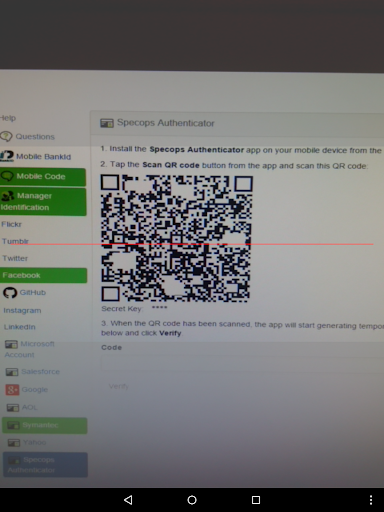
<b>Note! This is a corporate app that can be used only if your organization uses Specops uReset. It will NOT work for personal use.</b> Specops Authenticator allows users to authenticate with one time passwords to the Specops uReset self-service password reset service. The application generates a secret code that users must provide in addition to their username when authenticating their identity during a password reset. Before a user can use the Specops Authenticator app, they must enroll in the service by completing the set-up operation. 1. Install the Specops Authenticator and start it 2. Select scan QR code button from the Specops Authenticator application 3. From the uReset enrollment page, select the Specops Authenticator 4. Scan the QR code on the uReset enrollment page with the Specops Authenticator application 5. Specops Authenticator will generate a temporary passcode, enter this passcode and select verify.
Installs since 13 Nov 2026 Measured
Exact Google Play install counts, collected daily
Daily history starts once this app is in our daily install sample.
Ratings
- 5 ★0.0%
- 4 ★0.0%
- 3 ★0.0%
- 2 ★0.0%
- 1 ★0.0%
Recent reviews
Latest public reviews from the store
No reviews in our sample for this app yet.
Top chart positions
Latest Google Play chart ranks by country, last 10 days
Not in any tracked top chart in the last 10 days.
Specops Authenticator history
Release, install milestones, listing and store changes
- Reached 5,000+ installs 29 May 2022
- Reached 1,000+ installs 2 Sep 2017
- Reached 500+ installs 7 Jul 2016
- Reached 100+ installs 7 Oct 2015
- Reached 50+ installs 7 Sep 2015
- Reached 10+ installs 5 Jul 2015
- First released on the store 30 Jun 2015
Recent versions
Current version Varies with device
- Version 7.14.24193.111 Jul 2024
- Version 7.14.23234.122 Aug 2023
- Version 7.14.22174.124 Aug 2022
- Version 7.14.19219.17 Aug 2019
Listing keywords
Words and phrases Specops Authenticator repeats most in its store listing
Top phrases: specops authenticator (9), specops ureset (3), specops authenticator allows (2), specops authenticator application (2), ureset enrollment page (2).
Highlighted words also appear in the title. Counts cover the title, short description and description.
Business model and tech
From the store listing, the SDKs in the app package and its declared permissions
- Business model
- Free to download
- Built with
- Xamarin
- Ad networks (0)
- None detected
- Sensitive access
- Camera
0 ad, attribution and analytics SDKs detected. SDKs are read from the app package and permissions from the store listing, so code that loads later is not seen.
Technology
26 SDKs found in the app package
1 permissions
0 special access, 1 sensitive, 0 standard
- Take photos and videosSensitive
Compliance
What the listing and the app package show
- Store status
- Live
- Upkeep
- No update since 11 Jul 2024
- Registered in
- United States
- Privacy policy
- Linked on the listing
- Advertising
- No ads declared
- In-app purchases
- None declared
- Age rating
- Everyone
- Sensitive permissions
- 1 sensitive of 1
- Location access
- No
- Camera and microphone
- Camera
Apps like Specops Authenticator
영산강 안심 알림eICT융합소프트 & 스마트오더18.3K installs★ 4.0
JBLETRADOC Mobile10.3K installs★ 4.5
Two Point HeightOmega Centauri Software15.3K installs★ 2.22
Sheridan RecyclesCity of Sheridan634 installs★ 4.67
NAFNorges Automobil-Forbund200K installs★ 3.9
Ipsos Adria CAPIIpsos Serbia7.4K installs★ 3.9
Clock: Alarm Clock & TimerIntratech so36.1K installs★ 3.79
Süzme Sayaç HesaplamaNotsup30.3K installs★ 3.6
Cattle & Goat Record KeepingVetzKin10.3K installs★ 2.5
Specops Authenticator: questions and answers
How many downloads does Specops Authenticator have?
Specops Authenticator has 10,054 installs on Google Play, measured from the store's own count on 13 Nov 2026.
Who makes Specops Authenticator?
Specops Authenticator is published by Specops Software, a developer based in US.
When was Specops Authenticator last updated?
The latest version (Varies with device) was released on 11 Jul 2024.
Is Specops Authenticator free?
Yes. Specops Authenticator is free to download.
Is Specops Authenticator still available?
Yes. Specops Authenticator is live on Google Play as of 13 Nov 2026.
Track Specops Authenticator and its competitors
Watch any app for new versions, rating drops, chart moves and removals. Free plan, no card.