
Speed Dial
Dial number with one touch
- Installs
- 19.20K
- Measured
- Rating
- 3.5
- Ratings
- 93
- 7 reviews
- Version
- 1.2.6
- Updated 2 Nov 2026
- Released
- 3 May 2022
- Tracked since 13 May 2026
- Size
- —
Screenshots

About Speed Dial
The description on the store listing
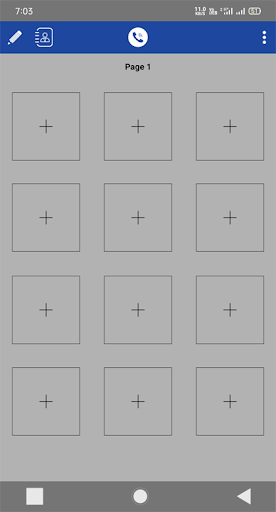
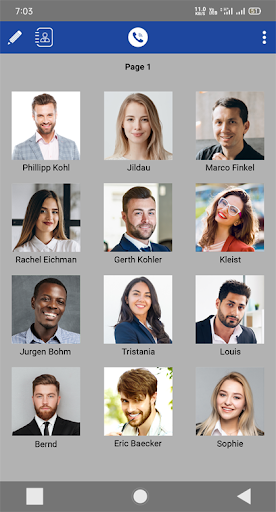
Using the Speed Dial App, you can just touch the plus symbol and select the target contact to your speed dial directory and assign speed dial numbers to make calls, SMS, and Email go faster.
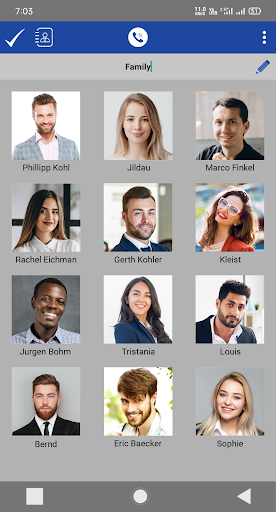
In this app Speed Dial, you can easily put and remove any contact. Tap the edit icon at the top left then select any one of your favorites contacts, now you are on the edit page. You can easily change your contact image, name, mobile number, email, and color.
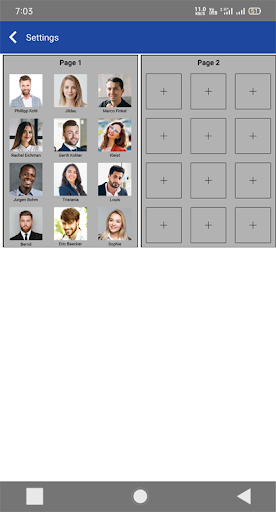
<b>To go to settings tap the icon at the top right.</b>
The first one is the <b>"Title Type"</b>, in these features you can select your Speed Dial icon shape like circle, square and rounded square select as per your choice.
The second one …
Read the full description
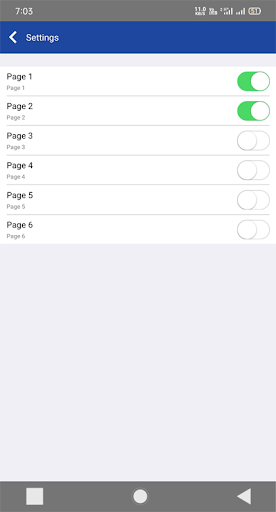
Using the Speed Dial App, you can just touch the plus symbol and select the target contact to your speed dial directory and assign speed dial numbers to make calls, SMS, and Email go faster. In this app Speed Dial, you can easily put and remove any contact. Tap the edit icon at the top left then select any one of your favorites contacts, now you are on the edit page. You can easily change your contact image, name, mobile number, email, and color. <b>To go to settings tap the icon at the top right.</b> The first one is the <b>"Title Type"</b>, in these features you can select your Speed Dial icon shape like circle, square and rounded square select as per your choice. The second one is <b>"Text Colour"</b>, which is "Black and White". The third one is <b>"Action Tap"</b>, there is a total of three tap single-tap, double-tap, and long press and there are a total four options call, SMS, Email, and none. Select which option is better for which tap is your choice. The fourth is <b>"Page"</b> there is a total of two option arrange pages and enable pages. In arranging pages you can arrange pages as per your choice example: keep pressed the fourth-page scroll up and put on the first page. In enable pages you can enable or disable any pages there is six total number of pages. The fifth one is <b>"Background"</b> choose any background, blur option, blank tint option, and remove background option. <b>Benefits:</b> One-touch of the user icon is a phone call to the right person. Share Contacts from "Speed Dial Widget - Quick Call, SMS, and Email by a tap to call, SMS, and email" if you want Change the photo of the contact photo list. Change the color of the text. Easily Arrange or Enables the pages. Choose your favorite background. Easily change your page name and put funny and interesting page name Easy and clear UI for easy access to all functions. <b>Support:</b> In this app Speed Dial if you have any feedback, bug reports, suggestions, or any help please contact us at [email protected], enjoy the totally free app, and let us know your reviews of this app. We would love to hear back from you.
Installs since 29 Aug 2026 Measured
Exact Google Play install counts, collected daily
Ratings
93 ratings, 7 reviews
- 5 ★54%
- 4 ★7.4%
- 3 ★0.0%
- 2 ★0.0%
- 1 ★38%
Recent reviews
Latest public reviews from the store
No reviews in our sample for this app yet.
Top chart positions
Latest Google Play chart ranks by country, last 10 days
Not in any tracked top chart in the last 10 days.
Speed Dial history
Release, install milestones, listing and store changes
- Reached 10,000+ installs 14 Oct 2024
- Reached 5,000+ installs 5 Oct 2023
- Reached 1,000+ installs 6 Dec 2022
- Reached 500+ installs 7 Oct 2022
- Reached 100+ installs 9 Jun 2022
- First released on the store 3 May 2022
Update frequency
How often Speed Dial ships a new version, month by month
3 updates in the last 12 months. Less often than most similar apps: they shipped a median of 4 updates in the same year.
Recent versions
Current version 1.2.6
- Version 1.2.62 Nov 2026
- added suggestion/feedback feature - add edit button on saved contacts - added multi languages - make performance smooth - added quick go to page in the dashboard
- Version 1.2.424 Jun 2026
- added suggestion/feedback feature - add edit button on saved contacts - added multi languages - make performance smooth - added quick go to page in the dashboard
- Version 1.2.32 Apr 2026
- Fixed Image cache issue - Fixed page sequance issue - Fixed home screen navigation isssue - Fixed contact picker issue - Improved performance - Fixed issues
- Version 1.2.23 Jan 2025
Listing keywords
Words and phrases Speed Dial repeats most in its store listing
Top phrases: speed dial (8), sms and email (3), call sms (3), arrange pages (2), enable pages (2).
Highlighted words also appear in the title. Counts cover the title, short description and description.
Business model and tech
From the store listing and declared permissions
- Business model
- Free to downloadShows ads
- Sensitive access
- ContactsPhotos, videos and filesAdvertising ID
16 permissions
0 special access, 5 sensitive, 11 standard
- Change contactsSensitive
- Read contactsSensitive
- Change or delete shared storageSensitive
- Read photosREAD_MEDIA_IMAGESSensitive
- Read shared storageSensitive
- Ad attribution (Privacy Sandbox)ACCESS_ADSERVICES_ATTRIBUTIONStandard
- Ad topics (Privacy Sandbox)ACCESS_ADSERVICES_TOPICSStandard
- Read the advertising IDAD_IDStandard
- Read the advertising ID (Privacy Sandbox)ACCESS_ADSERVICES_AD_IDStandard
- Keep the phone awakeStandard
- Run a foreground serviceFOREGROUND_SERVICEStandard
- Download files without a notificationStandard
Compliance
What the listing and the app package show
- Store status
- Live
- Upkeep
- Updated 2 Nov 2026
- Registered in
- India
- Privacy policy
- Linked on the listing
- Advertising
- Shows ads
- In-app purchases
- None declared
- Age rating
- Everyone
- Sensitive permissions
- 5 sensitive of 16
- Location access
- No
- Camera and microphone
- Neither
Apps like Speed Dial
WorldTone: Expert Video ChatWorldtone Corp33.8K installs★ 5.0
Universal email: All AccountsRB Quen27.3K installs★ 4.33
RyzenMail: Temporary EmailRyzen Mail35.5K installs★ 4.86
Tamil Text Dialogue StickersBM e-Solutions114K installs★ 4.1
Keetec GPS SniperTSS Group a.s.7.7K installs★ 2.8
Igreja da FamíliaIgreja Smart - Aplicativos7.4K installs★ 5.0
KouChatChristian Ihle10K installs★ 3.83
TelzioTelzio, Inc10.5K installs★ 3.85
Temp MailGlobalAxiomLabs32.1K installs★ 4.67
Speed Dial: questions and answers
How many downloads does Speed Dial have?
Speed Dial has 19,197 installs on Google Play, measured from the store's own count on 14 Nov 2026.
Who makes Speed Dial?
Speed Dial is published by Softpulse Infotech, a developer based in IN.
When was Speed Dial last updated?
The latest version (1.2.6) was released on 2 Nov 2026.
Is Speed Dial free?
Yes. Speed Dial is free to download, and it shows ads.
Is Speed Dial still available?
Yes. Speed Dial is live on Google Play as of 14 Nov 2026.
Track Speed Dial and its competitors
Watch any app for new versions, rating drops, chart moves and removals. Free plan, no card.