
Speedometer
Use your smartphone as the Speedometer.
- Installs
- 134
- Measured
- Rating
- —
- Ratings
- —
- Version
- Varies with device
- Updated 2 Apr 2026
- Released
- 5 Apr 2025
- Tracked since 13 May 2026
- Size
- —
Screenshots




About Speedometer
The description on the store listing
Speedometer is a real-time GPS-based speedometer and tracking app. While driving, you can check your current speed, travel distance, average speed, maximum speed, and more. You can also view your traveled route on the map in real-time.
[Key Features]
🚗 Real-time Speedometer
- Digital speedometer and gauge view
- Supports km/h and mph units
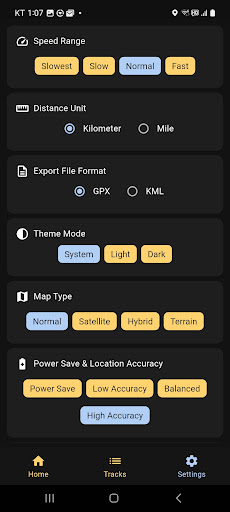
- Speed level settings (Slowest, Slow, Normal, Fast)
🗺️ GPS Tracking
- Real-time location tracking
- Total distance measurement
- Average and maximum speed recording
- Elapsed time display
🌍 Map View
- Google Maps integration
- Map type selection (Normal, Satellite, Hybrid, Terrain)
- Start and end point markers
📁 Track …
Read the full description
Speedometer is a real-time GPS-based speedometer and tracking app. While driving, you can check your current speed, travel distance, average speed, maximum speed, and more. You can also view your traveled route on the map in real-time. [Key Features] 🚗 Real-time Speedometer - Digital speedometer and gauge view - Supports km/h and mph units - Speed level settings (Slowest, Slow, Normal, Fast) 🗺️ GPS Tracking - Real-time location tracking - Total distance measurement - Average and maximum speed recording - Elapsed time display 🌍 Map View - Google Maps integration - Map type selection (Normal, Satellite, Hybrid, Terrain) - Start and end point markers 📁 Track Management - Save recorded tracks - Export to GPX and KML formats - View and delete track list ⚙️ Settings - Multi-language support (English, Chinese, Spanish, Hindi, Arabic, Japanese, Korean) - Theme mode (Light/Dark/System) - Speed range settings - Distance unit (km/mi) - GPS accuracy settings (Power Save/Low Accuracy/Balanced/High Accuracy) 💎 Premium - Ad-free experience - Purchase Premium to remove all ads [How to Use] 1. Launch the app to receive GPS signals for your current location. 2. Press the Start button to begin speed measurement and tracking. 3. Press the Stop button to end measurement and save the track. 4. Check the recorded route on the map in the Tracks screen. 5. Adjust various options in Settings. [Privacy Policy] This app only collects location data, which is stored solely on your device. It is not transmitted to any external servers.
Installs since 26 Aug 2026 Measured
Exact Google Play install counts, collected daily
Ratings
- 5 ★0.0%
- 4 ★0.0%
- 3 ★0.0%
- 2 ★0.0%
- 1 ★0.0%
Recent reviews
Latest public reviews from the store
No reviews in our sample for this app yet.
Top chart positions
Latest Google Play chart ranks by country, last 10 days
Not in any tracked top chart in the last 10 days.
Speedometer history
Release, install milestones, listing and store changes
- Reached 100+ installs 2 Apr 2026
- Reached 50+ installs 6 Jun 2025
- Reached 10+ installs 7 May 2025
- First released on the store 5 Apr 2025
Update frequency
How often Speedometer ships a new version, month by month
1 updates in the last 12 months. More often than most similar apps: they shipped a median of 0 updates in the same year.
Recent versions
Current version Varies with device
- Version 1.1.612 Mar 2026
- Version 1.1.512 Sep 2025
- Version 1.1.317 Jul 2025
- Version 1.1.223 Jun 2025
Listing keywords
Words and phrases Speedometer repeats most in its store listing
Top phrases: maximum speed (2).
Highlighted words also appear in the title. Counts cover the title, short description and description.
Business model and tech
From the store listing and declared permissions
- Business model
- Free to downloadIn-app purchasesShows ads
- Subscriptions and payments
- Google Play billing
- Sensitive access
- LocationPhotos, videos and filesAdvertising ID
15 permissions
0 special access, 4 sensitive, 11 standard
- Change or delete shared storageSensitive
- Read shared storageSensitive
- Approximate locationSensitive
- Precise locationSensitive
- Ad attribution (Privacy Sandbox)ACCESS_ADSERVICES_ATTRIBUTIONStandard
- Ad topics (Privacy Sandbox)ACCESS_ADSERVICES_TOPICSStandard
- Read the advertising IDAD_IDStandard
- Read the advertising ID (Privacy Sandbox)ACCESS_ADSERVICES_AD_IDStandard
- Keep the phone awakeStandard
- Run a foreground serviceFOREGROUND_SERVICEStandard
- Full internet accessStandard
- See network connectionsStandard
Compliance
What the listing and the app package show
- Store status
- Live
- Upkeep
- Updated 2 Apr 2026
- Registered in
- South Korea
- Privacy policy
- Linked on the listing
- Advertising
- Shows ads
- In-app purchases
- Offered
- Age rating
- Everyone
- Sensitive permissions
- 4 sensitive of 15
- Location access
- Yes, while in use
- Camera and microphone
- Neither
Apps like Speedometer
들어서 화면켜기Won3.5K installs★ 4.0
Height PredictionEcliptic App Ventures45.9K installs★ 2.4
Speicers`Pro VPNEldiablolucifer202021.2K installs★ 4.14
Lightning Tracker with AlertsYaksh Software4.3K installs★ 3.0
Mana Pathi (Unit Converter)Shirish Koirala2.2K installs★ 4.6
Multi-tab Calc - A simple app.Naoyuki Rikiji1.3K installs★ 5.0
Photo Recovery PlusBillApps7.1K installs★ 4.53
Just Silence. Scheduled.Akid Soft1.6K installs★ 5.0
- WoWp AssistantВиталий Робиновский2K installs★ 4.2
Speedometer: questions and answers
How many downloads does Speedometer have?
Speedometer has 134 installs on Google Play, measured from the store's own count on 18 Nov 2026.
Who makes Speedometer?
Speedometer is published by (주)토지분석연구소, a developer based in KR.
When was Speedometer last updated?
The latest version (Varies with device) was released on 2 Apr 2026.
Is Speedometer free?
Yes. Speedometer is free to download and offers in-app purchases, and it shows ads.
Is Speedometer still available?
Yes. Speedometer is live on Google Play as of 18 Nov 2026.
Track Speedometer and its competitors
Watch any app for new versions, rating drops, chart moves and removals. Free plan, no card.