
Split Browser Trial
Browse two web pages side by side and cast videos to Chromecast!
- Installs
- 44.76K
- Measured
- Rating
- 3.0
- Ratings
- 275
- 29 reviews
- Version
- 3.1
- Updated 21 Jun 2017
- Released
- 30 Jan 2013
- Tracked since 12 May 2026
- Size
- 3 MB
- Needs 4.0
Screenshots


About Split Browser Trial
The description on the store listing
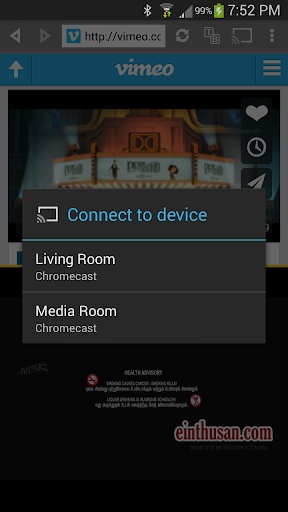
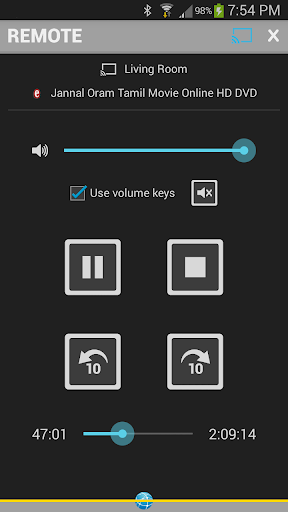
Cast videos to Chromecast & Nexus Player. Play videos from Split Browser on big screens!
Imagine if you could watch videos and write emails at the same time using your tablet! Or compare two web pages side by side, or take notes alongside a web page. Well, you can do all of that and more!
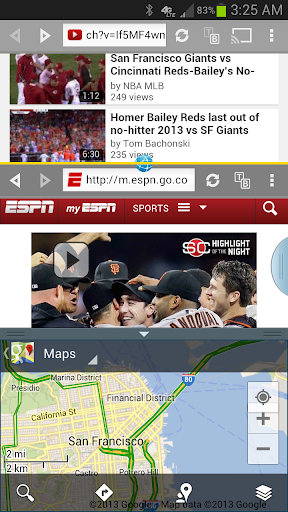
Split Browser is two browsers in one, working side by side. It lets you browse two web pages independent of each other. You can open links from one half into the other half. It also includes a notepad that allows you to take notes from a web page. You can open multiple tabs and swap them between two halves. You can also resize the two halves to suit your needs. Simply put, it is a powerful tool for …
Read the full description
Cast videos to Chromecast & Nexus Player. Play videos from Split Browser on big screens! Imagine if you could watch videos and write emails at the same time using your tablet! Or compare two web pages side by side, or take notes alongside a web page. Well, you can do all of that and more! Split Browser is two browsers in one, working side by side. It lets you browse two web pages independent of each other. You can open links from one half into the other half. It also includes a notepad that allows you to take notes from a web page. You can open multiple tabs and swap them between two halves. You can also resize the two halves to suit your needs. Simply put, it is a powerful tool for multitasking. Best suited for tablets and "phablets". 1/14/16 - SAMSUNG UPDATE: Split Browser Trial now works in newer Samsung devices in multi-window mode. - - - - - CHROMECAST & NEXUS PLAYER: Requires Google Play services (4.2 or above) to be enabled. Look under Android Settings > Applications. Not all videos can be cast (Flash videos, YouTube, live streams, etc). Low resolution videos might not look the same on your HD TV as they look in a small screen. Play videos in full view to cast. UPDATE 7/30/14: YouTube videos will not cast in Android 4.4 devices, please use the YouTube app. Steps to cast videos: http://www.appestry.biz/sb#cast See the main demo video for detailed casting instructions: http://youtu.be/fnKnVt6oY4A - - - - - Here's a quick rundown of its important features: • Resize the two browser halves by dragging the yellow divider line. • Rotate yellow divider (vertical/horizontal) independent of the screen orientation. • Watch videos in full view within each half. • Cast videos to Chromecast using the remote. • Start new tabs and switch them between the two halves. • Copy the current page over to the other half. • Open links and bookmarks in the other half and/or in a new tab. • Autocomplete address input from bookmarks and history. • Press and hold back/forward arrows to view history and jump to a page in the list. • Manage history across all tabs in one place, sorted reverse chronologically showing the time of last visit. • Search for text in the web page in either halves separately. • Separate clipboard option to paste the last 10 items copied. • Open notepads in either halves to take notes and save/share them. • Select text to copy and paste between two halves and notepads. • Links to useful tools like calculator, translator, converters... etc. • Remember form data and passwords. • Clear cache, history, cookies, form data and passwords. • View pages in desktop mode. • Works in dual view in Samsung devices that support multi-window mode. • Works in both cascade and dual views in Samsung Galaxy Note 10.1 tablets. This ad-free trial version closes every 10 minutes and allows only 3 bookmarks and 3 tabs. Using Chromecast the trial version can cast only 5 minutes of video at a time. Consider upgrading to the full version if you are satisfied with this trial version. Video review by @howtomen: http://youtu.be/bm5uoVhghh0 A quick look at multi-window support: http://youtu.be/1Czhk8OXAnM SWIFTKEY USERS: You might experience text input issues with SwiftKey keyboard in some websites. We are currently working to resolve this issue. More details in this SwiftKey forum thread: http://support.swiftkey.net/forums/116693-2-bug-reports/suggestions/3749006-nothing-is-written
Installs since 29 Aug 2026 Measured
Exact Google Play install counts, collected daily
Ratings
275 ratings, 29 reviews
- 5 ★50%
- 4 ★0.0%
- 3 ★0.0%
- 2 ★0.0%
- 1 ★50%
Recent reviews
Latest public reviews from the store
No reviews in our sample for this app yet.
Top chart positions
Latest Google Play chart ranks by country, last 10 days
Not in any tracked top chart in the last 10 days.
Split Browser Trial history
Release, install milestones, listing and store changes
- Reached 10,000+ installs 14 Mar 2014
- Reached 5,000+ installs 20 Oct 2013
- Reached 1,000+ installs 2 Apr 2013
- Reached 500+ installs 25 Mar 2013
- First released on the store 30 Jan 2013
Update frequency
How often Split Browser Trial ships a new version, month by month
0 updates in the last 12 months. Less often than most similar apps: they shipped a median of 1 updates in the same year.
Recent versions
Current version 3.1
- Version 3.121 Jun 2017
3.1: • Fixes crash when casting videos to newer Chromecast devices ---- 2.3.4: • Works in dual and cascade views in Samsung devices that support multi-window mode. ---- Thanks y'all for your feedback!
- Version 3.019 Jan 2016
- Version 2.4.323 May 2014
- Version 2.4.214 Mar 2014
Listing keywords
Words and phrases Split Browser Trial repeats most in its store listing
Top phrases: cast videos (4), split browser (4), side by side (3), videos to chromecast (3), multi window (3).
Highlighted words also appear in the title. Counts cover the title, short description and description.
Business model and tech
From the store listing, the SDKs in the app package and its declared permissions
- Business model
- Free to downloadShows ads
- Built with
- No cross-platform framework or game engine detected
- Ad networks (1)
- AdMob
- Analytics and crash reports
- Firebase
- Sensitive access
- LocationPhotos, videos and files
2 ad, attribution and analytics SDKs detected. SDKs are read from the app package and permissions from the store listing, so code that loads later is not seen.
Technology
6 SDKs found in the app package
Ad network libraries
Development tools
Ad networks
Advertising and install-attribution SDKs found in the app package
- AdMob
10 permissions
0 special access, 4 sensitive, 6 standard
- Change or delete shared storageSensitive
- Read shared storageSensitive
- Approximate locationSensitive
- Precise locationSensitive
- Keep the phone awakeStandard
- See running appsStandard
- Set the wallpaperStandard
- Full internet accessStandard
- See network connectionsStandard
- Receive push messagesStandard
Compliance
What the listing and the app package show
- Store status
- Live
- Upkeep
- No update since 21 Jun 2017
- Privacy policy
- Linked on the listing
- Advertising
- Shows ads
- In-app purchases
- None declared
- Age rating
- Everyone
- Sensitive permissions
- 4 sensitive of 10
- Location access
- Yes, while in use
- Camera and microphone
- Neither
Apps like Split Browser Trial
Digital CompassMobi Softech69K installs★ 4.71
Gearence: Godot Class Docsfengjiongmax36.4K installs★ 4.71
Fix Burn-inJay Webb87.4K installs★ 3.81
Any Screen Timeoutfruit4droid34.3K installs★ 3.17
Fuel economy CalculatorLemonClip95.7K installs★ 3.93
Ringtone SchedulerPower Mind Apps44.8K installs★ 3.7
Stop Tracking My DeviceKahima43.6K installs★ 3.65
Phone Clone for Android深圳市前海乐游原网络技术有限公司57.4K installs★ 3.29
AppGameKit PlayerThe Game Creators20K installs★ 3.58
Split Browser Trial: questions and answers
How many downloads does Split Browser Trial have?
Split Browser Trial has 44,760 installs on Google Play, measured from the store's own count on 14 Nov 2026.
Who makes Split Browser Trial?
Split Browser Trial is published by Appestry.
When was Split Browser Trial last updated?
The latest version (3.1) was released on 21 Jun 2017.
Is Split Browser Trial free?
Yes. Split Browser Trial is free to download, and it shows ads.
Is Split Browser Trial still available?
Yes. Split Browser Trial is live on Google Play as of 14 Nov 2026.
Track Split Browser Trial and its competitors
Watch any app for new versions, rating drops, chart moves and removals. Free plan, no card.