
Split Screen - Dual Window for
Split Screen creates shortcuts to instantly launch two app in multi-window mode
- Installs
- 16.34K
- Measured
- Rating
- —
- Ratings
- —
- Version
- 1.3
- Updated 5 Nov 2023
- Released
- 14 Sep 2021
- Tracked since 13 May 2026
- Size
- —
Screenshots




About Split Screen - Dual Window for
The description on the store listing
Split Screen - Dual Window for Multitasking
Split Screen - Multitasking window manager is the amazing application for Divide the screen in dual screen. After splitting the screen you can use different applications on both screens at a time. You can add the floating button on the home screen to easily open the app and also change the color of the floating button.
But unfortunately, so far the split screen feature can only be run on applications that do have support to run it. This is indeed designed in such a way as to make it easier for you to run two applications at once.
This app is with the user-friendly interface it means everyone can use this app easily. For using the app, an …
Read the full description
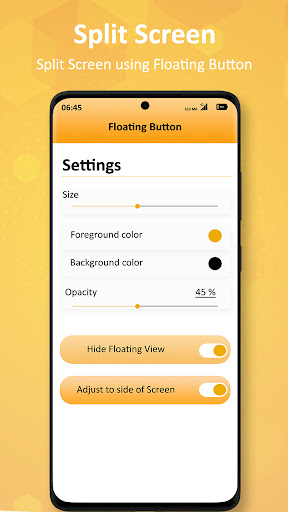
Split Screen - Dual Window for Multitasking Split Screen - Multitasking window manager is the amazing application for Divide the screen in dual screen. After splitting the screen you can use different applications on both screens at a time. You can add the floating button on the home screen to easily open the app and also change the color of the floating button. But unfortunately, so far the split screen feature can only be run on applications that do have support to run it. This is indeed designed in such a way as to make it easier for you to run two applications at once. This app is with the user-friendly interface it means everyone can use this app easily. For using the app, an internet connection is not required after downloading the application. Split Screen Monitor - Dual Window For Multitasking App Features : - You can adjust the size of the floating button. - Launch the same app in two different windows. - The floating button will automatically get adjusted towards the sides of the screen if the Adjust to sides option is turned on. - Add floating button on the home screen. - Set vibration on split screen option. - You can change the opacity of the floating button. - Hide icon from home launcher. - Not require an internet connection. Download and give us a review of Split Screen - Dual Window For Multitasking. If you like this App please share with your friends and family also we welcome your valuable comments. Note: Split screen will only work on those apps which supports screen splitting, if split is applied on non-supported apps it won't work and will show error message.
Installs since 8 Nov 2026 Measured
Exact Google Play install counts, collected daily
Daily history starts once this app is in our daily install sample.
Ratings
- 5 ★0.0%
- 4 ★0.0%
- 3 ★0.0%
- 2 ★0.0%
- 1 ★0.0%
Recent reviews
Latest public reviews from the store
- 5 Feb 2026
It was a wonderful experience, the driver was great, the car was clean... Highly recommended guys.
- 4 Feb 2026
This app is easy to use, booking is fast, and the pricing is transparent with no hidden charges. highly recommended!
- 4 Feb 2026
Prime Time Rideshare made my airport transfer super easy. The app worked perfectly, the shuttle arrived as scheduled, and the driver helped with luggage and drove safely. Great value for the price. Will use again for future trips!
- 4 Feb 2026
★★★★★ Prime Time Rideshare is AMAZING! Booked quickly and easily, driver arrived right when they said they would. Car was clean, comfortable, and the ride was smooth. Driver was friendly and professional the whole way.
What reviewers bring up
Topics mentioned in the latest 10 reviews, by how many reviews mention them
Liked in good reviews (10 reviews)
- driver 6
- smooth 5
- experience 4
- service 4
- highly 4
- ride 4
- recommended 3
- helped 3
Raised in bad reviews (0 reviews)
No topic comes up twice.
Top chart positions
Latest Google Play chart ranks by country, last 10 days
Not in any tracked top chart in the last 10 days.
Split Screen - Dual Window for history
Release, install milestones, listing and store changes
- Removed from the store 8 Nov 2026
- Reached 10,000+ installs 5 Nov 2023
- Reached 5,000+ installs 11 Feb 2022
- Reached 1,000+ installs 14 Oct 2021
- First released on the store 14 Sep 2021
Recent versions
Current version 1.3
- Version 1.322 Feb 2022
- Performance Improved.
- Version 1.226 Oct 2021
Listing keywords
Words and phrases Split Screen - Dual Window for repeats most in its store listing
Top phrases: split screen (9), floating button (6), dual window (4), screen dual window (3), split screen dual (3).
Highlighted words also appear in the title. Counts cover the title, short description and description.
Business model and tech
From the store listing and declared permissions
- Business model
- Free to downloadShows ads
- Sensitive access
- Photos, videos and filesDraws over other apps
7 permissions
1 special access, 2 sensitive, 4 standard
- Draw over other appsSpecial access
- Change or delete shared storageSensitive
- Read shared storageSensitive
- Control vibrationStandard
- Keep the phone awakeStandard
- Full internet accessStandard
- See network connectionsStandard
Compliance
What the listing and the app package show
- Store status
- Removed (8 Nov 2026)
- Upkeep
- No update since 5 Nov 2023
- Registered in
- India
- Privacy policy
- Linked on the listing
- Advertising
- Shows ads
- In-app purchases
- None declared
- Age rating
- Everyone
- Sensitive permissions
- 2 sensitive, 1 special access of 7
- Location access
- No
- Camera and microphone
- Neither
Apps like Split Screen - Dual Window for
들어서 화면켜기Won3.5K installs★ 4.0
Height PredictionEcliptic App Ventures45.9K installs★ 2.4
Speicers`Pro VPNEldiablolucifer202021.2K installs★ 4.14
Lightning Tracker with AlertsYaksh Software4.3K installs★ 3.0
Mana Pathi (Unit Converter)Shirish Koirala2.2K installs★ 4.6
Multi-tab Calc - A simple app.Naoyuki Rikiji1.3K installs★ 5.0
Photo Recovery PlusBillApps7.1K installs★ 4.53
Just Silence. Scheduled.Akid Soft1.6K installs★ 5.0
- WoWp AssistantВиталий Робиновский2K installs★ 4.2
Split Screen - Dual Window for: questions and answers
How many downloads does Split Screen - Dual Window for have?
Split Screen - Dual Window for has 16,345 installs on Google Play, measured from the store's own count on 8 Nov 2026.
Who makes Split Screen - Dual Window for?
Split Screen - Dual Window for is published by Photo Tools Studio, a developer based in IN.
When was Split Screen - Dual Window for last updated?
The latest version (1.3) was released on 5 Nov 2023.
Is Split Screen - Dual Window for free?
Yes. Split Screen - Dual Window for is free to download, and it shows ads.
Is Split Screen - Dual Window for still available?
No. Split Screen - Dual Window for is no longer listed on Google Play. We first saw it missing around 8 Nov 2026.
Track Split Screen - Dual Window for and its competitors
Watch any app for new versions, rating drops, chart moves and removals. Free plan, no card.