
Split Screen: Multitasking
Split your screen into a dual window, use two apps at once, and do multitasking.
- Installs
- 1.35M
- Measured
- Rating
- 3.65
- Ratings
- 5.5K
- 98 reviews
- Version
- Varies with device
- Updated 25 Mar 2026
- Released
- 8 Jun 2020
- Tracked since 13 May 2026
- Size
- 6 MB
- Needs 7.0
Also on App Store: Split Screen: multitasking (1 ratings), Split Screen - Multitasking (92 ratings)
Screenshots


About Split Screen: Multitasking
The description on the store listing
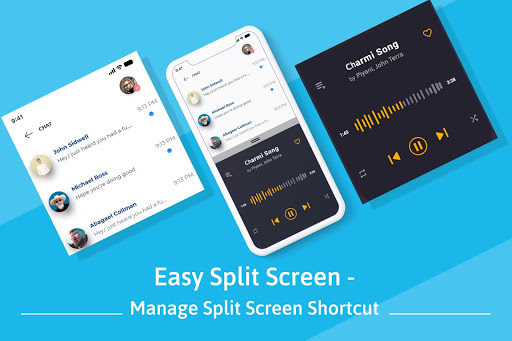
If you want to work with two different apps at the same time then you can do it using the Easy Split Screen app. This app creates dual windows on your phone screen so you can do multitasking.
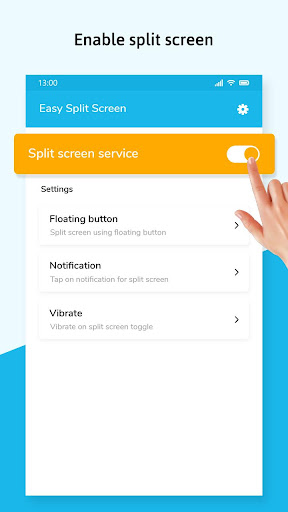
To split your screen into two parts first you have to enable split-screen service from the app. Then there are two shortcut ways available to get the split-screen, the first way is using the floating button and the second way is using the notification.
<b>Features of Easy Split Screen:</b>
- You can adjust the size of the floating button.
- You can customize the foreground color and background color of the floating button.
- You can change the opacity of the floating button.
- The floating …
Read the full description
If you want to work with two different apps at the same time then you can do it using the Easy Split Screen app. This app creates dual windows on your phone screen so you can do multitasking. To split your screen into two parts first you have to enable split-screen service from the app. Then there are two shortcut ways available to get the split-screen, the first way is using the floating button and the second way is using the notification. <b>Features of Easy Split Screen:</b> - You can adjust the size of the floating button. - You can customize the foreground color and background color of the floating button. - You can change the opacity of the floating button. - The floating button will automatically get adjusted towards the sides of the screen if the Adjust to sides option is turned on. - Your phone will vibrate when you activate or deactivate the split-screen. Download the app to split your mobile phone’s screen into dual windows and access any two apps simultaneously. Note: Split screen will only work on those apps which supports screen splitting, if split is applied on non-supported apps it won't work and will show error message. Our application needs accessibility services since we need to use the accessibility API to perform actions like Split Screen on floating button or using notification action.
Installs, last 30 days Measured
Exact Google Play install counts, collected daily
Ratings
5,468 ratings, 98 reviews
- 5 ★50%
- 4 ★15%
- 3 ★3.9%
- 2 ★1.9%
- 1 ★29%
Recent reviews
Latest public reviews from the store
No reviews in our sample for this app yet.
Top chart positions
Latest Google Play chart ranks by country, last 10 days
Not in any tracked top chart in the last 10 days.
Split Screen: Multitasking history
Release, install milestones, listing and store changes
- Reached 1,000,000+ installs 20 Jun 2024
- Reached 500,000+ installs 22 May 2022
- Reached 100,000+ installs 27 Jan 2021
- Reached 50,000+ installs 28 Dec 2020
- Reached 10,000+ installs 27 Sep 2020
- Reached 5,000+ installs 28 Aug 2020
- Reached 1,000+ installs 5 Jul 2020
- Reached 500+ installs 23 Jun 2020
Update frequency
How often Split Screen: Multitasking ships a new version, month by month
2 updates in the last 12 months. About as often as similar apps, which shipped a median of 2 updates in the same year.
Recent versions
Current version Varies with device
- Version 13.725 Mar 2026
- Version 13.620 Mar 2026
- Version 13.526 Aug 2025
- Version 13.42 Sep 2024
Listing keywords
Words and phrases Split Screen: Multitasking repeats most in its store listing
Top phrases: split screen (8), floating button (6), screen into dual (2), split your screen (2), dual windows (2).
Highlighted words also appear in the title. Counts cover the title, short description and description.
Business model and tech
From the store listing, the SDKs in the app package and its declared permissions
- Business model
- Free to downloadShows ads
- Built with
- No cross-platform framework or game engine detected
- Ad networks (2)
- AdMobFacebook Audience Network
- Analytics and crash reports
- Firebase
- Sensitive access
- Advertising ID
3 ad, attribution and analytics SDKs detected. SDKs are read from the app package and permissions from the store listing, so code that loads later is not seen.
Technology
24 SDKs found in the app package
Ad networks
Advertising and install-attribution SDKs found in the app package
- AdMob
- Facebook Audience Network
11 permissions
0 special access, 1 sensitive, 10 standard
- Show notificationsPOST_NOTIFICATIONSSensitive
- Ad attribution (Privacy Sandbox)ACCESS_ADSERVICES_ATTRIBUTIONStandard
- Ad topics (Privacy Sandbox)ACCESS_ADSERVICES_TOPICSStandard
- Read the advertising IDAD_IDStandard
- Read the advertising ID (Privacy Sandbox)ACCESS_ADSERVICES_AD_IDStandard
- Control vibrationStandard
- Keep the phone awakeStandard
- Run a foreground serviceFOREGROUND_SERVICEStandard
- Full internet accessStandard
- See network connectionsStandard
- Internal app permissionDYNAMIC_RECEIVER_NOT_EXPORTED_PERMISSIONStandard
Compliance
What the listing and the app package show
- Store status
- Live
- Upkeep
- Updated 25 Mar 2026
- Registered in
- India
- Privacy policy
- Linked on the listing
- Advertising
- Shows ads
- In-app purchases
- None declared
- Age rating
- Everyone
- Sensitive permissions
- 1 sensitive of 11
- Location access
- No
- Camera and microphone
- Neither
Apps like Split Screen: Multitasking
Plume HomePlume Design, Inc.645K installs★ 3.21
DS camSynology Inc.1.3M installs★ 2.52
EZ Notes - Notes Voice NotesAlexander Madani438K installs★ 3.8
QSROnline SchedulingQSROnline.com, Inc.298K installs★ 4.01
Thai keyboardSimple Keyboard, theme & emoji1.4M installs★ 4.4
Pashto keyboard - پشتو کیبوردDOSA Apps1.9M installs★ 4.07
HourglassCongregation Software Foundation1.1M installs★ 4.62
AR Drawing & Anime DrawingMonkey AI Studio2.5M installs★ 4.25
МТС ПартнерMWS LLC242K installs★ 3.33
Split Screen: Multitasking: questions and answers
How many downloads does Split Screen: Multitasking have?
Split Screen: Multitasking has 1,349,466 installs on Google Play, measured from the store's own count on 19 Nov 2026.
Who makes Split Screen: Multitasking?
Split Screen: Multitasking is published by kurekoo, a developer based in IN.
When was Split Screen: Multitasking last updated?
The latest version (Varies with device) was released on 25 Mar 2026.
Is Split Screen: Multitasking free?
Yes. Split Screen: Multitasking is free to download, and it shows ads.
Is Split Screen: Multitasking still available?
Yes. Split Screen: Multitasking is live on Google Play as of 19 Nov 2026.
Track Split Screen: Multitasking and its competitors
Watch any app for new versions, rating drops, chart moves and removals. Free plan, no card.