Square Analog Clock-7
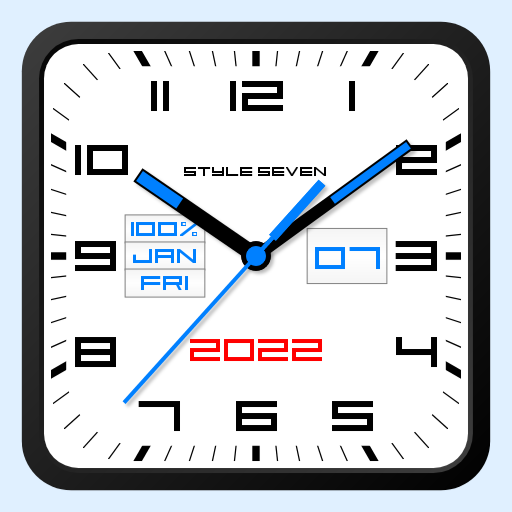
Square or round, white or black analog clock
- Installs
- 1.37M
- Measured
- Rating
- 4.4
- Ratings
- 5K
- 46 reviews
- Version
- 6.31
- Updated 15 May 2026
- Released
- 20 Nov 2014
- Tracked since 13 May 2026
- Size
- 2 MB
- Needs 4.0
Screenshots


About Square Analog Clock-7
The description on the store listing
Set square or round shape for the dial, use white or black color theme, select a secondary color for text and a second hand and create an original analog clock as you wish.
The clock uses special square font created by author too.
The analog clock also shows in slots the current date, month, day of the week, battery charge (except app widget). You can hide or replace a slot as well.
The analog clock can hint the current time by voice by double tap on the app window or Live Wallpaper and periodically, for example through 30 minutes..
Use the analog clock as topmost or overlay clock. The clock will be set under all windows. You can change position of the clock by drag and drop …
Read the full description
Set square or round shape for the dial, use white or black color theme, select a secondary color for text and a second hand and create an original analog clock as you wish. The clock uses special square font created by author too. The analog clock also shows in slots the current date, month, day of the week, battery charge (except app widget). You can hide or replace a slot as well. The analog clock can hint the current time by voice by double tap on the app window or Live Wallpaper and periodically, for example through 30 minutes.. Use the analog clock as topmost or overlay clock. The clock will be set under all windows. You can change position of the clock by drag and drop method and size of the clock. Use the analog clock as Live Wallpaper: set the clock size and position on the Home screen. Use the analog clock as an app widget: clock shows the second hand for Android 12 or high. Move and resize an app widget by standard way. Use the analog clock as app in full screen mode with "keep screen on" option. Use the analog clock as screensaver while a device is charging. 🕒 Use analog clocks as “Night Clock” — a calm mode with economy style (black background and dark‑gray hands) that saves battery. Random position change every minute protects the screen from burn‑in. All options work in Fullscreen mode, Live Wallpaper, and Screensaver. 🌙 Use analog clocks as “Always on Screen” — the clock remains visible even when the screen is turned off. ⚠ Important: the function does not start automatically, you need to launch it manually in Fullscreen mode. “Always on Screen” emulation works through additional options: 🔆 brightness control and Auto‑lock on exit. Choose an image form Gallery or color for background. Additional features: * App supports portrait an album orientation, all screen resolutions including 4k and HD displays wothout loss of quality. * Show or hide a second hand. * Use gray color for text. So this app is: square analog clock, analog clock widget, analog clock Live Wallpaper, analog clock widget, talking clock, clock widget with second hand.
Installs, last 30 days Measured
Exact Google Play install counts, collected daily
Ratings
5,047 ratings, 46 reviews
- 5 ★69%
- 4 ★13%
- 3 ★8.8%
- 2 ★3.8%
- 1 ★6.3%
Recent reviews
Latest public reviews from the store
No reviews in our sample for this app yet.
Top chart positions
Latest Google Play chart ranks by country, last 10 days
Not in any tracked top chart in the last 10 days.
Square Analog Clock-7 history
Release, install milestones, listing and store changes
- Reached 1,000,000+ installs 10 Nov 2019
- Reached 500,000+ installs 28 Aug 2018
- Reached 100,000+ installs 9 Apr 2016
- First released on the store 20 Nov 2014
Update frequency
How often Square Analog Clock-7 ships a new version, month by month
5 updates in the last 12 months. More often than most similar apps: they shipped a median of 1 updates in the same year.
Recent versions
Current version 6.31
- Version 6.3115 May 2026
Minor changes.
- Version 6.321 Mar 2026
* Added "Mini Clock" mode for Android 8+. When enabled, the clock collapses into a standard floating window that can be moved around the screen and snapped to the edge. You can return to the normal mode at any time. Enable it from the main menu. * Other improvements and fixes.
- Version 6.217 Mar 2026
- Version 6.225 Jan 2026
Listing keywords
Words and phrases Square Analog Clock-7 repeats most in its store listing
Top phrases: analog clock (14), live wallpaper (4), second hand (4), clock widget (3), always on screen (2).
Highlighted words also appear in the title. Counts cover the title, short description and description.
Business model and tech
From the store listing, the SDKs in the app package and its declared permissions
- Business model
- Free to downloadShows ads
- Built with
- No cross-platform framework or game engine detected
- Ad networks (1)
- AdMob
- Sensitive access
- Draws over other appsAdvertising ID
1 ad, attribution and analytics SDKs detected. SDKs are read from the app package and permissions from the store listing, so code that loads later is not seen.
Technology
8 SDKs found in the app package
Ad network libraries
Ad networks
Advertising and install-attribution SDKs found in the app package
- AdMob
12 permissions
2 special access, 0 sensitive, 10 standard
- Draw over other appsSpecial access
- Set exact alarmsSCHEDULE_EXACT_ALARMSpecial access
- Read how it was installed (install referrer)BIND_GET_INSTALL_REFERRER_SERVICEStandard
- Read the advertising IDAD_IDStandard
- Foreground service (special use)FOREGROUND_SERVICE_SPECIAL_USEStandard
- Run a foreground serviceFOREGROUND_SERVICEStandard
- Start when the phone turns onStandard
- Full internet accessStandard
- See network connectionsStandard
- Action manage overlay permissionACTION_MANAGE_OVERLAY_PERMISSIONStandard
- Internal app permissionDYNAMIC_RECEIVER_NOT_EXPORTED_PERMISSIONStandard
- Set an alarmStandard
Compliance
What the listing and the app package show
- Store status
- Live
- Upkeep
- Updated 15 May 2026
- Registered in
- Russia
- Privacy policy
- Linked on the listing
- Advertising
- Shows ads
- In-app purchases
- None declared
- Age rating
- Everyone
- Sensitive permissions
- 0 sensitive, 2 special access of 12
- Location access
- No
- Camera and microphone
- Neither
Apps like Square Analog Clock-7
Indic Keyboard Gesture Typingj15h.nu2.4M installs★ 4.23
Face PassCode Lock ScreenCatchy Tools3.2M installs★ 3.48
My Love Name Valentine Day LWPBhima Apps901K installs★ 4.36
Photo Lab-Photo EditorPhoto Frame Developer2.1M installs★ 3.88
My Photo Keyboard, Theme & PicDarvin Info3.7M installs★ 3.96
Zipper Lock Screen: Zip LockerMerryblue3.4M installs★ 4.64
Simple Wallpaper-Love Heart-+HOME by Ateam Entertainment1.2M installs★ 5.0
Emoji Keyboard: Fonts, EmojisYM, Inc.3.3M installs★ 3.63
Urdu Stickers for WhatsAppSnowBerry2M installs★ 3.6
Square Analog Clock-7: questions and answers
How many downloads does Square Analog Clock-7 have?
Square Analog Clock-7 has 1,370,770 installs on Google Play, measured from the store's own count on 19 Nov 2026.
Who makes Square Analog Clock-7?
Square Analog Clock-7 is published by Style-7, a developer based in RU.
When was Square Analog Clock-7 last updated?
The latest version (6.31) was released on 15 May 2026.
Is Square Analog Clock-7 free?
Yes. Square Analog Clock-7 is free to download, and it shows ads.
Is Square Analog Clock-7 still available?
Yes. Square Analog Clock-7 is live on Google Play as of 19 Nov 2026.
Track Square Analog Clock-7 and its competitors
Watch any app for new versions, rating drops, chart moves and removals. Free plan, no card.