
Step Counter - Pedometer
Track steps, calories, distance & walking progress with smart reminders.
- Installs
- 6.67K
- Measured
- Rating
- —
- Ratings
- —
- Version
- Varies with device
- Released
- 6 May 2026
- Tracked since 31 May 2026
- Size
- —
Screenshots

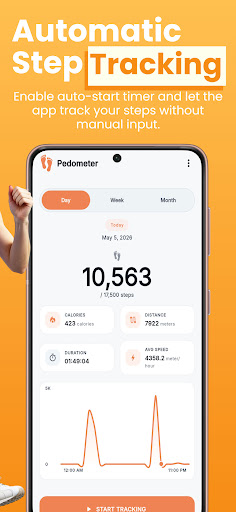


About Step Counter - Pedometer
The description on the store listing
<b>Step Counter - Pedometer</b> helps you track your daily steps, walking distance, calories burned, activity time, and progress toward your daily goal with a simple and easy-to-use step tracker.
Whether you walk for fitness, daily movement, weight control, or a healthier routine, this pedometer gives you a clear view of your activity without complicated setup.
🚶 <b>Track Your Daily Steps</b>
Use your phone to count steps and monitor your daily walking activity. The app shows your step count, distance, calories, duration, and average speed in one clean dashboard.
You can check your progress anytime and see how close you are to your daily step goal.
🎯 <b>Set Your Daily Step …
Read the full description
<b>Step Counter - Pedometer</b> helps you track your daily steps, walking distance, calories burned, activity time, and progress toward your daily goal with a simple and easy-to-use step tracker. Whether you walk for fitness, daily movement, weight control, or a healthier routine, this pedometer gives you a clear view of your activity without complicated setup. 🚶 <b>Track Your Daily Steps</b> Use your phone to count steps and monitor your daily walking activity. The app shows your step count, distance, calories, duration, and average speed in one clean dashboard. You can check your progress anytime and see how close you are to your daily step goal. 🎯 <b>Set Your Daily Step Goal</b> Choose a daily walking goal that fits your routine. You can select a preset goal or adjust your own target. Your goal helps you stay focused during the day, whether you want to walk more, build a simple fitness habit, or stay active between work and rest. ⏱️ <b>Manual & Automatic Tracking</b> The app gives you two tracking options: • <b>Recommended Mode</b> — manually start and stop step tracking when you want to record activity. • <b>Automatic Time Mode</b> — set start and stop times so tracking can begin and stop automatically based on your selected schedule. This gives you more control over how the pedometer works during your daily routine. 📍 <b>GPS Support for Better Accuracy</b> The app may use location permission to help improve activity accuracy when needed. GPS support can help improve walking distance and movement-related results depending on your device and settings. You can still use the app as a simple step counter, and available features may depend on permissions enabled on your phone. 📊 <b>View Daily, Weekly & Monthly Progress</b> Understand your activity with simple reports. You can view: • Daily steps • Weekly walking trends • Monthly activity progress • Calories burned • Distance covered • Activity duration These reports help you see your walking pattern and stay consistent over time. 🔔 <b>Smart Reminders & Notifications</b> Stay active with reminders that encourage you to move and keep your step goal in mind. You can use daily notifications and step reminders to help you return to the app, check your progress, and continue walking when needed. 🎨 <b>Light Mode, Dark Mode & Color Themes</b> Choose the look that feels comfortable for you. The app includes: • Light mode • Dark mode • Multiple color themes • Clean modern design • Easy-to-read activity screens You can personalize the app without making it difficult to use. 💾 <b>Export & Import Your Data</b> You can export your step data as a backup file and save it on your device. If you move to another phone or want to keep a copy of your activity history, you can share the backup file and import it again later. No login is required. Your backup is file-based, so you stay in control of your data. 🌍 <b>Multi-Language Support</b> The app supports multiple languages so users can track steps, goals, distance, calories, reminders, and settings in their selected language. 🏃 <b>Simple Walking & Fitness Tracking</b> Step Counter - Pedometer is useful for people who want to count daily steps, track walking progress, monitor basic fitness activity, and build a healthier routine without using a complicated fitness app. It is designed for users who want a clear pedometer, simple step tracking, walking reports, daily goals, reminders, and easy data backup in one lightweight app. Download <b>Step Counter - Pedometer</b> and start tracking your daily walking activity with a simple step counter and pedometer.
Installs since 3 Sep 2026 Measured
Exact Google Play install counts, collected daily
Ratings
- 5 ★0.0%
- 4 ★0.0%
- 3 ★0.0%
- 2 ★0.0%
- 1 ★0.0%
Recent reviews
Latest public reviews from the store
No reviews in our sample for this app yet.
Top chart positions
Latest Google Play chart ranks by country, last 10 days
Not in any tracked top chart in the last 10 days.
Step Counter - Pedometer history
Release, install milestones, listing and store changes
- First released on the store 6 May 2026
Listing keywords
Words and phrases Step Counter - Pedometer repeats most in its store listing
Top phrases: step counter (6), step counter pedometer (4), counter pedometer (4), daily steps (4), daily walking (3).
Highlighted words also appear in the title. Counts cover the title, short description and description.
Business model and tech
From the store listing and declared permissions
- Business model
- Free to downloadShows ads
- Sensitive access
- No sensitive permission declared
Compliance
What the listing and the app package show
- Store status
- Live
- Privacy policy
- Linked on the listing
- Advertising
- Shows ads
- In-app purchases
- None declared
- Age rating
- Everyone
Apps like Step Counter - Pedometer
The Doctor KRDZ Tech | زی تێك3.3K installs★ 4.8
P3RRTRT.me17.3K installs★ 4.71
my nib NZnib nz limited63.5K installs★ 3.2
YMCA PulseSGA Software24.5K installs★ 2.66
HHC Rehab ConnectHartford HealthCare Apps8.4K installs★ 4.49
Boost PlanSusana Raquel Antunes33.1K installs★ 4.6
Home Remedies : Natural CureFitOlympia15.8K installs★ 3.5
Time2Life — Quick Mood JournalWebteon S.R.L.3.9K installs★ 4.0
HyperVibe - Vibration MachineGravity Health Solutions Ltd13K installs★ 2.36
Step Counter - Pedometer: questions and answers
How many downloads does Step Counter - Pedometer have?
Step Counter - Pedometer has 6,672 installs on Google Play, measured from the store's own count on 12 Nov 2026.
Who makes Step Counter - Pedometer?
Step Counter - Pedometer is published by Developers Paradise.
Is Step Counter - Pedometer free?
Yes. Step Counter - Pedometer is free to download, and it shows ads.
Is Step Counter - Pedometer still available?
Yes. Step Counter - Pedometer is live on Google Play as of 12 Nov 2026.
Track Step Counter - Pedometer and its competitors
Watch any app for new versions, rating drops, chart moves and removals. Free plan, no card.