
Sunrise Clock Widget
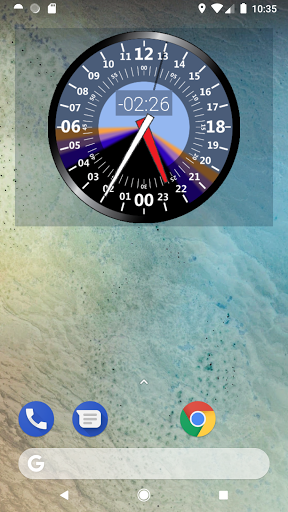
24 hour analog clock widget with face that represents daytime and night
- Installs
- 43.17K
- Measured
- Rating
- 3.76
- Ratings
- 389
- 36 reviews
- Version
- 2.14
- Updated 30 Aug 2026
- Released
- 11 Aug 2014
- Tracked since 13 May 2026
- Size
- 17 MB
- Needs 4.2
Screenshots




About Sunrise Clock Widget
The description on the store listing
SunriseClock is a 24 hour analog clock widget with a face that represents daytime/night. Sunrise and sunset times are displayed as well as the current moon phase.
Features
- 24 hour analog clock widget with multiple face and layout options
- Customizable color themes
- Displays sunrise, sunset as well as astromomical, nautical and civil times
- Moonrise and moonset times
- Moon phases
- App displays position of the sun and moon
- Sun and Moon positions
Helpful feedback welcome. If you have questions/suggestions, send me an email.
IMPORTANT:
You must configure your location after you add the widget to your home screen. To do this, tap the clock and go to settings. You …
Read the full description
SunriseClock is a 24 hour analog clock widget with a face that represents daytime/night. Sunrise and sunset times are displayed as well as the current moon phase. Features - 24 hour analog clock widget with multiple face and layout options - Customizable color themes - Displays sunrise, sunset as well as astromomical, nautical and civil times - Moonrise and moonset times - Moon phases - App displays position of the sun and moon - Sun and Moon positions Helpful feedback welcome. If you have questions/suggestions, send me an email. IMPORTANT: You must configure your location after you add the widget to your home screen. To do this, tap the clock and go to settings. You may resize the widget by long-pressing. If the clock "freezes", try disabling battery-saver or battery optimization. Changes: 2.1 - Updated moon phase code/logic - Updated API - Added support for multiple locations/configs - Bug fixes 2.0 - New activity layouts - Graphics cleanup - More aggressive widget updates (shouldn't affect battery usage) - Many bug fixes 1.90 - Added option to show solar noon on clock face - Added option to rotate clock face to align with solar noon - Added Moon position in app - Added 3 new clock faces - New color themes - Graphics cleanup - Bug fixes and updates 1.80 - Updated to SDK 28 - Added color themes (Rocky Mountain Skies by Daniel) - Option to display sunlight remaining - Option to disable minute hand - Taping left side now opens alarm on all layouts - Fixes 1.70 - Added "Noon at Top" layout - Added ability to change clock colors - Added sun position details - Layout and locale updates - Updated SDK to 25 1.60 - New moon phase algorithm - Settings fixes - New moon-only layout - Adjustable widget opacity - Activity layout changes 1.51 - Minor layout tweaks - Widget height reduced to two rows 1.50 - Auto location - Fixes 1.40 - Fixed crash issues with several locales - Improved support for devices without GPS or network 1.33 - Fixed settings for smaller screens 1.32 - Added ability to manually enter coordinates 1.30 - Additional layouts - Additional clock faces - Location search updates 1.20 - Now includes Civil, Nautical and Astronomical times - Moon time DST fix - Minor fixes 1.11 - Fixed compatibility with older versions 1.10 - bug fixes - additional display options - moon times 1.02 - display options - lockscreen support 1.01 - Minor bug fixes
Installs since 28 Aug 2026 Measured
Exact Google Play install counts, collected daily
Ratings
389 ratings, 36 reviews
- 5 ★52%
- 4 ★20%
- 3 ★1.3%
- 2 ★15%
- 1 ★12%
Recent reviews
Latest public reviews from the store
- 7 Apr 2026
good
- 14 Feb 2026
I like this app
- 7 Feb 2026
Good and convenient. But the Bible version is ancient, with thee and thou and thine.
- 15 Jan 2026
very organised and easy to use
What reviewers bring up
Topics mentioned in the latest 50 reviews, by how many reviews mention them
Liked in good reviews (41 reviews)
- readings 7
- god 5
- life 4
- useful 3
- access 3
- bible 3
- especially 2
- everyday 2
Raised in bad reviews (6 reviews)
No topic comes up twice.
Top chart positions
Latest Google Play chart ranks by country, last 10 days
Not in any tracked top chart in the last 10 days.
Sunrise Clock Widget history
Release, install milestones, listing and store changes
- Reached 10,000+ installs 14 Apr 2018
- Reached 5,000+ installs 6 Apr 2017
- Reached 1,000+ installs 1 Feb 2016
- Reached 500+ installs 26 Jan 2015
- Reached 100+ installs 24 Sep 2014
- Reached 50+ installs 10 Sep 2014
- Reached 10+ installs 30 Aug 2014
- Reached 5+ installs 25 Aug 2014
Update frequency
How often Sunrise Clock Widget ships a new version, month by month
3 updates in the last 12 months. More often than most similar apps: they shipped a median of 0 updates in the same year.
Recent versions
Current version 2.14
- Version 2.1430 Aug 2026
- Updated location and timezone logic
- Version 2.1329 Mar 2026
- Fix layout on android 15+ - Updated alarm logic - Updated sdk to 36
- Version 2.1223 Dec 2025
- Version 2.1115 Jun 2024
Listing keywords
Words and phrases Sunrise Clock Widget repeats most in its store listing
Top phrases: bug fixes (5), clock widget (4), analog clock widget (3), hour analog clock (3), analog clock (3).
Highlighted words also appear in the title. Counts cover the title, short description and description.
Business model and tech
From the store listing, the SDKs in the app package and its declared permissions
- Business model
- Free to downloadShows ads
- Built with
- No cross-platform framework or game engine detected
- Ad networks (1)
- AdMob
- Analytics and crash reports
- Firebase
- Sensitive access
- LocationAdvertising ID
2 ad, attribution and analytics SDKs detected. SDKs are read from the app package and permissions from the store listing, so code that loads later is not seen.
Technology
33 SDKs found in the app package
Ad networks
Advertising and install-attribution SDKs found in the app package
- AdMob
13 permissions
1 special access, 2 sensitive, 10 standard
- Set exact alarmsSCHEDULE_EXACT_ALARMSpecial access
- Approximate locationSensitive
- Precise locationSensitive
- Ad attribution (Privacy Sandbox)ACCESS_ADSERVICES_ATTRIBUTIONStandard
- Ad topics (Privacy Sandbox)ACCESS_ADSERVICES_TOPICSStandard
- Read the advertising IDAD_IDStandard
- Read the advertising ID (Privacy Sandbox)ACCESS_ADSERVICES_AD_IDStandard
- Keep the phone awakeStandard
- Run a foreground serviceFOREGROUND_SERVICEStandard
- Start when the phone turns onStandard
- Full internet accessStandard
- See network connectionsStandard
Compliance
What the listing and the app package show
- Store status
- Live
- Upkeep
- Updated 30 Aug 2026
- Registered in
- United States
- Privacy policy
- Linked on the listing
- Advertising
- Shows ads
- In-app purchases
- None declared
- Age rating
- Everyone
- Sensitive permissions
- 2 sensitive, 1 special access of 13
- Location access
- Yes, while in use
- Camera and microphone
- Neither
Apps like Sunrise Clock Widget
Clocks Widget Kansai CatsArtsPlanet18.9K installs★ 4.76
Chester Dark watch faceCHESTER WATCH FACES12.8K installs★ 4.45
Tiger Roaring Live WallpaperMy Live Wallpapers20.6K installs★ 5.0
One4KLWP UltimateOne4Studio60.2K installs★ 4.28
Flower Wallpapers 2024HarmonyApps43.2K installs★ 4.52
Blossoms of Love Wallpaper+HOME by Ateam Entertainment40K installs★ 5.0
Cute Baby Tiger Keyboard BackgFancy keyboard Themes Studio41.8K installs★ 4.89
Rosy Pink Flowers ThemeStylish Emoji Keyboard Style78.2K installs★ 4.89
Black Wolf Wallpapersanadolu222114K installs★ 5.0
Sunrise Clock Widget: questions and answers
How many downloads does Sunrise Clock Widget have?
Sunrise Clock Widget has 43,167 installs on Google Play, measured from the store's own count on 21 Nov 2026.
Who makes Sunrise Clock Widget?
Sunrise Clock Widget is published by Team TDR, a developer based in US.
When was Sunrise Clock Widget last updated?
The latest version (2.14) was released on 30 Aug 2026.
Is Sunrise Clock Widget free?
Yes. Sunrise Clock Widget is free to download, and it shows ads.
Is Sunrise Clock Widget still available?
Yes. Sunrise Clock Widget is live on Google Play as of 21 Nov 2026.
Track Sunrise Clock Widget and its competitors
Watch any app for new versions, rating drops, chart moves and removals. Free plan, no card.