
Super QR Code Reader
QR Code Scanner & QR Code Generator (barcode scanner and barcode generator)
- Installs
- 108K
- Measured
- Rating
- 4.4
- Ratings
- 948
- 5 reviews
- Version
- 3.20.5
- Updated 7 Aug 2026
- Released
- 21 Jan 2020
- Tracked since 13 May 2026
- Size
- 30 MB
- Needs 5.1
Also on App Store: Super QR Code Reader (64 ratings)
Screenshots
About Super QR Code Reader
The description on the store listing
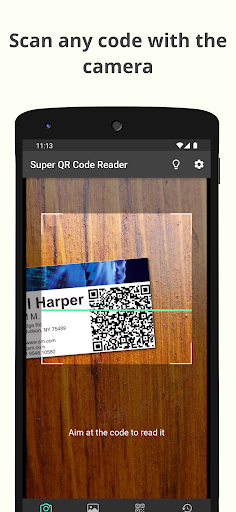
Super QR Code Reader is a QR code scanner and barcode reader that will allow you to read any code you find using your device's camera or by scanning an image. In addition, this application is also a QR code generator and barcode generator, so you can create your own personalized QR codes and barcodes with the data you enter.
Features:
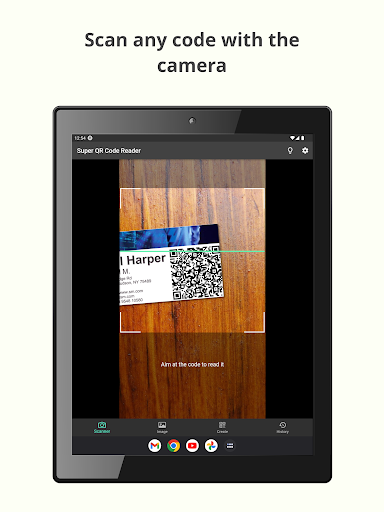
- Scan QR codes and barcodes with your device's camera
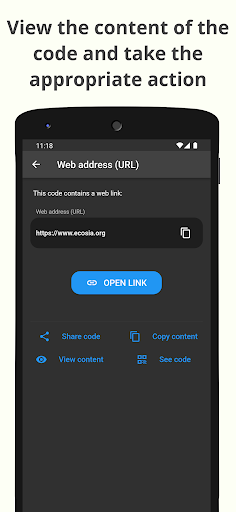
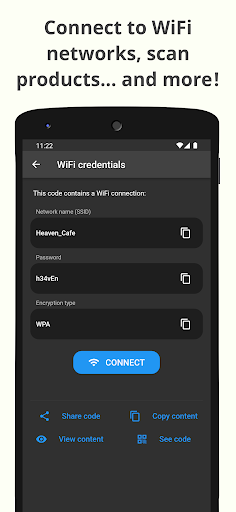
- Execute the correct action after scanning with the barcode scanner: open websites, connect to WiFi networks...
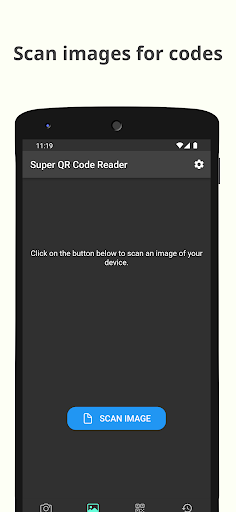
- Read codes by scanning images of your device
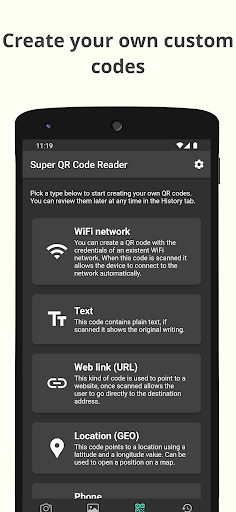
- QR code generator: create your own QR codes and barcodes
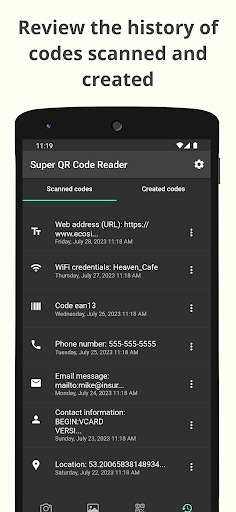
- Keep track of all codes read and created in the History section
- …
Read the full description
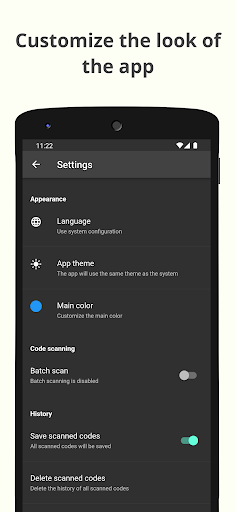
Super QR Code Reader is a QR code scanner and barcode reader that will allow you to read any code you find using your device's camera or by scanning an image. In addition, this application is also a QR code generator and barcode generator, so you can create your own personalized QR codes and barcodes with the data you enter. Features: - Scan QR codes and barcodes with your device's camera - Execute the correct action after scanning with the barcode scanner: open websites, connect to WiFi networks... - Read codes by scanning images of your device - QR code generator: create your own QR codes and barcodes - Keep track of all codes read and created in the History section - Customize the look and behavior of the app > What steps do I have to follow to scan a code with the QR scanner? When you find a QR code or barcode and want to scan it to view its contents with the QR scanner, all you have to do is open the app and point your device's rear camera at the code. The QR code scanner feature will detect it and the details of it will automatically be shown to you. From there you can perform the appropriate action on the code depending on its type, for example opening a website or connecting to a WiFi network, as well as being able to view other details of the code. > I have a code within an image, can this app scan it? Yeah! This scanner app allows you to perform a scan of any image file you have saved on your device. To do this, go to the image scanning tab, press the scan button and a selector will open where you can choose the image to scan. The QR reader feature will try to detect QR codes or barcodes and show you the same information screen that would be shown if you had scanned the code with your device's camera. > Is this app also a QR code creator? Of course! Super QR Code Reader is not only a scanner app for reading and detecting QR codes, it also has a QR code generator function. To use it as a QR code creator, go to the creation tab where you will see all the different types of QR codes that you can generate. Once the data is entered, the barcode generator function will create the code. Then, this code will be stored in your history section, where you can view it, execute your action, or share it. > Will the codes I have read with the QR reader or created with the QR code creator be saved? Of course. You can go to the History section at any time where you can review all the codes you have read with the barcode scanner, either through your device's camera or by scanning an image file. In this same section you can also find the codes generated by you. In addition, you will have complete control over this section, you will not only be able to recover previous codes, but also delete them if you do not need them. Additionally, you can disable the save codes option in this section if you don't need it to save space. --- In short, Super QR Code Reader is your all-terrain tool that will allow you to read any type of code, whether QR or barcode, to be able to see its details and be able to take the correct action on it. In addition, it will also help you create your own codes. Download now and get this utility for all your code scanning needs!
Installs since 29 Aug 2026 Measured
Exact Google Play install counts, collected daily
Ratings
948 ratings, 5 reviews
- 5 ★78%
- 4 ★7.3%
- 3 ★4.8%
- 2 ★4.8%
- 1 ★4.8%
Recent reviews
Latest public reviews from the store
- 22 Mar 2026
This is a very good app. everything works perfectly. just one thing should be added is group notifications.
- 1 Feb 2026
it works properly
- 11 Sep 2025
need
- 28 Aug 2025
nice app
What reviewers bring up
Topics mentioned in the latest 50 reviews, by how many reviews mention them
Liked in good reviews (25 reviews)
- notifications 2
- messages 2
- massages 2
- install 2
- see 2
Raised in bad reviews (19 reviews)
- subscription 3
- notification 3
- permissions 2
- without 2
- showing 2
- history 2
- removed 2
- access 2
Top chart positions
Latest Google Play chart ranks by country, last 10 days
Not in any tracked top chart in the last 10 days.
Super QR Code Reader history
Release, install milestones, listing and store changes
- Reached 100,000+ installs 4 Apr 2026
- Reached 50,000+ installs 30 Apr 2022
- Reached 10,000+ installs 11 Dec 2020
- Reached 5,000+ installs 30 Jul 2020
- Reached 1,000+ installs 21 Apr 2020
- Reached 500+ installs 7 Apr 2020
- Reached 100+ installs 24 Mar 2020
- Reached 50+ installs 10 Mar 2020
Update frequency
How often Super QR Code Reader ships a new version, month by month
4 updates in the last 12 months. More often than most similar apps: they shipped a median of 2 updates in the same year.
Recent versions
Current version 3.20.5
- Version 3.20.47 Aug 2026
This update includes minor improvements and bug fixes to provide a better experience.
- Version 3.20.321 May 2026
This update includes minor improvements and some bug fixes.
- Version 3.20.230 Apr 2026
This update includes minor improvements and some bug fixes.
- Version 3.20.131 Mar 2026
Listing keywords
Words and phrases Super QR Code Reader repeats most in its store listing
Top phrases: qr code (15), qr codes (6), qr code generator (4), qr code reader (4), super qr code (4).
Highlighted words also appear in the title. Counts cover the title, short description and description.
Business model and tech
From the store listing, the SDKs in the app package and its declared permissions
- Business model
- Free to downloadIn-app purchasesSubscriptionsShows ads
- Built with
- Flutter
- Ad networks (1)
- AdMob
- Subscriptions and payments
- RevenueCatGoogle Play billing
- Analytics and crash reports
- Sentry
- Sensitive access
- CameraAdvertising ID
1 ad, attribution and analytics SDKs detected. SDKs are read from the app package and permissions from the store listing, so code that loads later is not seen.
Technology
18 SDKs found in the app package
Ad networks
Advertising and install-attribution SDKs found in the app package
- AdMob
16 permissions
0 special access, 1 sensitive, 15 standard
- Take photos and videosSensitive
- Ad attribution (Privacy Sandbox)ACCESS_ADSERVICES_ATTRIBUTIONStandard
- Ad topics (Privacy Sandbox)ACCESS_ADSERVICES_TOPICSStandard
- Read the advertising IDAD_IDStandard
- Read the advertising ID (Privacy Sandbox)ACCESS_ADSERVICES_AD_IDStandard
- Control vibrationStandard
- Keep the phone awakeStandard
- Connect to and disconnect from Wi-FiStandard
- Full internet accessStandard
- See network connectionsStandard
- See Wi-Fi connectionsStandard
- Receive push messagesStandard
Compliance
What the listing and the app package show
- Store status
- Live
- Upkeep
- Updated 7 Aug 2026
- Registered in
- Spain
- Privacy policy
- Linked on the listing
- Advertising
- Shows ads
- In-app purchases
- Offered
- Age rating
- Everyone
- Sensitive permissions
- 1 sensitive of 16
- Location access
- No
- Camera and microphone
- Camera
Apps like Super QR Code Reader
FNKvision森泰(深圳)科技有限公司417K installs★ 3.8
LED Text ScrollerBlue Wave203K installs★ 3.5
Pet ZeroChongyuan313K installs★ 2.48
Europe VPN - Fast & SecureMASTERVNC196K installs★ 3.67
Sight BulbTrendmakers Inc327K installs★ 3.26
How Long Widget - Time CounterRubén Mayayo196K installs★ 3.68
USB OTG Checker: USB SupportDZApps Guru23.9K installs★ 4.33
Let's Clean-Phone Clean UpVeristocop18578K installs★ 3.57
RF Signal Tracker & DetectorMove More Solutions328K installs★ 2.68
Super QR Code Reader: questions and answers
How many downloads does Super QR Code Reader have?
Super QR Code Reader has 107,746 installs on Google Play, measured from the store's own count on 21 Nov 2026.
Who makes Super QR Code Reader?
Super QR Code Reader is published by David Serrano Canales, a developer based in ES.
When was Super QR Code Reader last updated?
The latest version (3.20.5) was released on 7 Aug 2026.
Is Super QR Code Reader free?
Yes. Super QR Code Reader is free to download and offers in-app purchases, and it shows ads.
Is Super QR Code Reader still available?
Yes. Super QR Code Reader is live on Google Play as of 21 Nov 2026.
Track Super QR Code Reader and its competitors
Watch any app for new versions, rating drops, chart moves and removals. Free plan, no card.