
Synced Tool
Open, browse, manage, and upload your files on your Synced Server account.
- Installs
- 30.09K
- Measured
- Rating
- 2.87
- Ratings
- 118
- 21 reviews
- Version
- 4.22.5-prod
- Updated 21 Oct 2026
- Released
- 18 Jan 2013
- Tracked since 11 May 2026
- Size
- 7 MB
- Needs 5.0
Also on App Store: Synced Tool (28 ratings)
Screenshots
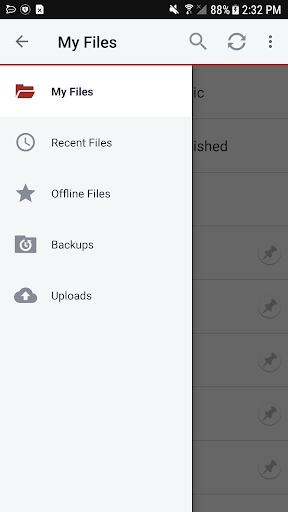


About Synced Tool
The description on the store listing
Synced Tool empowers you to stay productive with military-grade security and compliance, anywhere, anytime, on any device; it's invincible productivity. With Synced Tool, you can securely view, upload, edit, and share your files and folders, even if they exist on a file server back in the office, at home, or at a data center. Gain mobility, security, collaboration and business continuity with Synced Tool for Android.
• Securely view and edit files within the Synced Tool app or third party apps, that will sync with the server and other endpoints
• Generate secure share links on the fly to include in emails or chat tools
• Save files for offline viewing and keep them up to date whenever …
Read the full description
Synced Tool empowers you to stay productive with military-grade security and compliance, anywhere, anytime, on any device; it's invincible productivity. With Synced Tool, you can securely view, upload, edit, and share your files and folders, even if they exist on a file server back in the office, at home, or at a data center. Gain mobility, security, collaboration and business continuity with Synced Tool for Android. • Securely view and edit files within the Synced Tool app or third party apps, that will sync with the server and other endpoints • Generate secure share links on the fly to include in emails or chat tools • Save files for offline viewing and keep them up to date whenever online • Upload any content from your device to the server and other endpoints with a single click • Choose to enable camera upload which automatically uploads new photos and videos from your camera roll and photo stream • Quickly find the content you need, whenever you need it, wherever you are • Remotely access your backups of other endpoints on the road • Rename, delete, or even lock content to prevent others from editing and force them into read-only mode when accessing that content • Set up two-step authentication to further secure the data on your device • Utilize most secure file browsers on Android to access and manage your Synced Tool data through a tight integration with Android OS • Specify the amount of local storage allowed for storing your Synced Tool data locally • Choose whether or not to sync over WiFi only • Choose whether or not to auto-update your offline content • Experience the intuitive user interface in a fully localized experience translated in multiple languages • Easily manage the ways in which you share and collaborate over content with others through unique share links management workflows Supported on most current Android devices including Android powered phones and tablets!
Installs since 29 Aug 2026 Measured
Exact Google Play install counts, collected daily
Ratings
118 ratings, 21 reviews
- 5 ★43%
- 4 ★4.5%
- 3 ★0.0%
- 2 ★26%
- 1 ★26%
Recent reviews
Latest public reviews from the store
No reviews in our sample for this app yet.
Top chart positions
Latest Google Play chart ranks by country, last 10 days
Not in any tracked top chart in the last 10 days.
Synced Tool history
Release, install milestones, listing and store changes
- Reached 10,000+ installs 29 Feb 2016
- Reached 5,000+ installs 17 Oct 2014
- Reached 1,000+ installs 4 Oct 2013
- First released on the store 18 Jan 2013
Update frequency
How often Synced Tool ships a new version, month by month
3 updates in the last 12 months. More often than most similar apps: they shipped a median of 1 updates in the same year.
Recent versions
Current version 4.22.5-prod
- Version 4.22.5-prod21 Oct 2026
- Verified support for Android 17 - Updated the code to comply with the latest Google Play standards - Browse images with swipe navigation, without having to close one image before opening the next. Images larger than 10 MB are downloaded only on demand
- Version 4.22.41 Apr 2026
- Version 4.22.4-prod1 Apr 2026
- Fixed a bug where the Android status bar at the top of the screen was overlapping the app UI on Share Link options screens - Fixed a bug where the Android navigation buttons at the bottom of the screen (when gesture control is disabled) overlapped app buttons in the dialog of entering the PIN
- Version 4.22.312 Nov 2025
Listing keywords
Words and phrases Synced Tool repeats most in its store listing
Top phrases: synced tool (7), synced tool data (2), choose whether (2), securely view (2), share links (2).
Highlighted words also appear in the title. Counts cover the title, short description and description.
Business model and tech
From the store listing, the SDKs in the app package and its declared permissions
- Business model
- Free to download
- Built with
- No cross-platform framework or game engine detected
- Ad networks (0)
- None detected
- Analytics and crash reports
- Firebase
- Sensitive access
- Photos, videos and files
1 ad, attribution and analytics SDKs detected. SDKs are read from the app package and permissions from the store listing, so code that loads later is not seen.
Technology
36 SDKs found in the app package
14 permissions
0 special access, 7 sensitive, 7 standard
- Change or delete shared storageSensitive
- Read music and audioREAD_MEDIA_AUDIOSensitive
- Read photosREAD_MEDIA_IMAGESSensitive
- Read photos and videos the user picksREAD_MEDIA_VISUAL_USER_SELECTEDSensitive
- Read shared storageSensitive
- Read videosREAD_MEDIA_VIDEOSensitive
- Show notificationsPOST_NOTIFICATIONSSensitive
- Read how it was installed (install referrer)BIND_GET_INSTALL_REFERRER_SERVICEStandard
- Keep the phone awakeStandard
- Run a foreground serviceFOREGROUND_SERVICEStandard
- Start when the phone turns onStandard
- Full internet accessStandard
Compliance
What the listing and the app package show
- Store status
- Live
- Upkeep
- Updated 21 Oct 2026
- Registered in
- United States
- Privacy policy
- Linked on the listing
- Advertising
- No ads declared
- In-app purchases
- None declared
- Age rating
- Everyone
- Sensitive permissions
- 7 sensitive of 14
- Location access
- No
- Camera and microphone
- Neither
Apps like Synced Tool
Run My Life: Routine PlannerWoohoo Software21K installs★ 3.86
Mulch CalculatorDeCesare28.9K installs★ 4.09
Nice Mind Map PluginNext edu64K installs★ 4.15
PDF Reader, PDF Editor, Viewer8 square1K installs★ 4.66
TimeFilerTimeFiler82.9K installs★ 3.3
Scribbn - Voice to textChristian Klasen12.7K installs★ 4.33
SolarMeter solar panel plannervistech.projects3.8K installs★ 4.0
샵솔 - 급여명세서, 출퇴근기록, 매장관리Wesop Inc.168K installs★ 4.1
Note It - Notes & To Do ListPrometheus Interactive LLC16.6K installs★ 4.5
Synced Tool: questions and answers
How many downloads does Synced Tool have?
Synced Tool has 30,086 installs on Google Play, measured from the store's own count on 14 Nov 2026.
Who makes Synced Tool?
Synced Tool is published by eFolder, Inc. dba Axcient, a developer based in US.
When was Synced Tool last updated?
The latest version (4.22.5-prod) was released on 21 Oct 2026.
Is Synced Tool free?
Yes. Synced Tool is free to download.
Is Synced Tool still available?
Yes. Synced Tool is live on Google Play as of 14 Nov 2026.
Track Synced Tool and its competitors
Watch any app for new versions, rating drops, chart moves and removals. Free plan, no card.