
Syncfusion Xamarin UI Controls
The app helps developers explore the components in Essential Studio for Xamarin.
- Installs
- 38.41K
- Measured
- Rating
- 4.05
- Ratings
- 251
- 7 reviews
- Version
- 23.1
- Updated 20 Sep 2023
- Released
- 9 May 2016
- Tracked since 13 May 2026
- Size
- 71 MB
- Needs 4.4
Screenshots




About Syncfusion Xamarin UI Controls
The description on the store listing
Essential Studio for Xamarin is a comprehensive collection of components for the Xamarin.Android and Xamarin.Forms application development platforms. It includes a rich selection of components including charts, grids, list view, gauges, maps, scheduler, pdf viewer and much more.
This app helps developers explore the capabilities of all the components included in the package.
Key Highlights
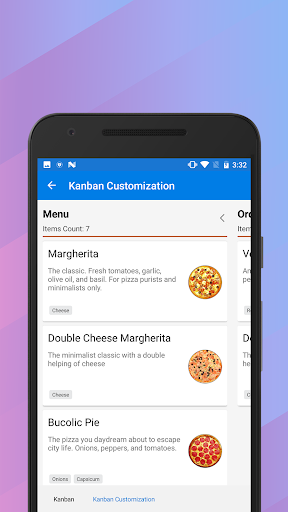
Chart: Plot over 25 chart types ranging from line charts to specialized financial charts.
DataGrid: Full-featured grid control with advanced features like grouping, sorting, filtering and export to excel.
ListView: Advanced ListView component with features like grid layout, grouping, …
Read the full description
Essential Studio for Xamarin is a comprehensive collection of components for the Xamarin.Android and Xamarin.Forms application development platforms. It includes a rich selection of components including charts, grids, list view, gauges, maps, scheduler, pdf viewer and much more. This app helps developers explore the capabilities of all the components included in the package. Key Highlights Chart: Plot over 25 chart types ranging from line charts to specialized financial charts. DataGrid: Full-featured grid control with advanced features like grouping, sorting, filtering and export to excel. ListView: Advanced ListView component with features like grid layout, grouping, pull-to-refresh and filtering. PDFViewer: High performance PDF Viewer component with features like search, zooming and text selection. TreeView: is a data-oriented control that displays data in a hierarchical structure with expanding and collapsing nodes. TextInputLayout: The text input layout control adds decorative elements like floating label, icons, assistive labels on top of input views such as masked textbox, numeric textbox, entry and editor. Autocomplete: Provide useful suggestions to users based on the already typed content. NumericTextBox: An advanced version of the text box control that restricts input to numeric values. Calendar: Month-View calendar interface for displaying events and selecting dates. NavigationDrawer: The navigation drawer control is a sliding panel that can be used to hide content like menus from the visible area of the screen. Gauges: Visualize numeric data using Circular, linear and Digital gauge controls. Range Navigator : The Range Navigator control provides an intuitive interface for selecting a smaller range from a large collection. Scheduler : Powerful calendar interface with appointment management capabilities. Kanban: The Kanban control provides an efficient interface to track and visualize the different stages in a task or workflow. Picker: Highly customizable picker control with features like cascading selection. PullToRefresh: Panel control with built-in support for triggering refresh when the user performs a pull-down action. SunburstChart: Visualize hierarchical data using concentric circle layout. Maps: Easily visualize business data over a geographical map. Treemap: The tree map control provides a simple yet effective way to visualize flat or hierarchical data as clustered rectangles. Barcode: Easily generate one and two-dimensional barcodes including QR codes within your applications. Sparkline: Sparkline's are small charts typically drawn to depict trends in data. RangeSlider: The Range slider control allows the user to select the range of values within the specified minimum and maximum limits. BusyIndicator: Pre-built animations to indicate busy status within your applications. DataSource: Simplifies connecting with various data sources and performing operations like sorting, filtering and grouping. Backdrop: Backdrop appears behind all other surfaces in an app, displaying contextual and actionable content using back and front view. Border: Border is the container control that’s draws a border, background, or both, around another object. Button: The Button control allows you to perform an action by clicking on it and has the feature of displaying both text and images. BadgeView: BadgeView is a notification control consists of small shapes such as circle and rectangle which contain a number or message. It is used to show the notification count, messages and status of something. Chips: The Chip control presents data in precise way with an image and text. The Chip group control arranges multiple chips in a layout as a group with selection. ParallaxView: ParallaxView is a visual element that binds the scroll position of a foreground element (e.g., a list) to a background element (e.g., an image). For more information : https://www.syncfusion.com/products/xamarin
Installs since 29 Aug 2026 Measured
Exact Google Play install counts, collected daily
Ratings
251 ratings, 7 reviews
- 5 ★69%
- 4 ★4.4%
- 3 ★8.8%
- 2 ★4.4%
- 1 ★14%
Recent reviews
Latest public reviews from the store
- 26 Dec 2022
Great selection of books
- 15 Nov 2022
The newer titles don't show up...
Top chart positions
Latest Google Play chart ranks by country, last 10 days
Not in any tracked top chart in the last 10 days.
Syncfusion Xamarin UI Controls history
Release, install milestones, listing and store changes
- Removed from the store 4 Jul 2026
- Reached 10,000+ installs 21 Feb 2019
- Reached 5,000+ installs 12 Apr 2018
- Reached 1,000+ installs 20 Mar 2017
- Reached 500+ installs 11 Dec 2016
- Reached 100+ installs 13 Jul 2016
- Reached 50+ installs 12 Jun 2016
- Reached 10+ installs 15 May 2016
Update frequency
How often Syncfusion Xamarin UI Controls ships a new version, month by month
0 updates in the last 12 months. Less often than most similar apps: they shipped a median of 2 updates in the same year.
Recent versions
Current version 23.1
- Version 23.120 Sep 2023
- Support for searching text in rotated text and documents with PDF Viewer. - The scroll button in the Rich Text Editor toolbar can be turned on or off. - Selective text redaction support in PDF documents. - Bug fixes and improvements.
- Version 22.130 Jun 2023
- Version 20.421 Dec 2022
- Version 20.24 Jul 2022
Listing keywords
Words and phrases Syncfusion Xamarin UI Controls repeats most in its store listing
Top phrases: control provides (3), component with features (2), helps developers explore (2), studio for xamarin (2), calendar interface (2).
Highlighted words also appear in the title. Counts cover the title, short description and description.
Business model and tech
From the store listing, the SDKs in the app package and its declared permissions
- Business model
- Free to download
- Built with
- Xamarin
- Ad networks (0)
- None detected
- Sensitive access
- Photos, videos and files
0 ad, attribution and analytics SDKs detected. SDKs are read from the app package and permissions from the store listing, so code that loads later is not seen.
Technology
24 SDKs found in the app package
4 permissions
0 special access, 2 sensitive, 2 standard
- Change or delete shared storageSensitive
- Read shared storageSensitive
- Full internet accessStandard
- See network connectionsStandard
Compliance
What the listing and the app package show
- Store status
- Removed (4 Jul 2026)
- Upkeep
- No update since 20 Sep 2023
- Registered in
- United States
- Privacy policy
- Linked on the listing
- Advertising
- No ads declared
- In-app purchases
- None declared
- Age rating
- Everyone
- Sensitive permissions
- 2 sensitive of 4
- Location access
- No
- Camera and microphone
- Neither
Apps like Syncfusion Xamarin UI Controls
JigglyPaint: Draw/Shake/Share!KunLun.Co7.4K installs★ 4.06
Servientrega ColombiaServientrega S.A.144K installs★ 1.83
Ai AnalyzerJLP Creation Studio165K installs★ 4.0
Kalendarz Polski ze ŚwiętamiAkstar Mobile70.2K installs★ 3.9
Region 6 NS RecyclesRegion 6 Solid Waste Management6.7K installs★ 4.8
ADV ResidencialADV SEGURIDAD111K installs★ 3.63
QR Scanner & Barcode ReaderAfex Digital242K installs★ 3.83
Resultivity - Work Gamifiedzababahano19.1K installs★ 4.39
Spanish English TranslatorTransl Apps93.6K installs★ 4.13
Syncfusion Xamarin UI Controls: questions and answers
How many downloads does Syncfusion Xamarin UI Controls have?
Syncfusion Xamarin UI Controls has 38,412 installs on Google Play, measured from the store's own count on 14 Nov 2026.
Who makes Syncfusion Xamarin UI Controls?
Syncfusion Xamarin UI Controls is published by Syncfusion, a developer based in US.
When was Syncfusion Xamarin UI Controls last updated?
The latest version (23.1) was released on 20 Sep 2023.
Is Syncfusion Xamarin UI Controls free?
Yes. Syncfusion Xamarin UI Controls is free to download.
Is Syncfusion Xamarin UI Controls still available?
No. Syncfusion Xamarin UI Controls is no longer listed on Google Play. We first saw it missing around 4 Jul 2026.
Track Syncfusion Xamarin UI Controls and its competitors
Watch any app for new versions, rating drops, chart moves and removals. Free plan, no card.