SysAdmin Tools
SysAdmin Tools is a pack of six unique tools for remote IT administration.
- Installs
- 52.62K
- Measured
- Rating
- 4.2
- Ratings
- 155
- 10 reviews
- Version
- 26.02.02
- Updated 29 Mar 2026
- Released
- 2 Nov 2017
- Tracked since 13 May 2026
- Size
- 14 MB
- Needs 5.0
Screenshots




About SysAdmin Tools
The description on the store listing
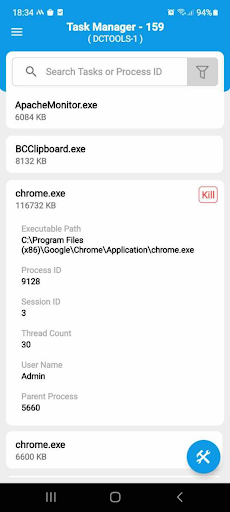
ManageEngine SysAdmin Tools is a free remote desktop management app that includes six simple tools that every IT admin needs. As an IT admin, you have a lot of desktop management activities to handle, and although you'd like to, you can't always resolve every issue instantly. This is where SysAdmin Tools comes in handy, helping IT admins like yourself manage computers even while they're away from their desks.
Getting started with SysAdmin Tools :
Step 1: Download and install the app.
Step 2: Sync your Active Directory (or) workgroup details.
Step 3: Under the list of computers in each domain/workgroup, select the computers that you'd like to manage.
Key features:
• Pull …
Read the full description
ManageEngine SysAdmin Tools is a free remote desktop management app that includes six simple tools that every IT admin needs. As an IT admin, you have a lot of desktop management activities to handle, and although you'd like to, you can't always resolve every issue instantly. This is where SysAdmin Tools comes in handy, helping IT admins like yourself manage computers even while they're away from their desks. Getting started with SysAdmin Tools : Step 1: Download and install the app. Step 2: Sync your Active Directory (or) workgroup details. Step 3: Under the list of computers in each domain/workgroup, select the computers that you'd like to manage. Key features: • Pull up information about managed computers like system name, date, serial number, username, manufacturer, operating system, RAM, model, and more, from your mobile device. • Manage software in your network with in-depth details like software name, version, manufacturer and installation date. You can also uninstall software remotely. • See which tasks are running on any given computer in your network and stop tasks instantly. • Remotely wake any system on the network using your mobile device. • Remotely shutdown, restart, standby, and hibernate your computers • Effectively manage all windows services in your remote machines. Use cases: This free admin tool can help you: • Identify prohibited software in your network and uninstall it instantly. • Detect and end remote tasks that reduce system efficiency. • Shutdown and restart remote computers when there is a demand. • Terminate windows service and tasks in remote machines instantly. What's unique? With ManageEngine SysAdmin Tools, you don't have to manually configure any setup on remote computers. Once you've selected computers under a domain/workgroup, System Tools automatically pushes a small package to that selected remote computer within the next two seconds. And there you go, that computer is officially under your control, no matter where you are. This app makes remote desktop management look easy. Support: This admin tool helps in managing your remote Windows computers. Contact us at [email protected]
Installs since 29 Aug 2026 Measured
Exact Google Play install counts, collected daily
Ratings
155 ratings, 10 reviews
- 5 ★65%
- 4 ★14%
- 3 ★6.1%
- 2 ★2.0%
- 1 ★12%
Recent reviews
Latest public reviews from the store
- 31 Mar 2026
Nice
- 18 Dec 2025
best admin app ever.
- 18 Nov 2025
Good it's
- 12 Oct 2025
allowed
What reviewers bring up
Topics mentioned in the latest 20 reviews, by how many reviews mention them
Liked in good reviews (13 reviews)
- admin 2
Raised in bad reviews (5 reviews)
- support 2
Top chart positions
Latest Google Play chart ranks by country, last 10 days
Not in any tracked top chart in the last 10 days.
SysAdmin Tools history
Release, install milestones, listing and store changes
- Reached 50,000+ installs 29 Mar 2026
- Reached 10,000+ installs 3 May 2020
- Reached 5,000+ installs 9 Mar 2019
- Reached 1,000+ installs 7 Feb 2018
- Reached 500+ installs 8 Jan 2018
- Reached 100+ installs 26 Nov 2017
- Reached 10+ installs 13 Nov 2017
- First released on the store 2 Nov 2017
Update frequency
How often SysAdmin Tools ships a new version, month by month
1 updates in the last 12 months. Less often than most similar apps: they shipped a median of 2 updates in the same year.
Recent versions
Current version 26.02.02
- Version 26.02.0222 Feb 2026
-Squashed few bugs and improved overall performance.
- Version 25.07.011 Aug 2025
- Version 25.03.0115 Mar 2025
- Version 24.05.0113 May 2024
Listing keywords
Words and phrases SysAdmin Tools repeats most in its store listing
Top phrases: sysadmin tools (6), desktop management (3), manageengine sysadmin tools (2), remote desktop management (2), admin tool (2).
Highlighted words also appear in the title. Counts cover the title, short description and description.
Business model and tech
From the store listing, the SDKs in the app package and its declared permissions
- Business model
- Free to download
- Built with
- No cross-platform framework or game engine detected
- Ad networks (0)
- None detected
- Analytics and crash reports
- Firebase
- Sensitive access
- No sensitive permission declared
1 ad, attribution and analytics SDKs detected. SDKs are read from the app package and permissions from the store listing, so code that loads later is not seen.
Technology
38 SDKs found in the app package
8 permissions
0 special access, 0 sensitive, 8 standard
- Read how it was installed (install referrer)BIND_GET_INSTALL_REFERRER_SERVICEStandard
- Keep the phone awakeStandard
- Run a foreground serviceFOREGROUND_SERVICEStandard
- Start when the phone turns onStandard
- Full internet accessStandard
- See network connectionsStandard
- See Wi-Fi connectionsStandard
- Internal app permissionDYNAMIC_RECEIVER_NOT_EXPORTED_PERMISSIONStandard
Compliance
What the listing and the app package show
- Store status
- Live
- Upkeep
- Updated 29 Mar 2026
- Registered in
- United States
- Privacy policy
- Linked on the listing
- Advertising
- No ads declared
- In-app purchases
- None declared
- Age rating
- Everyone
- Sensitive permissions
- 0 sensitive of 8
- Location access
- No
- Camera and microphone
- Neither
Apps like SysAdmin Tools
Outliner Pro KeyAlfred Fritz6.6K installs★ 4.57
Productivity Habit Trackermuslim wird16.6K installs★ 3.53
日本カレンダー 2026Jatisari Inovasi Studio47K installs★ 4.1
Black and Red Wallpaper 4Kariaulia studio39K installs★ 4.06
Callsign IncCallsign Inc.24.9K installs★ 2.6
Campo feGrupo Fe Holding S.R.L.74.3K installs★ 4.33
LinkArabyLinkAraby36.7K installs★ 2.6
Baker HVAC Pro+Watsco, Inc.26.8K installs★ 4.5
AHA ConferencesAmerican Heart Association, Inc16.7K installs★ 4.23
SysAdmin Tools: questions and answers
How many downloads does SysAdmin Tools have?
SysAdmin Tools has 52,618 installs on Google Play, measured from the store's own count on 12 Nov 2026.
Who makes SysAdmin Tools?
SysAdmin Tools is published by ManageEngine, a developer based in US.
When was SysAdmin Tools last updated?
The latest version (26.02.02) was released on 29 Mar 2026.
Is SysAdmin Tools free?
Yes. SysAdmin Tools is free to download.
Is SysAdmin Tools still available?
Yes. SysAdmin Tools is live on Google Play as of 12 Nov 2026.
Track SysAdmin Tools and its competitors
Watch any app for new versions, rating drops, chart moves and removals. Free plan, no card.