
TexFer: Text Transfer
Quickly Transfer Important Texts/ Long URLs between Mobile Phone and Desktop
- Installs
- 17.87K
- Measured
- Rating
- 2.05
- Ratings
- 120
- 12 reviews
- Version
- Varies with device
- Updated 25 Feb 2026
- Released
- 25 Jul 2018
- Tracked since 12 May 2026
- Size
- 7 MB
- Needs 4.1
Screenshots



About TexFer: Text Transfer
The description on the store listing
✎ Transfer text message from pc to mobile or mobile to pc within a fraction of seconds! TexFer is an all-in-one solution free text transfer app to share any important information to and fro, be it, text messages, URLs, or any other important information that you encounter in a mobile phone or desktop.
If you want to send that on different devices, mobile desktop, all you need to do is copy or type text, connect TexFer and press send. That’s it! Your text message will be displayed on your preferred platform’s screen straight away.
✨ Perks of Choosing us!
✌ Free to use App
✌ Only App to Swiftly Message Transfer between PC and Mobile
✌ Instant Copy, Paste and Share Text or URL …
Read the full description
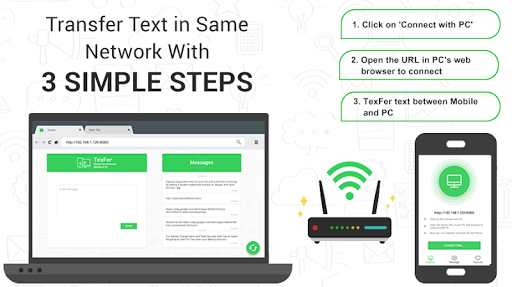
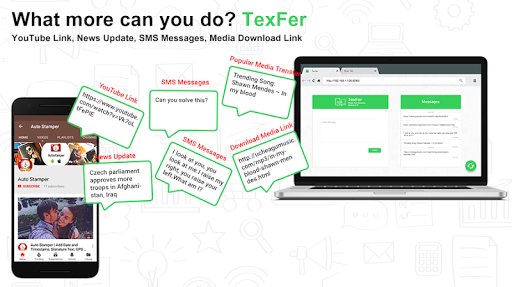
✎ Transfer text message from pc to mobile or mobile to pc within a fraction of seconds! TexFer is an all-in-one solution free text transfer app to share any important information to and fro, be it, text messages, URLs, or any other important information that you encounter in a mobile phone or desktop. If you want to send that on different devices, mobile desktop, all you need to do is copy or type text, connect TexFer and press send. That’s it! Your text message will be displayed on your preferred platform’s screen straight away. ✨ Perks of Choosing us! ✌ Free to use App ✌ Only App to Swiftly Message Transfer between PC and Mobile ✌ Instant Copy, Paste and Share Text or URL 👉 Why and When to Use this application? ✔ Copying Long Text We’d come across a situation where we wanted a copy and transfer a large amount of useful information from phone to your personal computer. And even need that text from desktop to your mobile phone! Even you might have faced that too! This is a hectic task provided that you don’t have TexFer! Sure, you must have tried different hacks of transferring that information, say a URL like images link, any media download link or a YouTube link if you want to check out the video in bigger screen than mobile. Isn’t it? In such cases of text transfer, if you miss out even a character, that web page will not open. Worry not! With just a few taps transfer text between pc and mobile and vice versa! ✔ Graphic Designers Graphic designers are always on a hunt for finding alluring images on the web. Going through hundreds of images it becomes very hard to bookmark them! So just TexFer it to your convenient device! ✔ SMS Messages If you have made subscriptions to any message packages, and want to transfer text message to create something new out of it, you will definitely need TexFer! Marketers can relate to this! ✔ Important message to colleague Many a time while surfing through mobile or desktop, it might have happened that you come across an important information which you might want to use later or send to your colleagues like Breaking news update, offers or any other information at the very moment. Now, easily send important messages to your colleagues or friends without any hustle! All you have to do is Type > Connect TexFer > Receive! 👉 Who is it for? ✔ Content Writers/Marketers Content writers have a cluster of text and images to manage. They keep writing irrespective of any platform. Transferring that content and image is a tough job. So now just TexFer it! With just a click transfer text from mobile to pc or reverse! ✔ Researchers In the tech-savvy world, we keep surfing on the net all the time. From reading the news to watching videos we are always online on the web world. Now, you can share your favorite texts across devices also! The list is endless! Check out the mockups for more! ◇ Fascinating Features and Functionality of TexFer! ➺ Rich User Interface ➺ Immediate Text Transfer PC to Mobile ➺ Multi-Platform Support ➺ Pin your Preferred Text to Favorites Tab ➺ Option to Edit & Share Text Free ➺ Unlimited Text Transfer ➺ Simple to Use App ✍ How to use this app? Open “TexFer” Click on “Connect With PC” Note down the URL displayed on application home screen. Type that URL on your PC’s browser. Wait till the Connection is Successful Note: PC and Mobile Phone Should be Connected to the Same Network to transfer text messages to computer & mobile phone. That’s it! Now you can start text transfer between pc and mobile & reverse! You can even add your selected text to favorites tab in order to effortlessly find your preferred important information later from the bunch. Following these simple steps, you can instantly get TexFer woking! TexFer is a rare application on Google Play Store that facilitates to seamlessly text transfer mobile to pc and vice versa! So, without a further due, download this application now and start TexFer your content irrespective of the platform!
Installs since 29 Aug 2026 Measured
Exact Google Play install counts, collected daily
Ratings
120 ratings, 12 reviews
- 5 ★16%
- 4 ★10%
- 3 ★0.0%
- 2 ★16%
- 1 ★58%
Recent reviews
Latest public reviews from the store
- 11 Mar 2025
One of the best Apps for best stories!
- 2 Jan 2024
This app is good you need more improvement In your PPT and also in your background 😁
- 4 Nov 2023
Types of stories are available
- 15 Jan 2023
It contains many interesting stories
What reviewers bring up
Topics mentioned in the latest 50 reviews, by how many reviews mention them
Liked in good reviews (45 reviews)
- stories 12
- story 6
- interesting 3
- english 3
- short 3
- found 2
- funny 2
- moral 2
Raised in bad reviews (4 reviews)
No topic comes up twice.
Top chart positions
Latest Google Play chart ranks by country, last 10 days
Not in any tracked top chart in the last 10 days.
TexFer: Text Transfer history
Release, install milestones, listing and store changes
- Reached 10,000+ installs 5 Apr 2021
- Reached 5,000+ installs 21 Jul 2019
- Reached 1,000+ installs 23 Oct 2018
- Reached 500+ installs 24 Sep 2018
- Reached 100+ installs 13 Aug 2018
- First released on the store 25 Jul 2018
Update frequency
How often TexFer: Text Transfer ships a new version, month by month
1 updates in the last 12 months. About as often as similar apps, which shipped a median of 1 updates in the same year.
Recent versions
Current version Varies with device
- Version 1.2.1325 Feb 2026
- Version 1.2.122 Oct 2025
- Version 1.2.1122 Aug 2025
- Version 1.2.102 Jul 2024
Listing keywords
Words and phrases TexFer: Text Transfer repeats most in its store listing
Top phrases: text transfer (7), mobile phone (5), transfer text (5), pc and mobile (4), important information (4).
Highlighted words also appear in the title. Counts cover the title, short description and description.
Business model and tech
From the store listing, the SDKs in the app package and its declared permissions
- Business model
- Free to downloadIn-app purchasesShows ads
- Built with
- No cross-platform framework or game engine detected
- Ad networks (1)
- AdMob
- Subscriptions and payments
- Google Play billing
- Analytics and crash reports
- Firebase
- Sensitive access
- Advertising ID
2 ad, attribution and analytics SDKs detected. SDKs are read from the app package and permissions from the store listing, so code that loads later is not seen.
Technology
12 SDKs found in the app package
Ad network libraries
Ad networks
Advertising and install-attribution SDKs found in the app package
- AdMob
13 permissions
0 special access, 0 sensitive, 13 standard
- Ad attribution (Privacy Sandbox)ACCESS_ADSERVICES_ATTRIBUTIONStandard
- Ad topics (Privacy Sandbox)ACCESS_ADSERVICES_TOPICSStandard
- Read how it was installed (install referrer)BIND_GET_INSTALL_REFERRER_SERVICEStandard
- Read the advertising IDAD_IDStandard
- Read the advertising ID (Privacy Sandbox)ACCESS_ADSERVICES_AD_IDStandard
- Keep the phone awakeStandard
- Run a foreground serviceFOREGROUND_SERVICEStandard
- Full internet accessStandard
- See network connectionsStandard
- See Wi-Fi connectionsStandard
- Internal app permissionDYNAMIC_RECEIVER_NOT_EXPORTED_PERMISSIONStandard
- Google Play license checkStandard
Compliance
What the listing and the app package show
- Store status
- Live
- Upkeep
- Updated 25 Feb 2026
- Registered in
- India
- Privacy policy
- Linked on the listing
- Advertising
- Shows ads
- In-app purchases
- Offered
- Age rating
- Everyone
- Sensitive permissions
- 0 sensitive of 13
- Location access
- No
- Camera and microphone
- Neither
Apps like TexFer: Text Transfer
Run My Life: Routine PlannerWoohoo Software21K installs★ 3.86
Mulch CalculatorDeCesare28.9K installs★ 4.09
Nice Mind Map PluginNext edu64K installs★ 4.15
PDF Reader, PDF Editor, Viewer8 square1K installs★ 4.66
TimeFilerTimeFiler82.9K installs★ 3.3
Scribbn - Voice to textChristian Klasen12.7K installs★ 4.33
SolarMeter solar panel plannervistech.projects3.8K installs★ 4.0
샵솔 - 급여명세서, 출퇴근기록, 매장관리Wesop Inc.168K installs★ 4.1
Note It - Notes & To Do ListPrometheus Interactive LLC16.6K installs★ 4.5
TexFer: Text Transfer: questions and answers
How many downloads does TexFer: Text Transfer have?
TexFer: Text Transfer has 17,873 installs on Google Play, measured from the store's own count on 17 Nov 2026.
Who makes TexFer: Text Transfer?
TexFer: Text Transfer is published by Susamp Apps, a developer based in IN.
When was TexFer: Text Transfer last updated?
The latest version (Varies with device) was released on 25 Feb 2026.
Is TexFer: Text Transfer free?
Yes. TexFer: Text Transfer is free to download and offers in-app purchases, and it shows ads.
Is TexFer: Text Transfer still available?
Yes. TexFer: Text Transfer is live on Google Play as of 17 Nov 2026.
Track TexFer: Text Transfer and its competitors
Watch any app for new versions, rating drops, chart moves and removals. Free plan, no card.