Text Reader Text Files Reader
Read or View all text format .txt files on your phones with the text reader app.
- Installs
- 759
- Measured
- Rating
- —
- Ratings
- —
- Version
- Varies with device
- Released
- —
- Tracked since 13 May 2026
- Size
- —
Screenshots


About Text Reader Text Files Reader
The description on the store listing
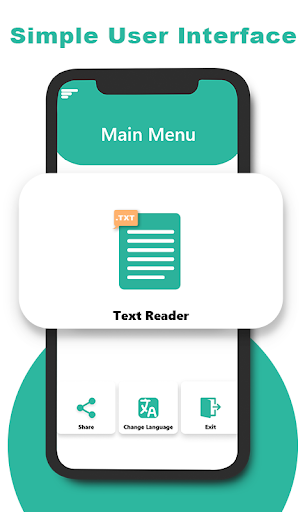
View text related files usually saved on your phones with .txt format that depicts that they are containing text. The text reader is a solution to read or view text documents with a single tap on the user's smart phone. The text view is highly user friendly and easy to understand for the users using the text viewer app for the first time. The text viewer search option inside the file manager of the app is also very helpful especially when it comes to reading specific text files from a number of files.
In text viewer app the user will initially explore the splash screen from there to main screen that asks for selection of the language you're comfortable with. After the selection of the …
Read the full description
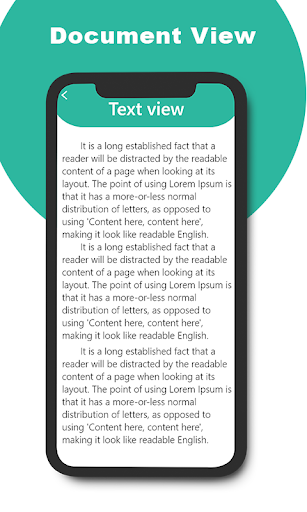
View text related files usually saved on your phones with .txt format that depicts that they are containing text. The text reader is a solution to read or view text documents with a single tap on the user's smart phone. The text view is highly user friendly and easy to understand for the users using the text viewer app for the first time. The text viewer search option inside the file manager of the app is also very helpful especially when it comes to reading specific text files from a number of files. In text viewer app the user will initially explore the splash screen from there to main screen that asks for selection of the language you're comfortable with. After the selection of the language you'll be directed to the home screen of the text reader app that displays several options including Share App, Select Language & Text View corner. In order to view text files, press the text view button which then first fetches out all supported files like .txt from the phone & display them inside the file manager. The user will then select the file they want to view or read from in the text viewer app. The search bar available right above is for helping users in locating any specific file from number of files. About Our Apps: Please Note: Our apps use All Files Access Permission to fetch all supported format files to display inside the document readers app. All Files Access Permission grants document reader to load and display all supported document files for you inside the app. Without the All Files Access Permission the document reader apps do not perform their task to load and display document files to you. Grant the All Files Access Permission for the document reader apps so they can run smoothly on your mobile phones. The text view app is a simple easy to use text reader solution that mainly focuses on the reading of the text files for their users. This text reader app helps users in viewing or reading text files on their smart phones with the help of a single click to view text documents easily. The Text reader supports reading for text docs that are displayed in the file viewer section after fetching all supported format files from the phone with text format or .txt file format to display them inside the document view. Viewing all text docs or rich formatting is possible with the help of the text reader app which is a solution for text format files. The text document is stored on the phone with .txt format that is only viewable by the text reader app which functions in displaying them in the document view section of the app. Text files if contain multiple pages they're displayed as form of book separated page wise into different pages with scroller around to move in upward or downward direction to change the page of the text document. The text reader app works on the basis of office viewer functionality that supports specific format like .txt format files to work on user devices & help them in viewing any text file or document easily. Open document that is of text format with the help of processor that works on the text files to make them readable on user devices with the help of text reader app. The document file will be displayed inside the app with the help of management system that is highly efficient and organized in such a way it helps users in making document search or share file or view document with text format. You can share rename or delete a text file too in this text reader app. The quick view of the text files is viewable by the help of file reader that reads the format of the document then displays them inside the app that can be later viewed by the user once pressed.
Installs since 8 Nov 2026 Measured
Exact Google Play install counts, collected daily
Daily history starts once this app is in our daily install sample.
Ratings
- 5 ★0.0%
- 4 ★0.0%
- 3 ★0.0%
- 2 ★0.0%
- 1 ★0.0%
Recent reviews
Latest public reviews from the store
- 31 Mar 2026
“This text app is very easy to use and helpful. The interface is simple and smooth. I really like its features.”
- 24 Jan 2024
Great 👌 App love it work for me and it will work for you just try it out thank you for the best App it will be great if you can put on your videos thank ones again
- 23 Jul 2023
Really good app but it should have more beautiful pointers such as; flower beautiful pens ... and also should have more beautiful backgrounds
- 22 May 2023
I really like this, its easy to use, got some ood effects and its free. If the ads do your head in, just turn off wifi while you create & turn back on when u done!! Many thanx.😄😄😄
What reviewers bring up
Topics mentioned in the latest 10 reviews, by how many reviews mention them
Liked in good reviews (4 reviews)
No topic comes up twice.
Raised in bad reviews (4 reviews)
- error 2
- video 2
- same 2
Top chart positions
Latest Google Play chart ranks by country, last 10 days
Not in any tracked top chart in the last 10 days.
Listing keywords
Words and phrases Text Reader Text Files Reader repeats most in its store listing
Top phrases: text reader (12), text files (8), text format (5), files access permission (4), access permission (4).
Highlighted words also appear in the title. Counts cover the title, short description and description.
Business model and tech
From the store listing and declared permissions
- Business model
- Free to downloadShows ads
- Sensitive access
- No sensitive permission declared
Compliance
What the listing and the app package show
- Store status
- Live
- Registered in
- United States
- Privacy policy
- Linked on the listing
- Advertising
- Shows ads
- In-app purchases
- None declared
- Age rating
- Everyone
Apps like Text Reader Text Files Reader
들어서 화면켜기Won3.5K installs★ 4.0
Height PredictionEcliptic App Ventures45.9K installs★ 2.4
Speicers`Pro VPNEldiablolucifer202021.2K installs★ 4.14
Lightning Tracker with AlertsYaksh Software4.3K installs★ 3.0
Mana Pathi (Unit Converter)Shirish Koirala2.2K installs★ 4.6
Multi-tab Calc - A simple app.Naoyuki Rikiji1.3K installs★ 5.0
Photo Recovery PlusBillApps7.1K installs★ 4.53
Just Silence. Scheduled.Akid Soft1.6K installs★ 5.0
- WoWp AssistantВиталий Робиновский2K installs★ 4.2
Text Reader Text Files Reader: questions and answers
How many downloads does Text Reader Text Files Reader have?
Text Reader Text Files Reader has 759 installs on Google Play, measured from the store's own count on 8 Nov 2026.
Who makes Text Reader Text Files Reader?
Text Reader Text Files Reader is published by apptch, a developer based in US.
Is Text Reader Text Files Reader free?
Yes. Text Reader Text Files Reader is free to download, and it shows ads.
Is Text Reader Text Files Reader still available?
Yes. Text Reader Text Files Reader is live on Google Play as of 8 Nov 2026.
Track Text Reader Text Files Reader and its competitors
Watch any app for new versions, rating drops, chart moves and removals. Free plan, no card.