
Text Scanner - OCR App
Text Scanner is an OCR app for extracting the text from the camera & documents.
- Installs
- 19.32K
- Measured
- Rating
- 5.0
- Ratings
- 103
- 4 reviews
- Version
- 2.0.3
- Updated 26 Feb 2025
- Released
- 25 May 2021
- Tracked since 12 May 2026
- Size
- —
Screenshots



About Text Scanner - OCR App
The description on the store listing
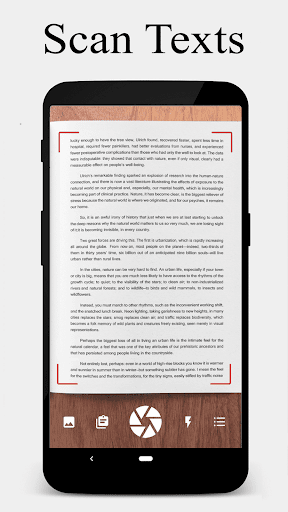
<b>Text Scanner</b> is an app to convert the image to text for saving it and sharing.
You can extract the text accurately from any document/boards/books etc.
Using the app, you can easily convert images to text. It is an offline and free application; It is fast, easy and simple to use application with the latest technology. <b>Text Scanner</b> OCR can be used to extract text from Gallery images or on real time from camera. It is one of the useful tools which convert image to text very easily within no time.
<b>Features of Text Scanner App:</b>
★ Converts an image to text very fast.
★ High accuracy scanning image.
★ Speed reading result.
★ Attractive user-friendly design
★ …
Read the full description
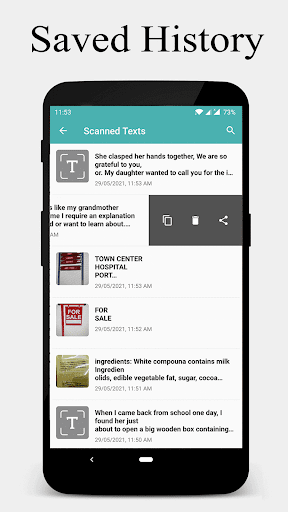
<b>Text Scanner</b> is an app to convert the image to text for saving it and sharing. You can extract the text accurately from any document/boards/books etc. Using the app, you can easily convert images to text. It is an offline and free application; It is fast, easy and simple to use application with the latest technology. <b>Text Scanner</b> OCR can be used to extract text from Gallery images or on real time from camera. It is one of the useful tools which convert image to text very easily within no time. <b>Features of Text Scanner App:</b> ★ Converts an image to text very fast. ★ High accuracy scanning image. ★ Speed reading result. ★ Attractive user-friendly design ★ Translate text to any languages ★ In the scanned text URL & Phone numbers are clickable. ★ Edit extracted text and copy to clipboard ★ Easily share scanned text with other application. ★ Save the history of scanned texts. ★ Search the scanned texts. ★ Save/Edit/Delete/Share options. ★ Flash On/Off feature. ★ Pick images for gallery for extracting the text. Turn your Android phone into a <b>Text Scanner</b> with this application. <b>Perfect For:</b> • Students - Scan notes, books, or whiteboards for study material. • Professionals - Extract text from business cards, receipts, or documents. • Writers & Journalists - Digitize printed text for editing and sharing. Scan the text that can later can be send via email or share on social media. Also, you can copy that text in clipboard and later can be used in any other app. This app is suitable for everyone, such as students, businessmen, journalists, teachers, writers etc. Download the <b>Text Scanner</b> app to extract the text with high accuracy and speed. Your feedback is important to us. Write us on <b>[email protected]</b> Follow us on: <a href="https://www.google.com/url?q=https%3A%2F%2Ftwitter.com%2Fcodeorigin_tech%2F&sa=D&sntz=1&usg=AOvVaw33UZrm5HwiAYbDX6K30_ta">Twitter/codeorigin_tech</a> <a href="https://www.google.com/url?q=https%3A%2F%2Fwww.instagram.com%2Fcodeorigin.tech&sa=D&sntz=1&usg=AOvVaw0mZbyKMIqMbC2BqqBGF561">Instagram/codeorigin.tech</a>
Installs since 29 Aug 2026 Measured
Exact Google Play install counts, collected daily
Ratings
103 ratings, 4 reviews
- 5 ★100%
- 4 ★0.0%
- 3 ★0.0%
- 2 ★0.0%
- 1 ★0.0%
Recent reviews
Latest public reviews from the store
- 12 May 2026
never show my secrets
- 23 Apr 2026
super
- 21 Apr 2026
excellent app for security and any note .
- 12 Apr 2026
good app
What reviewers bring up
Topics mentioned in the latest 50 reviews, by how many reviews mention them
Liked in good reviews (47 reviews)
- notes 14
- features 7
- useful 7
- interface 5
- minimal 4
- color 4
- clean 4
- note-taking 3
Raised in bad reviews (2 reviews)
No topic comes up twice.
Top chart positions
Latest Google Play chart ranks by country, last 10 days
Not in any tracked top chart in the last 10 days.
Text Scanner - OCR App history
Release, install milestones, listing and store changes
- Reached 10,000+ installs 13 Dec 2021
- Reached 5,000+ installs 6 Sep 2021
- Reached 1,000+ installs 24 Jul 2021
- First released on the store 25 May 2021
Update frequency
How often Text Scanner - OCR App ships a new version, month by month
0 updates in the last 12 months. Less often than most similar apps: they shipped a median of 2 updates in the same year.
Recent versions
Current version 2.0.3
- Version 2.0.325 Feb 2025
★ Supporting latest versions of Android. ★ Minor improvements. ★ Bug fixes.
- Version 2.0.230 Sep 2024
- Version 2.0.11 Sep 2024
- Version 1.0.1018 Oct 2023
Listing keywords
Words and phrases Text Scanner - OCR App repeats most in its store listing
Top phrases: text scanner (7), image to text (3), extract the text (2), extracting the text (2), text scanner ocr (2).
Highlighted words also appear in the title. Counts cover the title, short description and description.
Business model and tech
From the store listing and declared permissions
- Business model
- Free to downloadIn-app purchasesShows ads
- Subscriptions and payments
- Google Play billing
- Sensitive access
- CameraPhotos, videos and filesDraws over other appsAdvertising ID
16 permissions
1 special access, 3 sensitive, 12 standard
- Draw over other appsSpecial access
- Take photos and videosSensitive
- Change or delete shared storageSensitive
- Read shared storageSensitive
- Ad attribution (Privacy Sandbox)ACCESS_ADSERVICES_ATTRIBUTIONStandard
- Ad topics (Privacy Sandbox)ACCESS_ADSERVICES_TOPICSStandard
- Read how it was installed (install referrer)BIND_GET_INSTALL_REFERRER_SERVICEStandard
- Read the advertising IDAD_IDStandard
- Read the advertising ID (Privacy Sandbox)ACCESS_ADSERVICES_AD_IDStandard
- Keep the phone awakeStandard
- Open the status barStandard
- Run a foreground serviceFOREGROUND_SERVICEStandard
Compliance
What the listing and the app package show
- Store status
- Live
- Upkeep
- Updated 26 Feb 2025
- Registered in
- India
- Privacy policy
- Linked on the listing
- Advertising
- Shows ads
- In-app purchases
- Offered
- Age rating
- Everyone
- Sensitive permissions
- 3 sensitive, 1 special access of 16
- Location access
- No
- Camera and microphone
- Camera
Apps like Text Scanner - OCR App
aDataConMonamazing-create13.6K installs★ 4.3
Universal TV Remote for All TVAlphard Solutions56K installs★ 3.17
Auto Scroll TTAbyssiniatech64.2K installs★ 2.67
Whistle SoundsInfinite_Apps64.4K installs★ 3.5
QR Barcode : Scanner & CreateScan Team320K installs★ 3.38
Calendario de Puerto Rico 2025FamilyAppsPro15.2K installs★ 4.57
Motion Detector: Security CamFabioDeveloper8.1K installs★ 4.1
Watt VA Amp Volt CalculationsElectroMission Co.53.2K installs★ 1.0
Zip Extractor–Unzip UnRARMS Apps Lab30.1K installs★ 3.5
Text Scanner - OCR App: questions and answers
How many downloads does Text Scanner - OCR App have?
Text Scanner - OCR App has 19,321 installs on Google Play, measured from the store's own count on 17 Nov 2026.
Who makes Text Scanner - OCR App?
Text Scanner - OCR App is published by Code Origin Apps, a developer based in IN.
When was Text Scanner - OCR App last updated?
The latest version (2.0.3) was released on 26 Feb 2025.
Is Text Scanner - OCR App free?
Yes. Text Scanner - OCR App is free to download and offers in-app purchases, and it shows ads.
Is Text Scanner - OCR App still available?
Yes. Text Scanner - OCR App is live on Google Play as of 17 Nov 2026.
Track Text Scanner - OCR App and its competitors
Watch any app for new versions, rating drops, chart moves and removals. Free plan, no card.