
The Presentation Timer
Simple Speech Performance Timer
- Installs
- 816
- Measured
- Rating
- —
- Ratings
- —
- Version
- Varies with device
- Updated 5 Apr 2026
- Released
- 28 Jan 2025
- Tracked since 13 May 2026
- Size
- —
Also on App Store: The Presentation Timer (2 ratings)
Screenshots
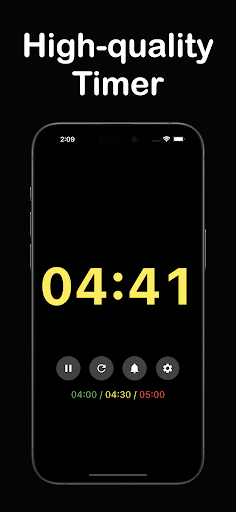


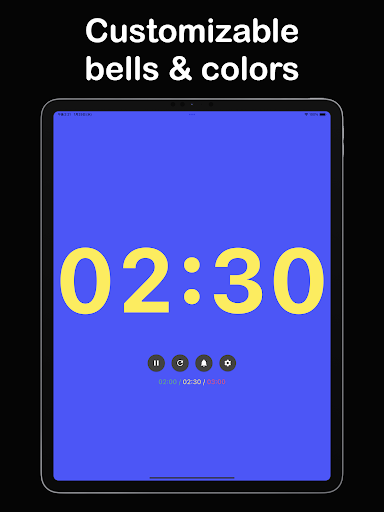


About The Presentation Timer
The description on the store listing
“The Presentation Timer” is an app that provides smart support for managing time in any presentation setting—be it a speech, a conference, or any other type of public speaking. You can set the timer for up to 999 minutes and 59 seconds, and customize when the bell rings: once for the first alert, twice for the second, and three times for the third. You can also save multiple presets, allowing you to switch smoothly between different presentations or scenarios.
Its straightforward operation ensures accurate time allocation, making it perfect for those who want to focus on their presentation or speech without worrying about the clock.
How to Use
1.Set the Timer
Specify the time (minutes …
Read the full description
“The Presentation Timer” is an app that provides smart support for managing time in any presentation setting—be it a speech, a conference, or any other type of public speaking. You can set the timer for up to 999 minutes and 59 seconds, and customize when the bell rings: once for the first alert, twice for the second, and three times for the third. You can also save multiple presets, allowing you to switch smoothly between different presentations or scenarios. Its straightforward operation ensures accurate time allocation, making it perfect for those who want to focus on their presentation or speech without worrying about the clock. How to Use 1.Set the Timer Specify the time (minutes and seconds) and customize the bell timings to your preference. 2.Tap the Start Button The timer starts counting immediately. 3.The Bell Rings at Your Set Intervals The first alert rings once, the second alert rings twice, and the third alert rings three times, making it easy to distinguish each reminder. 4.Freely Change the Number Color After the bell rings, switch the color of the numbers to clearly see how much time is left at a glance. Features - Up to 999 Minutes 59 Seconds Suitable for everything from lengthy seminars and conferences to shorter speeches. - Customizable Bell Count & Timing Get precise signals according to your presentation flow. - Multiple Presets Easily manage configurations for “Meeting,” “Seminar,” and more, all in one place. - Adjustable Number and Background Colors Visually emphasize remaining time so you can check progress in an instant. - Made in Japan Designed to high-quality standards, ensuring reliability for business use. Recommended For - Anyone who feels uneasy about time management during presentations or speeches - Those who need precise control of presentation times in meetings - Anyone planning multiple presentations and requiring easy switching between timer settings - Those who want to reduce the risk of running overtime With “The Presentation Timer,” you can make your presentations and speeches more professional. Customize bell settings and color changes to “visualize” your time allocation. From conferences to seminars and academic presentations, it’s an indispensable tool in any business scene. Don’t miss the chance to download it and experience efficient time management today.
Installs since 28 Aug 2026 Measured
Exact Google Play install counts, collected daily
Daily history starts once this app is in our daily install sample.
Ratings
- 5 ★0.0%
- 4 ★0.0%
- 3 ★0.0%
- 2 ★0.0%
- 1 ★0.0%
Recent reviews
Latest public reviews from the store
- 13 Jan 2024
Nice
Top chart positions
Latest Google Play chart ranks by country, last 10 days
Not in any tracked top chart in the last 10 days.
The Presentation Timer history
Release, install milestones, listing and store changes
- Reached 500+ installs 5 Apr 2026
- Reached 100+ installs 14 Sep 2025
- Reached 50+ installs 6 Jul 2025
- Reached 10+ installs 28 Mar 2025
- Reached 5+ installs 14 Mar 2025
- First released on the store 28 Jan 2025
Listing keywords
Words and phrases The Presentation Timer repeats most in its store listing
Top phrases: alert rings (3), bell rings (3), presentation timer (3), minutes and seconds (2), seconds and customize (2).
Highlighted words also appear in the title. Counts cover the title, short description and description.
Business model and tech
From the store listing and declared permissions
- Business model
- Free to downloadShows ads
- Sensitive access
- Advertising ID
10 permissions
0 special access, 0 sensitive, 10 standard
- Ad attribution (Privacy Sandbox)ACCESS_ADSERVICES_ATTRIBUTIONStandard
- Ad topics (Privacy Sandbox)ACCESS_ADSERVICES_TOPICSStandard
- Read the advertising IDAD_IDStandard
- Read the advertising ID (Privacy Sandbox)ACCESS_ADSERVICES_AD_IDStandard
- Keep the phone awakeStandard
- Run a foreground serviceFOREGROUND_SERVICEStandard
- Full internet accessStandard
- See network connectionsStandard
- Internal app permissionDYNAMIC_RECEIVER_NOT_EXPORTED_PERMISSIONStandard
- Google Play license checkStandard
Compliance
What the listing and the app package show
- Store status
- Live
- Upkeep
- Updated 5 Apr 2026
- Registered in
- Japan
- Privacy policy
- Linked on the listing
- Advertising
- Shows ads
- In-app purchases
- None declared
- Age rating
- Everyone
- Sensitive permissions
- 0 sensitive of 10
- Location access
- No
- Camera and microphone
- Neither
Apps like The Presentation Timer
영산강 안심 알림eICT융합소프트 & 스마트오더18.3K installs★ 4.0
JBLETRADOC Mobile10.3K installs★ 4.5
Two Point HeightOmega Centauri Software15.3K installs★ 2.22
Sheridan RecyclesCity of Sheridan634 installs★ 4.67
NAFNorges Automobil-Forbund200K installs★ 3.9
Ipsos Adria CAPIIpsos Serbia7.4K installs★ 3.9
Clock: Alarm Clock & TimerIntratech so36.1K installs★ 3.79
Süzme Sayaç HesaplamaNotsup30.3K installs★ 3.6
Cattle & Goat Record KeepingVetzKin10.3K installs★ 2.5
The Presentation Timer: questions and answers
How many downloads does The Presentation Timer have?
The Presentation Timer has 816 installs on Google Play, measured from the store's own count on 28 Aug 2026.
Who makes The Presentation Timer?
The Presentation Timer is published by Vida Apps Inc., a developer based in JP.
When was The Presentation Timer last updated?
The latest version (Varies with device) was released on 5 Apr 2026.
Is The Presentation Timer free?
Yes. The Presentation Timer is free to download, and it shows ads.
Is The Presentation Timer still available?
Yes. The Presentation Timer is live on Google Play as of 28 Aug 2026.
Track The Presentation Timer and its competitors
Watch any app for new versions, rating drops, chart moves and removals. Free plan, no card.