
Timer Widget - Tea Time
Timer and Stopwatch widgets: set a timer or stopwatch right on your home screen
- Installs
- 70.28K
- Measured
- Rating
- 4.46
- Ratings
- 750
- 113 reviews
- Version
- 3.4.5
- Updated 9 Aug 2026
- Released
- 21 Feb 2021
- Tracked since 13 May 2026
- Size
- 2 MB
- Needs 7.0
Screenshots



About Timer Widget - Tea Time
The description on the store listing
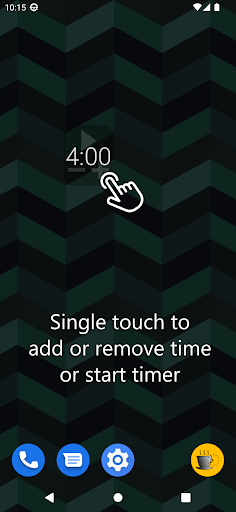
Tea Time provides simple widgets that let you place one or multiple timers and stopwatches on your home screen that you can set, start and reset without having to open an app.
● Single Touch to Start: Simply tap the widget on your home screen to start or stop the timer or stopwatch
● Set Timer from Home Screen: Tap the - or + buttons to increment the timers - no need to open an app to set the time
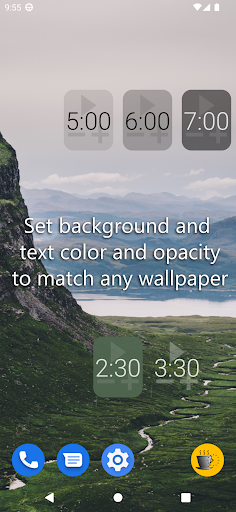
● Multiple Widgets - Anywhere on you Screen: Add as many widgets as you want and place them anywhere on your home screen
● Match Any Wallpaper: Options for background and transparency let you blend the widget with your wallpaper, or turn up the contrast for maximum visibility
● Choose Your …
Read the full description
Tea Time provides simple widgets that let you place one or multiple timers and stopwatches on your home screen that you can set, start and reset without having to open an app. ● Single Touch to Start: Simply tap the widget on your home screen to start or stop the timer or stopwatch ● Set Timer from Home Screen: Tap the - or + buttons to increment the timers - no need to open an app to set the time ● Multiple Widgets - Anywhere on you Screen: Add as many widgets as you want and place them anywhere on your home screen ● Match Any Wallpaper: Options for background and transparency let you blend the widget with your wallpaper, or turn up the contrast for maximum visibility ● Choose Your Ring Sound: Choose from any of your phone's ring or notification sounds ● Variable Ring Time: Either play a ring sound just once, or longer until you stop it ● Adjust Time While Running: Tap the - or + buttons while the timer is running to quickly add or remove time ● Optional Ring Notification: Choose to have a notification popup when the timer goes off, with actions to stop or restart the timer ● Free - No Ads After installing the app, simply add a Tea Time widget (or multiples) to your home screen. Tea Time also has a few options available, which you can access through the app screen, or by double-tapping on the widget. You can set the time using a slider, which is faster than the buttons, or set how fast the buttons increment the timer. You choose the sound, the volume, and how long it rings when the timer goes off. You can also change the background and text color and transparency. Note that the Tea Time widgets are small and simple, and can't provide all the sophisticated options of some timer or stopwatch apps. The maximum time is limited to 90 minutes (or 99 for the stopwatch) due to the limited space for the numbers.
Installs since 29 Aug 2026 Measured
Exact Google Play install counts, collected daily
Ratings
750 ratings, 113 reviews
- 5 ★76%
- 4 ★11%
- 3 ★6.4%
- 2 ★3.6%
- 1 ★3.6%
Recent reviews
Latest public reviews from the store
- 16 Mar 2024
Wünderbar!!!
Top chart positions
Latest Google Play chart ranks by country, last 10 days
Not in any tracked top chart in the last 10 days.
Timer Widget - Tea Time history
Release, install milestones, listing and store changes
- Reached 50,000+ installs 17 Oct 2025
- Reached 10,000+ installs 7 May 2022
- First released on the store 21 Feb 2021
Update frequency
How often Timer Widget - Tea Time ships a new version, month by month
5 updates in the last 12 months. More often than most similar apps: they shipped a median of 1 updates in the same year.
Recent versions
Current version 3.4.5
- Version 3.4.49 Aug 2026
3.4.4: Increased ring time up to 10 minutes 3.4.3: Improved vibration handling 3.4.1 and 3.4.2: Fixed bugs on Android <= 11 3.4.0: Added option to change font or reduce text size 3.3.0: Added option to show lock button, preventing accidental taps 3.2.11: Fix some issues on older (Android 10) devices 3.2.9: Fixed crash on phones with dark theme 3.2.5: Added option to hide stop button unless stopwatch is paused
- Version 3.4.31 Jul 2026
3.4.3: Improved vibration handling 3.4.1 and 3.4.2: Fixed bugs on Android <= 11 3.4.0: Added option to change font or reduce text size 3.3.0: Added option to show lock button, preventing accidental taps 3.2.11: Fix some issues on older (Android 10) devices 3.2.9: Fixed crash on phones with dark theme 3.2.5: Added option to hide stop button unless stopwatch is paused
- Version 3.4.22 May 2026
3.4.1 and 3.4.2: Fixed bugs on Android <= 11 3.4.0: Added option to change font or reduce text size 3.3.0: Added option to show lock button, preventing accidental taps 3.2.11: Fix some issues on older (Android 10) devices 3.2.9: Fixed crash on phones with dark theme 3.2.5: Added option to hide stop button unless stopwatch is paused 3.2.4: Fixed bug in previous release after API update 3.2.0: Added option to copy (duplicate) settings from another widget, Set default widget to flat layout
- Version 3.3.027 Jan 2026
Listing keywords
Words and phrases Timer Widget - Tea Time repeats most in its store listing
Top phrases: home screen (6), timer or stopwatch (3), timer goes off (2), goes off (2), ring sound (2).
Highlighted words also appear in the title. Counts cover the title, short description and description.
Business model and tech
From the store listing, the SDKs in the app package and its declared permissions
- Business model
- Free to download
- Built with
- No cross-platform framework or game engine detected
- Ad networks (0)
- None detected
- Sensitive access
- No sensitive permission declared
0 ad, attribution and analytics SDKs detected. SDKs are read from the app package and permissions from the store listing, so code that loads later is not seen.
Technology
11 SDKs found in the app package
7 permissions
1 special access, 1 sensitive, 5 standard
- Set exact alarmsSCHEDULE_EXACT_ALARMSpecial access
- Show notificationsPOST_NOTIFICATIONSSensitive
- Control vibrationStandard
- Foreground service (system exempted)FOREGROUND_SERVICE_SYSTEM_EXEMPTEDStandard
- Run a foreground serviceFOREGROUND_SERVICEStandard
- Internal app permissionDYNAMIC_RECEIVER_NOT_EXPORTED_PERMISSIONStandard
- Use exact alarmUSE_EXACT_ALARMStandard
Compliance
What the listing and the app package show
- Store status
- Live
- Upkeep
- Updated 9 Aug 2026
- Registered in
- Canada
- Privacy policy
- Linked on the listing
- Advertising
- No ads declared
- In-app purchases
- None declared
- Age rating
- Everyone
- Sensitive permissions
- 1 sensitive, 1 special access of 7
- Location access
- No
- Camera and microphone
- Neither
Apps like Timer Widget - Tea Time
USB OTG Checker: USB SupportDZApps Guru23.9K installs★ 4.33
How Long Widget - Time CounterRubén Mayayo196K installs★ 3.68
Lily - AI AgentSensor Notes Global55.5K installs★ 4.16
Sight BulbTrendmakers Inc327K installs★ 3.26
Europe VPN - Fast & SecureMASTERVNC196K installs★ 3.67
Pet ZeroChongyuan313K installs★ 2.48
LED Text ScrollerBlue Wave203K installs★ 3.5
FNKvision森泰(深圳)科技有限公司417K installs★ 3.8
Avaritia Mod for Minecraft PETOV MINORI72.5K installs★ 5.0
Timer Widget - Tea Time: questions and answers
How many downloads does Timer Widget - Tea Time have?
Timer Widget - Tea Time has 70,285 installs on Google Play, measured from the store's own count on 21 Nov 2026.
Who makes Timer Widget - Tea Time?
Timer Widget - Tea Time is published by Hirschkorn, a developer based in CA.
When was Timer Widget - Tea Time last updated?
The latest version (3.4.5) was released on 9 Aug 2026.
Is Timer Widget - Tea Time free?
Yes. Timer Widget - Tea Time is free to download.
Is Timer Widget - Tea Time still available?
Yes. Timer Widget - Tea Time is live on Google Play as of 21 Nov 2026.
Track Timer Widget - Tea Time and its competitors
Watch any app for new versions, rating drops, chart moves and removals. Free plan, no card.