To do list
To Do list with reminder.
- Installs
- 158K
- Measured
- Rating
- 3.75
- Ratings
- 565
- 4 reviews
- Version
- 2.9.4
- Updated 30 Jul 2025
- Released
- 28 Dec 2015
- Tracked since 13 May 2026
- Size
- 4 MB
- Needs 4.1
Screenshots


About To do list
The description on the store listing
To Do list with reminder will allow you to organize your <b>tasks to do</b> or events, and keep track of them.
• The best personal organizer for FREE.
• Agenda with simple and intuitive interface.
• Much more than a To-Do List. It will help you accomplish all your goals.
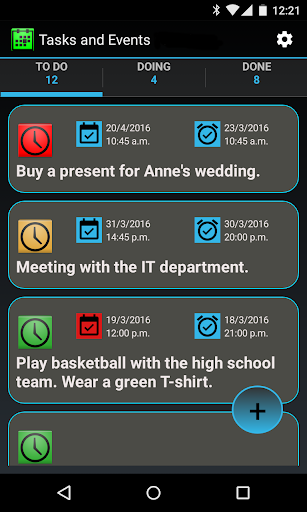
• Keep organized. This agenda has three panels (<b><i>TO DO</i></b>, <b><i>DOING</i></b>, or <b><i>DONE</i></b>), so you can easily keep track of everything.
• Set <b>priorities</b> to your tasks or events. You can set a <b>deadline</b> for each task and also set an <b>alarm</b>, so that you will never forget an important event, date, meeting or task to do.
• Customize notifications with cool …
Read the full description
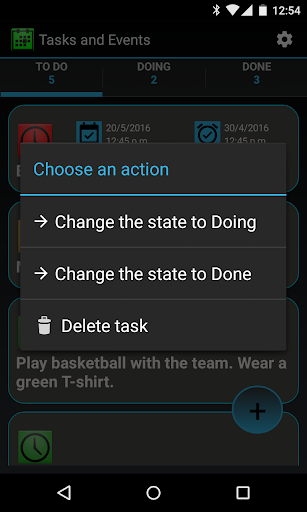
To Do list with reminder will allow you to organize your <b>tasks to do</b> or events, and keep track of them. • The best personal organizer for FREE. • Agenda with simple and intuitive interface. • Much more than a To-Do List. It will help you accomplish all your goals. • Keep organized. This agenda has three panels (<b><i>TO DO</i></b>, <b><i>DOING</i></b>, or <b><i>DONE</i></b>), so you can easily keep track of everything. • Set <b>priorities</b> to your tasks or events. You can set a <b>deadline</b> for each task and also set an <b>alarm</b>, so that you will never forget an important event, date, meeting or task to do. • Customize notifications with cool ringtone/alarm <b>sounds</b>. • Export tasks to excel. • Set <b>priorities</b> to your notes, tasks, events, meetings or dates. Each priority has a color, so you can know how things are going with a quick look. • Smartwatch compatible. Your notifications will show up on your <b>android smartwatch</b>. • Keep all your upcoming events under control just by the color. As the date approaches the color changes. • Create a reminder or task using your voice, due to the built-in <b>voice recognition</b>. • Add your events to you favorite <b>calendar</b> with ease. Just check the box <i>"add to calendar"</i>. Google Calendar compatible. • Never miss a reminder with the <b>LED blink</b> (if device supports). The color of the LED indicates its priority (green, orange or red). • Pick up the date and time for you reminder from an easy-to-use calendar. • Sort tasks by date or priority. • Built-in tutorial; • Widget for a quick access to create, modify or just keep track of your pending tasks. • <b>Battery-life optimized</b> with the best programming practices. • Limited to 10 tasks. Check out the Premium version for a full experience. <b>Quick start.</b> Press the + button to add a new task or event. To create a task, a description must be written and it must have a priority and an initial state (<i>To Do</i>, <i>Doing</i> or <i>Done</i>). Once the task has been created its state can be easily changed by a long click on it, and it will be moved to the appropriate tab. <b>Deadline.</b> A deadline can be added to a task. In that case a color-changing icon will show up. As the deadline gets closer the color will change as follows: • Cyan: More than 72 hours left. • Green: Less than 72 hours left. • Orange: Less than 48 hours left. • Red: Less than 24 hours left. • Grey: The deadline has expired. <b>Alarm.</b> An alarm can be added to a task or event. To set an alarm, the task must have a deadline set. The time alarm must be prior to the deadline. When an alarm goes off, a notification is launched with the description of the task, and the selected sound on the Sounds configuration. The color of the notification will be accordingly to the priority assigned. In case the device is turned off, when started, all the alarms that could have gone off during that time, will show up. The color of the alarm icon never changes. <b>Sorting.</b> On the options menu the sorting criteria of the tasks can be set for the states <i>To Do</i> and <i>Doing</i>. • By priority: The higher priority tasks first. When same priority, the closest deadline first. • By deadline: The closest deadline first.
Installs since 29 Aug 2026 Measured
Exact Google Play install counts, collected daily
Ratings
565 ratings, 4 reviews
- 5 ★64%
- 4 ★0.0%
- 3 ★9.0%
- 2 ★0.0%
- 1 ★27%
Recent reviews
Latest public reviews from the store
- 11 Oct 2024
তাস্ক 2
- 28 Jun 2023
Most helpful app with only 10 items on list.
- 9 Nov 2022
Great app
- 23 Jun 2022
Very useful app
What reviewers bring up
Topics mentioned in the latest 50 reviews, by how many reviews mention them
Liked in good reviews (46 reviews)
- useful 6
- helps 6
- keeps 4
- organized 3
- features 3
- track 3
- tasks 3
- list 3
Raised in bad reviews (3 reviews)
No topic comes up twice.
Top chart positions
Latest Google Play chart ranks by country, last 10 days
Not in any tracked top chart in the last 10 days.
To do list history
Release, install milestones, listing and store changes
- Reached 100,000+ installs 30 Jul 2018
- Reached 50,000+ installs 19 Oct 2016
- Reached 10,000+ installs 3 Apr 2016
- Reached 5,000+ installs 15 Mar 2016
- Reached 1,000+ installs 7 Feb 2016
- Reached 500+ installs 30 Jan 2016
- Reached 100+ installs 12 Jan 2016
- Reached 5+ installs 5 Jan 2016
Update frequency
How often To do list ships a new version, month by month
0 updates in the last 12 months. Less often than most similar apps: they shipped a median of 1 updates in the same year.
Recent versions
Current version 2.9.4
- Version 2.9.430 Jul 2025
Minor bugs fixed.
- Version 2.9.39 Jan 2024
- Version 2.9.213 Jun 2023
- Version 2.9.111 Mar 2022
Listing keywords
Words and phrases To do list repeats most in its store listing
Top phrases: hours left (4), less than hours (3), added to task (2), list with reminder (2), set an alarm (2).
Highlighted words also appear in the title. Counts cover the title, short description and description.
Business model and tech
From the store listing, the SDKs in the app package and its declared permissions
- Business model
- Free to downloadIn-app purchasesShows ads
- Built with
- No cross-platform framework or game engine detected
- Ad networks (1)
- AdMob
- Subscriptions and payments
- Google Play billing
- Sensitive access
- CalendarPhotos, videos and filesAdvertising ID
1 ad, attribution and analytics SDKs detected. SDKs are read from the app package and permissions from the store listing, so code that loads later is not seen.
Technology
17 SDKs found in the app package
Ad networks
Advertising and install-attribution SDKs found in the app package
- AdMob
16 permissions
0 special access, 3 sensitive, 13 standard
- Read calendar eventsSensitive
- Read shared storageSensitive
- Show notificationsPOST_NOTIFICATIONSSensitive
- Ad attribution (Privacy Sandbox)ACCESS_ADSERVICES_ATTRIBUTIONStandard
- Ad topics (Privacy Sandbox)ACCESS_ADSERVICES_TOPICSStandard
- Read the advertising IDAD_IDStandard
- Read the advertising ID (Privacy Sandbox)ACCESS_ADSERVICES_AD_IDStandard
- Control vibrationStandard
- Keep the phone awakeStandard
- Run a foreground serviceFOREGROUND_SERVICEStandard
- Start when the phone turns onStandard
- Full internet accessStandard
Compliance
What the listing and the app package show
- Store status
- Live
- Upkeep
- Updated 30 Jul 2025
- Registered in
- Spain
- Privacy policy
- Linked on the listing
- Advertising
- Shows ads
- In-app purchases
- Offered
- Age rating
- Everyone
- Sensitive permissions
- 3 sensitive of 16
- Location access
- No
- Camera and microphone
- Neither
Apps like To do list
TipType Keyboard LiteXavit Soft23K installs★ 4.0
SocialSchedulesSocialSchedules Inc.141K installs★ 3.83
TVTCTVTC - Technical & Vocational Training Corporation51.5K installs★ 2.71
Rental Property Managere.s.y198K installs★ 3.45
ElectroMaster Electrical CalcCarlo Terracciano - MasterApps110K installs★ 4.25
Quick MemoBlacksmith DoubleCircle143K installs★ 4.27
POPdiary+ : diary, journalenex6.4K installs★ 4.11
PDF Viewer LiteIpsita Developer408K installs★ 3.89
HyToolsIMI Hydronic Engineering192K installs★ 1.58
To do list: questions and answers
How many downloads does To do list have?
To do list has 158,141 installs on Google Play, measured from the store's own count on 14 Nov 2026.
Who makes To do list?
To do list is published by Vázquez Software, a developer based in ES.
When was To do list last updated?
The latest version (2.9.4) was released on 30 Jul 2025.
Is To do list free?
Yes. To do list is free to download and offers in-app purchases, and it shows ads.
Is To do list still available?
Yes. To do list is live on Google Play as of 14 Nov 2026.
Track To do list and its competitors
Watch any app for new versions, rating drops, chart moves and removals. Free plan, no card.