Total Commander - file manager
Android version of the desktop file manager Total Commander (www.ghisler.com).
- Installs
- 41.20M
- Measured
- Rating
- 4.02
- Ratings
- 212K
- 3K reviews
- Version
- 3.62
- Updated 13 Feb 2026
- Released
- 20 May 2012
- Tracked since 12 May 2026
- Size
- —
Screenshots



About Total Commander - file manager
The description on the store listing
Android version of the desktop file manager Total Commander (www.ghisler.com).
Important note: This app does NOT contain any ads. However, it contains a link "Add plugins (download)" in the home folder. This is treated as an ad by the Play Store because it links to our other apps (plugins).
Main features:
- Copy, Move whole subfolders
- Drag & Drop (long press on file icon, move icon)
- In place rename, create directories
- Delete (no recycle bin)
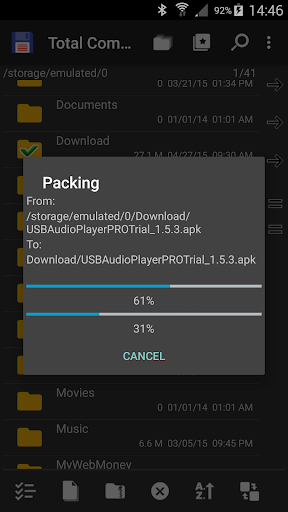
- Zip and unzip, unrar
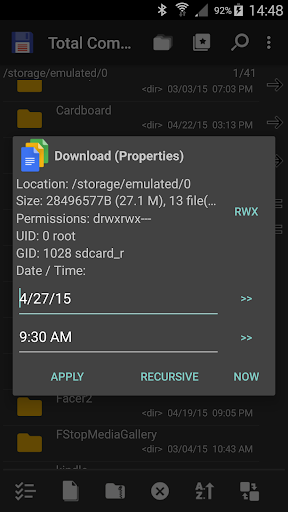
- Properties dialog, change permissions
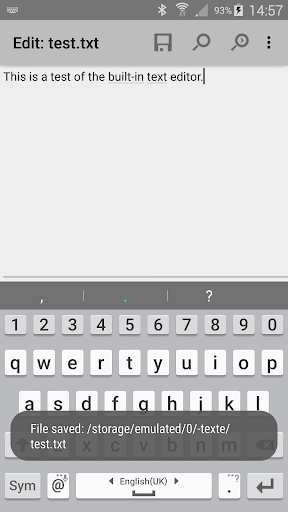
- Built-in text editor
- Search function (also for text)
- Select/unselect groups of files
- Select by tapping on file icons
- Select range: Long tap+release on icon …
Read the full description
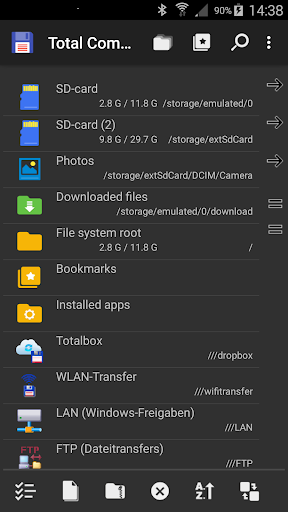
Android version of the desktop file manager Total Commander (www.ghisler.com). Important note: This app does NOT contain any ads. However, it contains a link "Add plugins (download)" in the home folder. This is treated as an ad by the Play Store because it links to our other apps (plugins). Main features: - Copy, Move whole subfolders - Drag & Drop (long press on file icon, move icon) - In place rename, create directories - Delete (no recycle bin) - Zip and unzip, unrar - Properties dialog, change permissions - Built-in text editor - Search function (also for text) - Select/unselect groups of files - Select by tapping on file icons - Select range: Long tap+release on icon - Show List of installed Applications, manually backup apps (built-in plugin) - FTP and SFTP client (plugin) - WebDAV (Web folders) (plugin) - LAN access (plugin) - Plugins for cloud services: Google Drive, Microsoft Live OneDrive, Dropbox - Root support for the main functions (optional) - Send files via Bluetooth (OBEX) - Thumbnails for pictures - Two panels side by side, or virtual two panel mode - Bookmarks - Directory history - Save files received from other apps via share function - Media player which can stream directly from LAN, WebDAV and cloud plugins - Configurable button bar for changing directories, internal commands, launching apps, and sending shell commands - Simple help function in English, German, Russian, Ukrainian and Czech - Optimizations for visually impaired, like text for icons - Supported languages of the main program: English, German, Bulgarian, Croatian, Czech, Danish, Dutch, French, Greek, Hebrew, Hungarian, Indonesian, Italian, Japanese, Korean, Polish, Portuguese, Romanian, Russian, Serbian, Simplified Chinese, Slovak, Slovenian, Spanish, Swedish, Traditional Chinese, Turkish, Ukrainian and Vietnamese. - Public translation via http://crowdin.net/project/total-commander About the new permission "SuperUser": This permission is now requested to make Total Commander work better on rooted devices. It tells the SuperUser app that Total Commander supports root functions. It has no effect if your device is not rooted. Root functions allow Total Commander to write to system folders like /system or /data. You will be warned before anything is written if the partition is write protected. You can find some more information here: http://su.chainfire.eu/#updates-permission
Installs, last 30 days Measured
Exact Google Play install counts, collected daily
Ratings
212,375 ratings, 3,020 reviews
- 5 ★60%
- 4 ★11%
- 3 ★6.2%
- 2 ★3.8%
- 1 ★19%
Recent reviews
Latest public reviews from the store
- 22 Aug 2025
Excelente ligero y hace su trabajo, lo mejor sin anuncios, sin bloatware etc.
- 13 Aug 2025
good
- 5 May 2025
I like this apps check know everyone
- 21 Apr 2025
good
What reviewers bring up
Topics mentioned in the latest 50 reviews, by how many reviews mention them
Liked in good reviews (37 reviews)
- file 6
- plugin 5
- sftp 5
- server 4
- android 3
- useful 3
- able 3
- explorer 2
Raised in bad reviews (11 reviews)
- support 3
- connection 2
- terminus 2
- password 2
- open 2
Top chart positions
Latest Google Play chart ranks by country, last 10 days
Not in any tracked top chart in the last 10 days.
Total Commander - file manager history
Release, install milestones, listing and store changes
- Reached 10,000,000+ installs 19 May 2015
- Reached 5,000,000+ installs 9 Nov 2013
- Reached 1,000,000+ installs 18 Nov 2012
- Reached 250,000+ installs 5 Jun 2012
- Reached 50,000+ installs 27 May 2012
- Reached 10,000+ installs 22 May 2012
- Reached 500+ installs 21 May 2012
- First released on the store 20 May 2012
Update frequency
How often Total Commander - file manager ships a new version, month by month
3 updates in the last 12 months. About as often as similar apps, which shipped a median of 3 updates in the same year.
Recent versions
Current version 3.62
- Version 3.6213 Feb 2026
- Bugfixes
- Version 3.6129 Dec 2025
- Version 3.6024 Nov 2025
- Version 3.5027 Mar 2024
Listing keywords
Words and phrases Total Commander - file manager repeats most in its store listing
Top phrases: total commander (6), file manager (3), commander www ghisler (2), desktop file manager (2), file manager total (2).
Highlighted words also appear in the title. Counts cover the title, short description and description.
Business model and tech
From the store listing and declared permissions
- Business model
- Free to downloadShows ads
- Sensitive access
- No sensitive permission declared
Compliance
What the listing and the app package show
- Store status
- Live
- Upkeep
- Updated 13 Feb 2026
- Registered in
- Switzerland
- Privacy policy
- Linked on the listing
- Advertising
- Shows ads
- In-app purchases
- None declared
- Age rating
- Everyone
Apps like Total Commander - file manager
Mi OrangeOrange Spain11.5M installs★ 4.04
Mi Tigo BoliviaTigo Bolivia6.6M installs★ 3.87
SWAP - No ROOTAllaKore LTDA13.2M installs★ 4.58
WhatisRemoved+Development Colors24.8M installs★ 3.93
drawnames | Secret Santa appdrawnames4.8M installs★ 4.8
Loc360 - Find LocationPapp Yazilim Hizmetleri1.8M installs★ 4.32
DO Multiple Accounts & CloneRiver Stone Tech11.2M installs★ 4.32
Live LocationMOBIHOME21.4M installs★ 4.22
TotalAV Antivirus & SecurityTotal Security Limited13.6M installs★ 4.24
Total Commander - file manager: questions and answers
How many downloads does Total Commander - file manager have?
Total Commander - file manager has 41,203,540 installs on Google Play, measured from the store's own count on 19 Nov 2026.
Who makes Total Commander - file manager?
Total Commander - file manager is published by C. Ghisler, a developer based in CH.
When was Total Commander - file manager last updated?
The latest version (3.62) was released on 13 Feb 2026.
Is Total Commander - file manager free?
Yes. Total Commander - file manager is free to download, and it shows ads.
Is Total Commander - file manager still available?
Yes. Total Commander - file manager is live on Google Play as of 19 Nov 2026.
Track Total Commander - file manager and its competitors
Watch any app for new versions, rating drops, chart moves and removals. Free plan, no card.