
Touch Screen Test +
Fast tests and procedures to check and repair your touchscreen.
- Installs
- 152K
- Measured
- Rating
- 3.9
- Ratings
- 394
- 7 reviews
- Version
- 22.5.0
- Updated 20 Aug 2026
- Released
- 14 Oct 2022
- Tracked since 13 May 2026
- Size
- —
Screenshots


About Touch Screen Test +
The description on the store listing
<b>Touch Screen Test +</b> is a professional app that is very useful when you want to quickly assess the quality of your smartphone screen and its graphic capabilities, or when you want to fix some dead pixels it may have. There are four big groups of procedures: COLOR, ANIMATION, TOUCH, and DRAWING tests; in addition, SYSTEM FONTS, RGB COLORS, Display information and Repair pixels complete the package of tests and make this free application a must-have software for most Android smartphones and tablets. You can easily find out which is the screen resolution, pixel density, aspect ratio, or current level of brightness; also, you can find out the frame rate for other 2D and 3D applications …
Read the full description
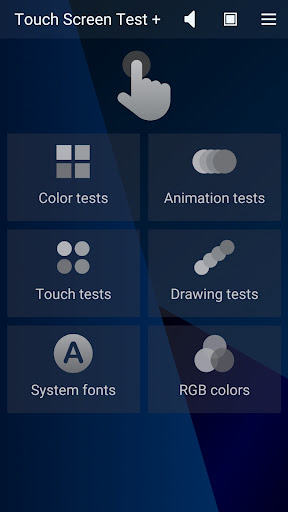
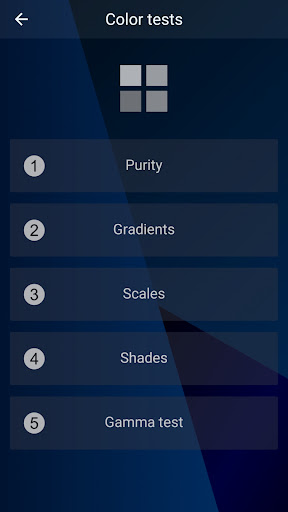
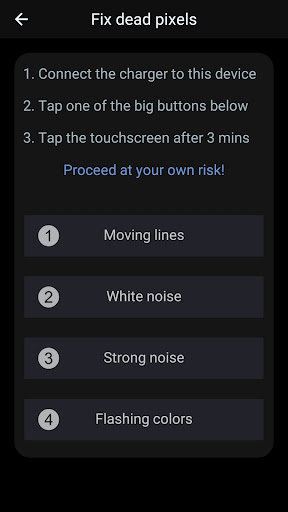
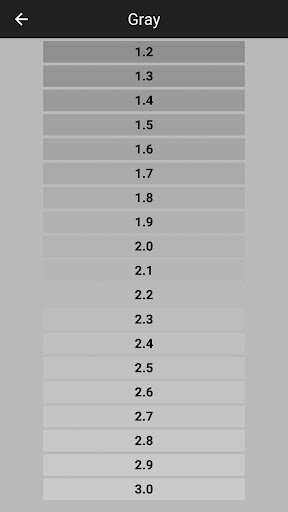
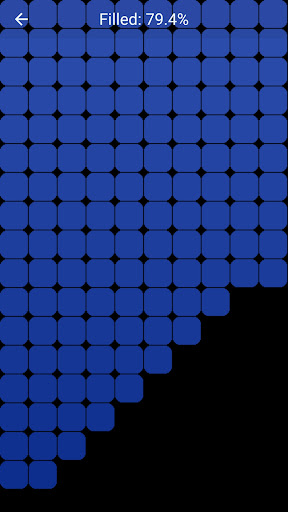
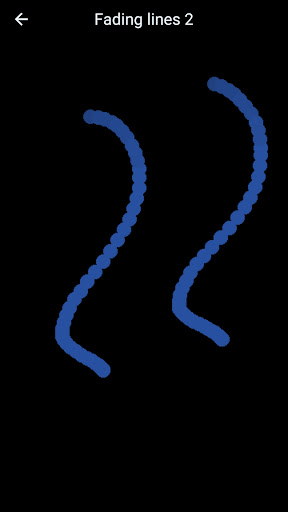
<b>Touch Screen Test +</b> is a professional app that is very useful when you want to quickly assess the quality of your smartphone screen and its graphic capabilities, or when you want to fix some dead pixels it may have. There are four big groups of procedures: COLOR, ANIMATION, TOUCH, and DRAWING tests; in addition, SYSTEM FONTS, RGB COLORS, Display information and Repair pixels complete the package of tests and make this free application a must-have software for most Android smartphones and tablets. You can easily find out which is the screen resolution, pixel density, aspect ratio, or current level of brightness; also, you can find out the frame rate for other 2D and 3D applications or if the gravity/acceleration sensors are working fine. Run all tests and you can rapidly decide, for example, if the eye comfort mode must be enabled to prevent eye strain, if the brightness level requires some adjustment or if the touch sensitivity is still good all over the screen's surface. Once the application starts, the hand icon starts to fade in and out and you can select any group of tests by tapping the appropriate button. The Speaker button from the upper part of the screen enables/disables the text to speech (English must be set as the default language), while the one with a Screen icon allows two special pages to be displayed, Color bars and Color spectrum. The menu button offers easy access to Display info and Repair pixels pages, along with some other app-related commands. <b>Color tests</b> shows five more buttons, one for each color test available: Purity, Gradients, Scales, Shades, and Gamma test. These tests allow you to simply verify the uniformity of the main colors on the screen, the contrast they offer at the current level of brightness, and see how many of their shades may be identified. The gamma test displays a suite of color shades that allows you to find out the gamma value (it indicates how well the brightness level of your device reflects the input signal). <b>Animation tests</b> includes 2D and 3D animations, 2D and 3D gravity tests, and a page showing Moving bars of different colors. Execute these tests and you will find out the display FPS (frames per second) value for different 2D and 3D animations, as well as the working state of the inclination and gravity sensors (whose values are determining the motion of a ball on the screen). The <b>Touch tests</b> group includes two Single-touch tests, two Multi-touch tests, and a page named Zoom and rotate. First tests allow you to verify the sensitivity of your touch screen and to identify the eventual less functional areas; they are complete when the whole screen is filled with blue rectangles - including the area occupied by the upper text message. <b>Drawing tests</b> may be used to check if your touch screen is sensitive enough to allow you drawing continuous or dotted lines (which are persistent or are fading out in a few seconds) with your finger or your stylus. The fifth test is specially designed for styluses, checking if you can use one of them to touch some very small areas on the screen. <b>Repair pixels</b> is the location of four special procedures that try to fix the dead pixels your touch screen might have: Moving lines, White / Strong noise, and Flashing colors. WARNING! - each of these procedures sets the screen brightness to maximum and contains flashing images, so we recommend you avoid looking at the screen directly while they are running - as they intensively use the graphic controller, we recommend having the charger connected to your mobile device - proceed with these procedures at your own risk! (each procedure must be active for at least 3 minutes for good results - touch the screen anywhere to exit) Key features -- comprehensive tests for touch screens -- free application, non-intrusive ads -- no permission required -- portrait orientation -- compatible with most tablets and smartphones -- simple and intuitive interface
Installs since 29 Aug 2026 Measured
Exact Google Play install counts, collected daily
Ratings
394 ratings, 7 reviews
- 5 ★56%
- 4 ★11%
- 3 ★17%
- 2 ★11%
- 1 ★5.4%
Recent reviews
Latest public reviews from the store
- 3 Mar 2024
Super game. Nice!
Top chart positions
Latest Google Play chart ranks by country, last 10 days
Not in any tracked top chart in the last 10 days.
Touch Screen Test + history
Release, install milestones, listing and store changes
- Reached 100,000+ installs 27 Jun 2025
- Reached 50,000+ installs 27 Jun 2024
- Reached 10,000+ installs 8 May 2023
- Reached 5,000+ installs 5 Apr 2023
- First released on the store 14 Oct 2022
Update frequency
How often Touch Screen Test + ships a new version, month by month
4 updates in the last 12 months. More often than most similar apps: they shipped a median of 1 updates in the same year.
Recent versions
Current version 22.5.0
- Version 22.5.020 Aug 2026
- a GPU Benchmark was added, to measure the video performance - two new groups of tests were added, Contrast and Extra tests - Sounds and better graphics - More font families - Device Info added to the menu - Camera tests group was added to the main menu - Six more tests were added (1px lines, maximum FPS, response time, color lines, texts, color mixer) - System Fonts and RGB Colors groups were added to the main menu - Custom colors to test your screen for banding, flickering and smudges
- Version 21.4.027 Jun 2026
- Test code optimization - Five test pictures - Sounds and better graphics - More font families - Device Info added to the menu - Check Icons were added to each test - Camera tests group was added to the main menu - Six more tests were added (1px lines, maximum FPS, response time, color lines, texts, color mixer) - System Fonts and RGB Colors groups were added to the main menu - Improved graphics and animations, custom colors to test your screen for banding, flickering and smudges
- Version 19.4.020 Feb 2026
- Test code optimization - Five test pictures - Sounds and better graphics - More font families - Device Info added to the menu - Check Icons were added to each test - Camera tests group was added to the main menu - Six more tests were added (1px lines, maximum FPS, response time, color lines, texts, color mixer) - System Fonts and RGB Colors groups were added to the main menu - Improved graphics and animations, custom colors to test your screen for banding, flickering and smudges
- Version 18.3.021 Dec 2025
Listing keywords
Words and phrases Touch Screen Test + repeats most in its store listing
Top phrases: touch screen (5), 2d and 3d (4), repair pixels (3), touch tests (3), level of brightness (2).
Highlighted words also appear in the title. Counts cover the title, short description and description.
Business model and tech
From the store listing and declared permissions
- Business model
- Free to downloadShows ads
- Sensitive access
- Camera
5 permissions
1 special access, 1 sensitive, 3 standard
- Change system settingsSpecial access
- Take photos and videosSensitive
- Full internet accessStandard
- See network connectionsStandard
- Google Play license checkStandard
Compliance
What the listing and the app package show
- Store status
- Live
- Upkeep
- Updated 20 Aug 2026
- Registered in
- Romania
- Privacy policy
- Linked on the listing
- Advertising
- Shows ads
- In-app purchases
- None declared
- Age rating
- Everyone
- Sensitive permissions
- 1 sensitive, 1 special access of 5
- Location access
- No
- Camera and microphone
- Camera
Apps like Touch Screen Test +
UpgradoElite srl157K installs★ 1.58
HollyVPN: Fast & Secure ProxyOxtfrds Design651K installs★ 4.0
Height (height measurement)Jdragon419K installs★ 2.62
Find My Lost PhoneSoul Tech130K installs★ 4.14
Tank volumeS.V.I.140K installs★ 4.88
All Currency Exchange RatesThe Card Shop125K installs★ 3.4
Serial WiFi TerminalKai Morich125K installs★ 4.41
DWServiceDWSNET50.2K installs★ 4.33
Ultimate Free BasicsDark Heart Creation216K installs★ 3.33
Touch Screen Test +: questions and answers
How many downloads does Touch Screen Test + have?
Touch Screen Test + has 152,389 installs on Google Play, measured from the store's own count on 14 Nov 2026.
Who makes Touch Screen Test +?
Touch Screen Test + is published by Microsys Com Ltd., a developer based in RO.
When was Touch Screen Test + last updated?
The latest version (22.5.0) was released on 20 Aug 2026.
Is Touch Screen Test + free?
Yes. Touch Screen Test + is free to download, and it shows ads.
Is Touch Screen Test + still available?
Yes. Touch Screen Test + is live on Google Play as of 14 Nov 2026.
Track Touch Screen Test + and its competitors
Watch any app for new versions, rating drops, chart moves and removals. Free plan, no card.