Transfer My Data - Phone Clone
Transfer your data or clone your phone easily and quickly
- Installs
- 2.98M
- Measured
- Rating
- 4.04
- Ratings
- 4.3K
- 57 reviews
- Version
- 9.8
- Updated 22 Oct 2026
- Released
- 13 Jun 2023
- Tracked since 12 May 2026
- Size
- —
Screenshots




About Transfer My Data - Phone Clone
The description on the store listing
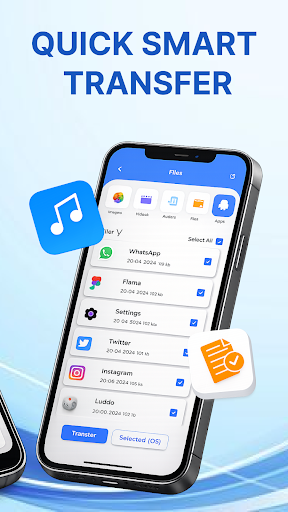
Transfer My Data - Phone Clone allows you to easily copy your data from one device to another with copy my data app, users can transfer their personal data, settings, and apps with minimal effort. Transfer My Data - Phone Clone mobile transfer is very useful when upgrading to a new device or when switching between devices, as it eliminates the need to manually transfer files, settings, and apps one by one.
To Clone Phone, both devices must be connected to the same Wi-Fi network and then use the Transfer My Data - Phone Clone feature found in the settings of the new device. This can include various types of information such as photos, music, videos, and other file formats, as well as …
Read the full description
Transfer My Data - Phone Clone allows you to easily copy your data from one device to another with copy my data app, users can transfer their personal data, settings, and apps with minimal effort. Transfer My Data - Phone Clone mobile transfer is very useful when upgrading to a new device or when switching between devices, as it eliminates the need to manually transfer files, settings, and apps one by one. To Clone Phone, both devices must be connected to the same Wi-Fi network and then use the Transfer My Data - Phone Clone feature found in the settings of the new device. This can include various types of information such as photos, music, videos, and other file formats, as well as settings like Wi-Fi network configurations, custom wallpapers, and app data. <u><b>Features of Transfer My Data - Phone Clone :</b></u> ● Transfer of calendar events, and photos between devices. ● Data transfer over Wi-Fi. ● A user-friendly interface that guides you through the process of transferring data. ● The ability to select which data types to transfer. ● Easy and fast data transfer. ● Support for multiple types of data like photos, music, videos, documents, and more. ● Security and encryption options to protect data during transfer. ● One-click data transfer. ● Smart Select feature to quickly select which data to transfer. <u><b>How to use Transfer My Data - Phone Clone :</b></u> To use the Smart transfer app to copy your data from one device to another, you will need to have both devices connected to the same Wi-Fi network. Here are the basic steps: 1. On the device that you want to transfer data FROM, open the Transfer My Data - Phone Clone mobile and select the "Send" option. 2. On the device that you want to transfer data TO, open the Transfer my Data app and select the "Receive" option. 3. On the sending device, select the data that you want to transfer. This may include photos, videos, and more. 4. On the receiving device, confirm that you want to receive the data. 5. The devices will now connect and begin the transferring of data. The amount of time it takes will depend on the amount of data being transferred. Smart transfer app and content transfer are used to transfer data between devices. A Transfer My Data - Phone Clone with content transfer capability allows for seamless and effortless transfer of data from your old device to your new one. Whether it's important documents, precious photos, or favorite music, a phone replicate or transfer content app ensures that your content is quickly and securely transferred without any loss or damage. This feature makes it easy to upgrade to a new device without worrying about losing any important information. Plus, with content transfer, you can do the data transfer in a simple and convenient way, avoiding complicated and time-consuming setup processes. Copy my data app is a great way to quickly transfer your data from one device to another, saving you time and effort. <u><b>Disclaimer:</b></u> This app is not related to smart switch. Your privacy and security are of the utmost importance to us, and we assure you that any permissions we have obtained are solely for the purpose of providing you with a superior service.
Installs, last 30 days Measured
Exact Google Play install counts, collected daily
Ratings
4,292 ratings, 57 reviews
- 5 ★61%
- 4 ★15%
- 3 ★7.9%
- 2 ★1.8%
- 1 ★14%
Recent reviews
Latest public reviews from the store
- 5 Aug 2025
Excellent application to manage State revenue.
Top chart positions
Latest Google Play chart ranks by country, last 10 days
Not in any tracked top chart in the last 10 days.
Transfer My Data - Phone Clone history
Release, install milestones, listing and store changes
- Reached 1,000,000+ installs 23 Mar 2024
- First released on the store 13 Jun 2023
Update frequency
How often Transfer My Data - Phone Clone ships a new version, month by month
10 updates in the last 12 months. More often than most similar apps: they shipped a median of 3 updates in the same year.
Recent versions
Current version 9.8
- Version 9.822 Oct 2026
Buy Premium For Fastest Data Transfer. Improved User Experience. Clear Guidance Better Quality and Support. Data Transfer Easily with smart switch. Clone Phone and copy your data. Improved UI Bugs Fixed
- Version 9.324 Jul 2026
Buy Premium For Fastest Data Transfer. Improved User Experience. Clear Guidance Better Quality and Support. Data Transfer Easily with smart switch. Clone Phone and copy your data. Improved UI Bugs Fixed
- Version 9.224 Jul 2026
Buy Premium For Fastest Data Transfer. Improved User Experience. Clear Guidance Better Quality and Support. Data Transfer Easily with smart switch. Clone Phone and copy your data. Improved UI Bugs Fixed
- Version 9.110 Apr 2026
Buy Premium For Fastest Data Transfer. Improved User Experience. Clear Guidance Better Quality and Support. Data Transfer Easily with smart switch. Clone Phone and copy your data. Improved UI Bugs Fixed
Listing keywords
Words and phrases Transfer My Data - Phone Clone repeats most in its store listing
Top phrases: transfer my data (9), data phone clone (8), data phone (8), phone clone (8), data transfer (4).
Highlighted words also appear in the title. Counts cover the title, short description and description.
Business model and tech
From the store listing, the SDKs in the app package and its declared permissions
- Business model
- Free to downloadIn-app purchasesShows ads
- Built with
- No cross-platform framework or game engine detected
- Ad networks (3)
- AdMobAppLovinIronsource
- Subscriptions and payments
- Google Play billing
- Attribution and measurement
- Open Measurement
- Analytics and crash reports
- Firebase
- Sensitive access
- LocationCameraContactsPhotos, videos and filesAdvertising ID
4 ad, attribution and analytics SDKs detected. SDKs are read from the app package and permissions from the store listing, so code that loads later is not seen.
Technology
44 SDKs found in the app package
Ad networks
Advertising and install-attribution SDKs found in the app package
- AdMob
- AppLovin
- Ironsource
- Open Measurement
27 permissions
3 special access, 7 sensitive, 17 standard
- Install other appsREQUEST_INSTALL_PACKAGESSpecial access
- Manage all filesMANAGE_EXTERNAL_STORAGESpecial access
- Set exact alarmsSCHEDULE_EXACT_ALARMSpecial access
- Take photos and videosSensitive
- Change contactsSensitive
- Read contactsSensitive
- Change or delete shared storageSensitive
- Read shared storageSensitive
- Precise locationSensitive
- Show notificationsPOST_NOTIFICATIONSSensitive
- Ad attribution (Privacy Sandbox)ACCESS_ADSERVICES_ATTRIBUTIONStandard
- Ad topics (Privacy Sandbox)ACCESS_ADSERVICES_TOPICSStandard
Compliance
What the listing and the app package show
- Store status
- Live
- Upkeep
- Updated 22 Oct 2026
- Privacy policy
- Linked on the listing
- Advertising
- Shows ads
- In-app purchases
- Offered
- Age rating
- Everyone
- Sensitive permissions
- 7 sensitive, 3 special access of 27
- Location access
- Yes, while in use
- Camera and microphone
- Camera
Apps like Transfer My Data - Phone Clone
Samsung TV RemoteNew World Apps964K installs★ 3.86
e-ProcessoServiços e Informações do Brasil743K installs★ 4.57
Urdu Pana Flex - Banner MakerU&S-Soft221K installs★ 4.55
Grapher - Equation PlotterBasile Van Hoorick1.5M installs★ 4.12
TiviMate CompanionArmobsoft FZE2.3M installs★ 3.23
My BTBhutan Telecom Ltd.686K installs★ 3.97
GalleryMV Gallery761K installs★ 4.5
SQCOMShenzhen SHANGQING INDUSTRIAL CO., LTD419K installs★ 3.74
Mi Band 4 WatchFacesWallet Passes Alliance3.3M installs★ 3.78
Transfer My Data - Phone Clone: questions and answers
How many downloads does Transfer My Data - Phone Clone have?
Transfer My Data - Phone Clone has 2,979,572 installs on Google Play, measured from the store's own count on 19 Nov 2026.
Who makes Transfer My Data - Phone Clone?
Transfer My Data - Phone Clone is published by Codix Apps.
When was Transfer My Data - Phone Clone last updated?
The latest version (9.8) was released on 22 Oct 2026.
Is Transfer My Data - Phone Clone free?
Yes. Transfer My Data - Phone Clone is free to download and offers in-app purchases, and it shows ads.
Is Transfer My Data - Phone Clone still available?
Yes. Transfer My Data - Phone Clone is live on Google Play as of 19 Nov 2026.
Track Transfer My Data - Phone Clone and its competitors
Watch any app for new versions, rating drops, chart moves and removals. Free plan, no card.