Trello: Personal Planner App
Organize your day and tackle your to dos with task lists, daily reminders & more
- Installs
- 31.12M
- Measured
- Rating
- 3.78
- Ratings
- 123K
- 4.9K reviews
- Version
- Varies with device
- Updated 10 Nov 2026
- Released
- 8 Aug 2012
- Tracked since 10 May 2026
- Size
- —
Screenshots




About Trello: Personal Planner App
The description on the store listing
Work smarter and do more with your personal productivity powerhouse, Trello. Capture, organize, and tackle your to-dos from anywhere. No more chaotic schedules, lost sticky notes, or searching for bookmarked messages across apps. Stay organized and efficient with Inbox, Boards, and Planner. Every personal or work-related to-do, idea, or responsibility—no matter how small—finds its place, keeping you at the top of your game, all from your phone for smarter task management.
Trello lets you instantly capture tasks, ideas, and notes right from your phone into a Trello card for a seamless schedule and to-do organizer. Add due dates, comments, checklists, descriptions, files, and more. Save …
Read the full description
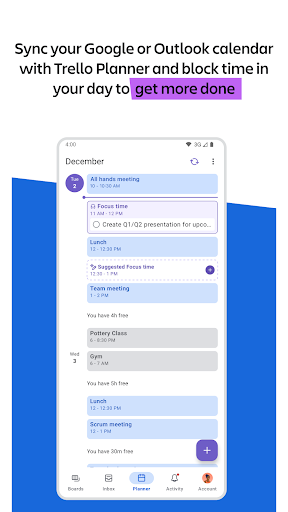
Work smarter and do more with your personal productivity powerhouse, Trello. Capture, organize, and tackle your to-dos from anywhere. No more chaotic schedules, lost sticky notes, or searching for bookmarked messages across apps. Stay organized and efficient with Inbox, Boards, and Planner. Every personal or work-related to-do, idea, or responsibility—no matter how small—finds its place, keeping you at the top of your game, all from your phone for smarter task management. Trello lets you instantly capture tasks, ideas, and notes right from your phone into a Trello card for a seamless schedule and to-do organizer. Add due dates, comments, checklists, descriptions, files, and more. Save messages from popular work apps like Slack or Microsoft Teams, snap a photo, and forward emails to Trello. Upgrade to unlock AI features that summarize your saved to-dos into a Trello card so that nothing slips through the cracks. Everything captured lands as a card in your Trello Inbox, making it easy to review, prioritize, and organize your work across boards. See your scheduled day in Trello Planner, synced with your Google or Outlook calendars. Standard and Premium users can also enable Planner to schedule focus time for completing saved to-dos. Get reminders that work for you by setting up push notifications for your work tasks or personal to-dos. Get timely alerts for the updates you care about, like due dates or changes to your card. Download today to seamlessly start turning your to-do list into action. TO-DO LIST TURNED INTO SEAMLESS TASK MANAGEMENT - Capture, edit and sort your to-dos from your Trello Inbox. - Connect your Google or Outlook calendars. - See what you have scheduled for your day (and set aside focus time on what you’ve captured in Trello cards to get done later). - Use the Trello widget to add more to your to-dos without ever opening the app. - View all your to-dos from multiple boards in one place. PERSONAL & WORK SCHEDULE ORGANIZER - Trello Inbox: Add reminders, forward emails, and save messages in your Trello Inbox. - Trello Boards: No-code automation is built into every Trello board for intelligent task management. - Trello Planner: Place your top tasks into your calendar, and make time for what truly matters in your schedule organizer. - Notifications: Get timely alerts for the updates you care about, like due dates or changes to your card. - Work offline: Capture ideas and update boards even without internet. Your changes sync automatically when you’re back online. AI TOOLS FOR TASK AND SCHEDULE SUMMARIES - Let AI tools turn your ideas into action with Trello task management. - AI can extract the action items and due dates, enabling you to create a plan of action, a checklist, or simply gain clarity on what needs to be done. - Generate, summarize, and improve spelling and grammar of work, copywriting, or personal content. Create beautiful, flexible boards: Organize your captured cards into customizable kanban boards and lists, tailored to your workflow. Trello’s tactile, visual mobile interface, with drag-and-drop gestures and smooth transitions between boards, offers a natural way to plan your work on a mobile device. Download Trello and experience a new era of personal productivity management. It’s free! When you use features that require your device’s photos, camera, microphone, or contacts, we will request permission before accessing that data.
Installs, last 30 days Measured
Exact Google Play install counts, collected daily
Ratings
122,688 ratings, 4,871 reviews
- 5 ★58%
- 4 ★9.2%
- 3 ★8.3%
- 2 ★7.2%
- 1 ★17%
Recent reviews
Latest public reviews from the store
No reviews in our sample for this app yet.
Top chart positions
Latest Google Play chart ranks by country, last 10 days
- Countries ranked
- 4
- Best rank
- #147
- Top 10 placements
- 0
- of 4 chart placements
- Average rank
- #170
Best countries on Google Play
- 🇧🇷 Brazil · Top free, Productivity#147
- 🇨🇦 Canada · Top free, Productivity#160
- 🇦🇺 Australia · Top free, Productivity#182
- 🇬🇧 United Kingdom · Top free, Productivity#191
Trello: Personal Planner App history
Release, install milestones, listing and store changes
- First released on the store 8 Aug 2012
Update frequency
How often Trello: Personal Planner App ships a new version, month by month
12 updates in the last 12 months. More often than most similar apps: they shipped a median of 2 updates in the same year.
Recent versions
Current version Varies with device
- Version 2026.8.3.7014614 Apr 2026
- Version 2026.7.2.696769 Apr 2026
- Version 2026.7.1.6813223 Mar 2026
- Version 2026.6.1.665355 Mar 2026
Listing keywords
Words and phrases Trello: Personal Planner App repeats most in its store listing
Top phrases: due dates (4), task management (4), trello inbox (4), about like due (2), dates or changes (2).
Highlighted words also appear in the title. Counts cover the title, short description and description.
Business model and tech
From the store listing and declared permissions
- Business model
- Free to download
- Sensitive access
- No sensitive permission declared
Compliance
What the listing and the app package show
- Store status
- Live
- Upkeep
- Updated 10 Nov 2026
- Registered in
- Australia
- Privacy policy
- Linked on the listing
- Advertising
- No ads declared
- In-app purchases
- None declared
- Age rating
- Everyone
Apps like Trello: Personal Planner App
My VodafoneVodafone Portugal, Comunicações Pessoais, S.A.6.2M installs★ 3.81
MediaFireMediaFire24.6M installs★ 3.65
BasicNote: Notes & NotepadNotas Notepad13.8M installs★ 4.5
All Document Reader and Viewero16i Apps4.1M installs★ 4.24
Kia AccessKia America1.6M installs★ 4.68
Cash App: Recharge Earning appReward Supreme1.6M installs★ 4.83
Easy Contacts CleanerLSM Apps3.6M installs★ 4.8
Beatron - AI Music MakerOcean Float Mobile5.5M installs★ 4.58
B-Love NetworkCloud Intense12.5M installs★ 3.0
Trello: Personal Planner App: questions and answers
How many downloads does Trello: Personal Planner App have?
Trello: Personal Planner App has 31,117,153 installs on Google Play, measured from the store's own count on 20 Nov 2026.
Who makes Trello: Personal Planner App?
Trello: Personal Planner App is published by Atlassian, a developer based in AU.
When was Trello: Personal Planner App last updated?
The latest version (Varies with device) was released on 10 Nov 2026.
Is Trello: Personal Planner App free?
Yes. Trello: Personal Planner App is free to download.
Is Trello: Personal Planner App still available?
Yes. Trello: Personal Planner App is live on Google Play as of 20 Nov 2026.
Track Trello: Personal Planner App and its competitors
Watch any app for new versions, rating drops, chart moves and removals. Free plan, no card.