
Tusky : Password Manager
Most Secured Password Generator, Saver and Protector. Proudly Made in India.
- Installs
- 349
- Measured
- Rating
- —
- Ratings
- —
- Version
- 1.0.1
- Updated 16 Mar 2022
- Released
- 16 Mar 2022
- Tracked since 13 May 2026
- Size
- —
Screenshots


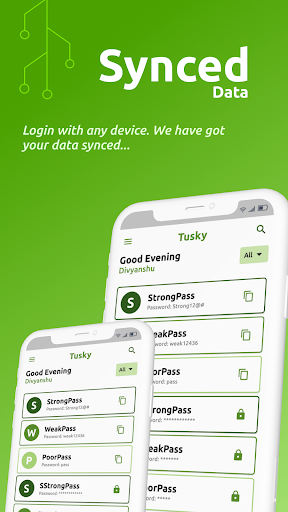


About Tusky : Password Manager
The description on the store listing
<b>Introduction</b>
Tusky is a password managing app. It will take 106 trillion years to break a password created by Tusky. Avoid using the auto save functionality of your android device, because it may cause severe problems to your personal privacy. In Tusky we do not even know the name of the person. We do not save your details. Your passwords are end to end encrypted. Tusky encrypts your password by using 23 languages characters. With Tusky, save your passwords without a worry.
Tusky the password manager, is a one stop solution of the problems that include forgetting passwords, not knowing how to make secure passwords, and how to upgrade password security to 2 factor authentication. …
Read the full description
<b>Introduction</b> Tusky is a password managing app. It will take 106 trillion years to break a password created by Tusky. Avoid using the auto save functionality of your android device, because it may cause severe problems to your personal privacy. In Tusky we do not even know the name of the person. We do not save your details. Your passwords are end to end encrypted. Tusky encrypts your password by using 23 languages characters. With Tusky, save your passwords without a worry. Tusky the password manager, is a one stop solution of the problems that include forgetting passwords, not knowing how to make secure passwords, and how to upgrade password security to 2 factor authentication. <b>Generate Passwords</b> No more frustration over the websites or the app which keep reminding you that your password is weak. Go to generate password in Tusky and create the strongest password that no hacker can break. Tusky generates password by using ascii keywords, English alphabets (lower and upper case both), and numbers. You can save the generated password with just a single click. With Tusky generating passwords has become easier than ever before. <b>Save Passwords</b> Tusky provides you with the functionality to save your passwords as well. It includes 3 text fields where you can enter the title, subtitle and password. You can also enable 2 factor authentication in Tusky while saving your password. You can categories your password into different provided categories on the screen to access the passwords easily. Save your passwords with Tusky and be tension free. <b>View Password Offline</b> If you are stuck in no internet zone. Do not worry Tusky saves your passwords locally on your device without the interference of any third party application. You can view your passwords in offline mode, even if you have no internet connection. <b>End to End Encryption</b> We totally understand the privacy concern these days. With Tusky we do not share your personal information among the third party services. With each and every password saved, all your passwords get encrypted once again and get saved in our database all over again. Suppose you have a password something like “2bytecode123”, to us it looks like “HSGB625qh&@(@$#”, which is nearly impossible to break. It also changes with the next iteration of the password. So, you can put your faith in us. Download Tusky the password manager. We have a lot more features than this, like your deleted password stays for 30 days in the app. So, you can have them back or delete permanently if you want. <b>Features Summary</b> - Generate Password - Save Password with 2FA - 30 Days Deleted Passwords backup - Prevent Screen Shot - Biometric App Lock - All Logged in Devices Detail - One Click Copy Passwords - Categories Passwords Thanks for using Tusky : Password Manager. Team 2ByteCode
Installs since 14 Nov 2026 Measured
Exact Google Play install counts, collected daily
Daily history starts once this app is in our daily install sample.
Ratings
- 5 ★0.0%
- 4 ★0.0%
- 3 ★0.0%
- 2 ★0.0%
- 1 ★0.0%
Recent reviews
Latest public reviews from the store
- 4 Aug 2025
good
- 7 Dec 2024
Working pretty good.Exactly as I expected .
- 18 Jul 2024
Cool
- 30 Sep 2023
Teksdan xato topish uchun eng zoʻr dastur. Bazi icon lar koʻrinmay qolibdi
What reviewers bring up
Topics mentioned in the latest 22 reviews, by how many reviews mention them
Liked in good reviews (22 reviews)
- dastur 8
- rahmat 4
- ekan 4
- juda 4
- ham 4
- yaxshi 3
- uchun 3
- faqat 3
Raised in bad reviews (0 reviews)
No topic comes up twice.
Top chart positions
Latest Google Play chart ranks by country, last 10 days
Not in any tracked top chart in the last 10 days.
Tusky : Password Manager history
Release, install milestones, listing and store changes
- First released on the store 16 Mar 2022
Recent versions
Current version 1.0.1
- Version 1.0.116 Mar 2022
- Generate Password - Save Password with 2FA - 30 Days Deleted Passwords backup - Prevent Screen Shot - Biometric App Lock - All Logged in Devices Detail - One-Click Copy Passwords - Categories Passwords
Listing keywords
Words and phrases Tusky : Password Manager repeats most in its store listing
Top phrases: password manager (4), save your passwords (3), end to end (2), tusky password manager (2), tusky the password (2).
Highlighted words also appear in the title. Counts cover the title, short description and description.
Business model and tech
From the store listing and declared permissions
- Business model
- Free to download
- Sensitive access
- Advertising ID
8 permissions
0 special access, 0 sensitive, 8 standard
- Read how it was installed (install referrer)BIND_GET_INSTALL_REFERRER_SERVICEStandard
- Read the advertising IDAD_IDStandard
- Control vibrationStandard
- Keep the phone awakeStandard
- Use fingerprint or face unlockUSE_BIOMETRICStandard
- Use the fingerprint readerUSE_FINGERPRINTStandard
- Full internet accessStandard
- See network connectionsStandard
Compliance
What the listing and the app package show
- Store status
- Live
- Upkeep
- No update since 16 Mar 2022
- Registered in
- India
- Privacy policy
- Linked on the listing
- Advertising
- No ads declared
- In-app purchases
- None declared
- Age rating
- Everyone
- Sensitive permissions
- 0 sensitive of 8
- Location access
- No
- Camera and microphone
- Neither
Apps like Tusky : Password Manager
들어서 화면켜기Won3.5K installs★ 4.0
Height PredictionEcliptic App Ventures45.9K installs★ 2.4
Speicers`Pro VPNEldiablolucifer202021.2K installs★ 4.14
Lightning Tracker with AlertsYaksh Software4.3K installs★ 3.0
Mana Pathi (Unit Converter)Shirish Koirala2.2K installs★ 4.6
Multi-tab Calc - A simple app.Naoyuki Rikiji1.3K installs★ 5.0
Photo Recovery PlusBillApps7.1K installs★ 4.53
Just Silence. Scheduled.Akid Soft1.6K installs★ 5.0
- WoWp AssistantВиталий Робиновский2K installs★ 4.2
Tusky : Password Manager: questions and answers
How many downloads does Tusky : Password Manager have?
Tusky : Password Manager has 349 installs on Google Play, measured from the store's own count on 14 Nov 2026.
Who makes Tusky : Password Manager?
Tusky : Password Manager is published by 2ByteCode, a developer based in IN.
When was Tusky : Password Manager last updated?
The latest version (1.0.1) was released on 16 Mar 2022.
Is Tusky : Password Manager free?
Yes. Tusky : Password Manager is free to download.
Is Tusky : Password Manager still available?
Yes. Tusky : Password Manager is live on Google Play as of 14 Nov 2026.
Track Tusky : Password Manager and its competitors
Watch any app for new versions, rating drops, chart moves and removals. Free plan, no card.