
uAttend
Punch in and out, transfer departments, and manage time cards on the go.
- Installs
- 499K
- Measured
- Rating
- 3.27
- Ratings
- 1.1K
- 341 reviews
- Version
- Varies with device
- Updated 1 May 2026
- Released
- 12 Apr 2011
- Tracked since 13 May 2026
- Size
- 48 MB
- Needs 4.4
Also on App Store: uAttend (250 ratings)
Screenshots

About uAttend
The description on the store listing
The uAttend mobile app works in conjunction with uAttend’s Cloud-Connected Time and Attendance System. Employees appreciate the convenience of in and out punching in the palm their hands while administrators and supervisors manage timecards with ease. For a personalized touch, the app displays your company logo upon login once you’ve added it to your existing uAttend account.
SMART PUNCHING
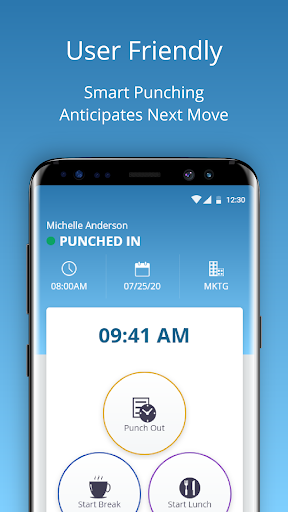
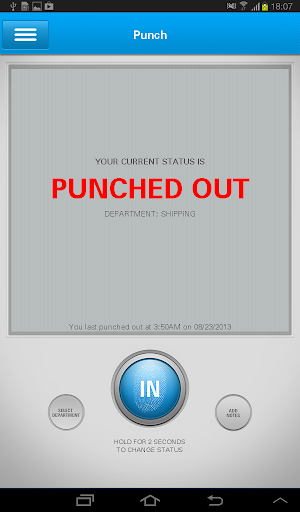
Hourly employees can clock in and out for work, lunches and breaks. It’s all possible in the app! To streamline the process, the app shows the next most likely punch option available to each employee. When someone is on their lunch break, they’ll return to a screen prompt to punch in from …
Read the full description
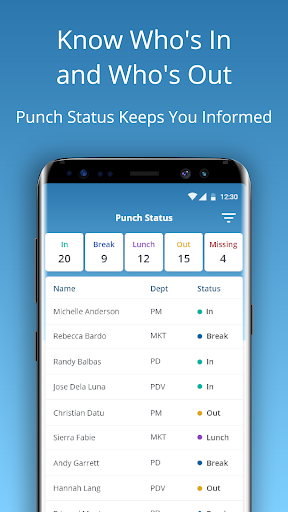
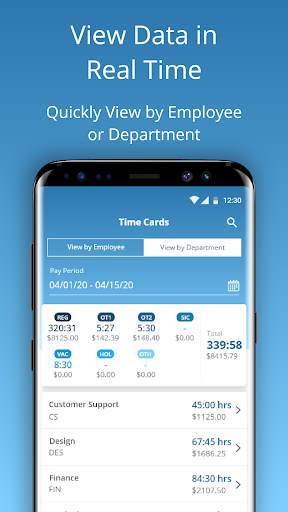
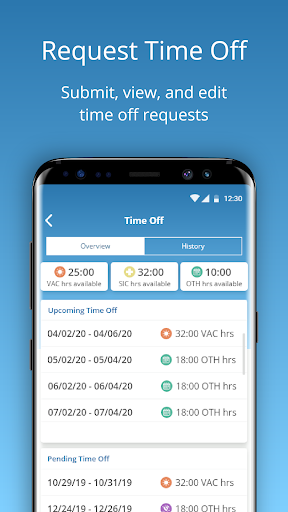
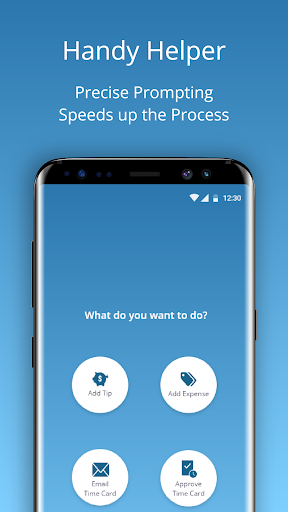
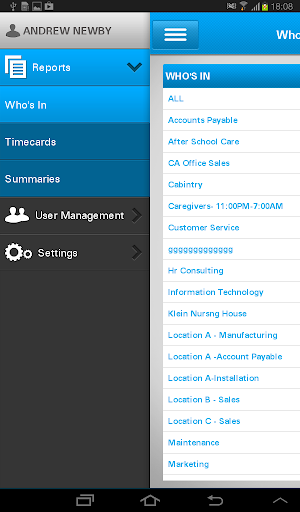
The uAttend mobile app works in conjunction with uAttend’s Cloud-Connected Time and Attendance System. Employees appreciate the convenience of in and out punching in the palm their hands while administrators and supervisors manage timecards with ease. For a personalized touch, the app displays your company logo upon login once you’ve added it to your existing uAttend account. SMART PUNCHING Hourly employees can clock in and out for work, lunches and breaks. It’s all possible in the app! To streamline the process, the app shows the next most likely punch option available to each employee. When someone is on their lunch break, they’ll return to a screen prompt to punch in from lunch.Once punched in, the employee will see their punch status along with the time, date and department they are punched into. They can even transfer departments with the touch of a button. DEPARTMENT TRANSFERS When transferring departments employees are prompted to enter the new department or search by name. Once you transfer it automatically punches you out of your existing department and punches you into the new one. EASY ACCESS TO TIME CARDS Employees with permission can view current and past time cards. It’s easy to approve or email their time cards to a supervisor or themselves in an instant. ADDING TIPS AND EXPENSES Employees can add tips and expenses right from the app. This comes in handy for reporting purposes and so payroll can handle. Add expenses based on the expense codes your account has set up. Track gas, team lunches or whatever you need by selecting the category and adding the amount. Once everything is entered, you can filter by gross pay, notes, tips and expenses. LEAVING NOTES Keep the lines of communication open knowing staff can write a short note to their supervisor with each punch. ADMINISTRATOR/SUPERVISOR FEATURES Administrators and supervisors enjoy real-time oversight on employee time and attendance regardless of location. The app provides a list of all employees and their punch status. At a glance you’ll know who’s in, who’s out and who’s missing. Filter by different statuses to identify who’s at lunch. Administrators view and edit all departments while supervisors view and edit departments or employees they are responsible for. Email timecards individually or to multiple people. EDITING TIME CARDS Within your account, you can filter by employee or department to return results. Search employees to show gross pay, overtime, benefit hours and more. Email the timecard summary for all employees and add notes before sending.As an administrator you can edit punches, facilitate group punches, approve timecards and even contact support directly from the app. If you change your pay period after the fact, there is a way to recalculate timecards as well.
Installs, last 30 days Measured
Exact Google Play install counts, collected daily
Ratings
1,135 ratings, 341 reviews
- 5 ★36%
- 4 ★15%
- 3 ★3.9%
- 2 ★11%
- 1 ★34%
Recent reviews
Latest public reviews from the store
No reviews in our sample for this app yet.
Top chart positions
Latest Google Play chart ranks by country, last 10 days
Not in any tracked top chart in the last 10 days.
uAttend history
Release, install milestones, listing and store changes
- Reached 100,000+ installs 23 Aug 2018
- Reached 50,000+ installs 17 Jan 2017
- Reached 10,000+ installs 14 May 2014
- Reached 5,000+ installs 9 Jul 2013
- Reached 1,000+ installs 11 May 2012
- Reached 500+ installs 1 Jan 2012
- Reached 100+ installs 26 Jun 2011
- Reached 50+ installs 29 May 2011
Update frequency
How often uAttend ships a new version, month by month
2 updates in the last 12 months. More often than most similar apps: they shipped a median of 1 updates in the same year.
Recent versions
Current version Varies with device
- Version 3.1.3727 Apr 2026
- Version 3.1.3626 Feb 2026
- Version 3.1.2331 Oct 2025
- Version 3.1.027 Oct 2025
Listing keywords
Words and phrases uAttend repeats most in its store listing
Top phrases: tips and expenses (3), administrators and supervisors (2), view and edit (2), gross pay (2), punch status (2).
Highlighted words also appear in the title. Counts cover the title, short description and description.
Business model and tech
From the store listing, the SDKs in the app package and its declared permissions
- Business model
- Free to download
- Built with
- Xamarin
- Ad networks (0)
- None detected
- Analytics and crash reports
- Firebase
- Sensitive access
- Location
1 ad, attribution and analytics SDKs detected. SDKs are read from the app package and permissions from the store listing, so code that loads later is not seen.
Technology
27 SDKs found in the app package
7 permissions
0 special access, 3 sensitive, 4 standard
- Approximate locationSensitive
- Precise locationSensitive
- Mock location sources for testingSensitive
- Full internet accessStandard
- See network connectionsStandard
- Internal app permissionDYNAMIC_RECEIVER_NOT_EXPORTED_PERMISSIONStandard
- Google Play license checkStandard
Compliance
What the listing and the app package show
- Store status
- Live
- Upkeep
- Updated 1 May 2026
- Registered in
- United States
- Privacy policy
- Linked on the listing
- Advertising
- No ads declared
- In-app purchases
- None declared
- Age rating
- Everyone
- Sensitive permissions
- 3 sensitive of 7
- Location access
- Yes, while in use
- Camera and microphone
- Neither
Apps like uAttend
CubeSmart Self StorageCubeSmart, L.P.461K installs★ 3.43
Philadelphia Gas WorksSmart Energy Water23.3K installs★ 4.67
1Huddle1HUDDLE58.3K installs★ 4.6
Watermark photos - WatermarkNiemDinhTue286K installs★ 3.7
GreenPal Pro For VendorsGreenPal Co34.4K installs★ 3.82
HLF APPSLITEHinduja Leyland Finance284K installs★ 4.75
Gifty DZGifty Technology342K installs★ 5.0
BARN’sBarns App Dev243K installs★ 2.44
Carefast JobsPT. Carefastindo240K installs★ 4.17
uAttend: questions and answers
How many downloads does uAttend have?
uAttend has 499,495 installs on Google Play, measured from the store's own count on 20 Nov 2026.
Who makes uAttend?
uAttend is published by Workwell Technologies, a developer based in US.
When was uAttend last updated?
The latest version (Varies with device) was released on 1 May 2026.
Is uAttend free?
Yes. uAttend is free to download.
Is uAttend still available?
Yes. uAttend is live on Google Play as of 20 Nov 2026.
Track uAttend and its competitors
Watch any app for new versions, rating drops, chart moves and removals. Free plan, no card.