vCastSender
Share any content from any mobile device to ViewBoard® Interactive Flat Panels
- Installs
- 302K
- Measured
- Rating
- 2.79
- Ratings
- 326
- 15 reviews
- Version
- v2.8.1016
- Updated 30 Oct 2026
- Released
- 25 Jul 2017
- Tracked since 13 May 2026
- Size
- 4 MB
- Needs 4.0
Also on App Store: vCastSender (35 ratings)
Screenshots


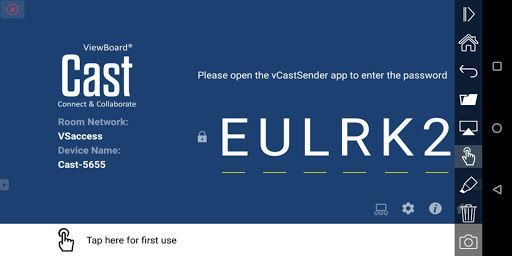

About vCastSender
The description on the store listing
ViewBoard® Cast software is designed for wireless presentations and wireless collaboration.
Key Features
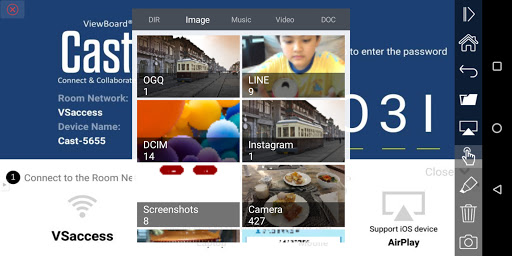
● Working with ViewBoard® Cast software, the vCastSender app will allow you to not only stream live recordings and annotate but also share your screen, photos, videos, music, annotations, documents, and camera directly onto ViewSonic® ViewBoard® Interactive Flat Panels and other mobile devices.
● Presenters can control displayed content from a phone, tablet or laptop while Android and iOS device users are able to use vCastSender’s specialized annotation toolbar as well as enjoy controlling the ViewBoard® remotely.
● Whether in class or in a meeting, the vCastSender app …
Read the full description
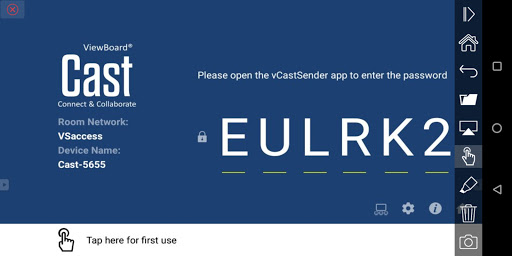
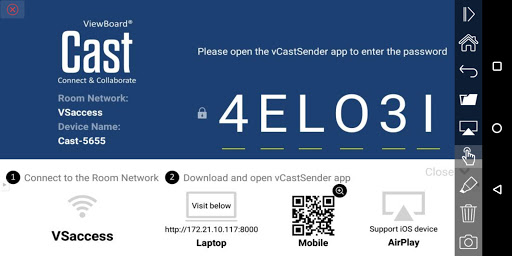
ViewBoard® Cast software is designed for wireless presentations and wireless collaboration. Key Features ● Working with ViewBoard® Cast software, the vCastSender app will allow you to not only stream live recordings and annotate but also share your screen, photos, videos, music, annotations, documents, and camera directly onto ViewSonic® ViewBoard® Interactive Flat Panels and other mobile devices. ● Presenters can control displayed content from a phone, tablet or laptop while Android and iOS device users are able to use vCastSender’s specialized annotation toolbar as well as enjoy controlling the ViewBoard® remotely. ● Whether in class or in a meeting, the vCastSender app makes teaching and group discussion quick and easy. Quick Guide ● Connect your device to the same network as the ViewBoard® Interactive Flat Panel. ● Open the vCastReceiver app on the ViewBoard® Interactive Flat Panel. ● Depending on your device, either enter the IP address, scan the QR code, or go the relevant application store to download the vCastSender app. ● Open the vCastSender app on your device and enter the ViewBoard® Interactive Flat Panel’s vCastReceiver PIN code to connect and begin wireless collaboration. Please note that vCastSender needs your permission to allow access to the phone's storage files and use the “Reversed Device Control” feature, otherwise the app will not function normally. Note: If an Android “Permission Request” is encountered, please follow these steps: 1. On your Android device, open Settings. 2. Open Apps. 3. Select the app you want to turn on a permission for (e.g., vCastSender). 4. Open Permissions. 5. Follow the on-screen instructions. Please note that some of these steps work only with Android 13 and up. Accessibility Service API Usage: 1. This application uses the Accessibility Service API for the functionality of the “Reversed Device Control” feature only. 2. In a meeting or teaching scenario, with this feature enabled, you can operate your personal device from the designated display you are casting to – adding convenience and enhancing the interactive experience. 3. vCastSender will not collect your personal or device information, nor will it monitor your operations. Accessibility Service API Usage and Location: ● Ensure both your device and the panel are connected to the same network. ● Open the vCastSender application on your device. ● Read the “Tips” message prompt and tap the Accept button if you agree. ● Wirelessly connect to the panel by entering the PIN Code of the panel or selecting it from the Device List. ● Tap the upper-right “Setting Icon” to enter the Settings menu. ● Tapping the toggle to turn on the “Reversed Device Control” feature will prompt a “Tips” message to appear. Read the message and tap the Accept button if you agree to allow vCastSender Accessibility Service to have full control of your device. ● Under your device’s Accessibility settings, grant vCastSender permission to control your device. ● You are now ready to cast your device’s screen onto the receiving panel.
Installs since 27 Aug 2026 Measured
Exact Google Play install counts, collected daily
Ratings
326 ratings, 15 reviews
- 5 ★35%
- 4 ★2.9%
- 3 ★5.9%
- 2 ★5.9%
- 1 ★50%
Recent reviews
Latest public reviews from the store
No reviews in our sample for this app yet.
Top chart positions
Latest Google Play chart ranks by country, last 10 days
Not in any tracked top chart in the last 10 days.
vCastSender history
Release, install milestones, listing and store changes
- Reached 100,000+ installs 14 Aug 2023
- Reached 50,000+ installs 4 Dec 2021
- Reached 10,000+ installs 15 Nov 2019
- Reached 5,000+ installs 2 May 2019
- Reached 1,000+ installs 10 Apr 2018
- Reached 500+ installs 27 Jan 2018
- Reached 100+ installs 1 Oct 2017
- Reached 50+ installs 1 Sep 2017
Update frequency
How often vCastSender ships a new version, month by month
2 updates in the last 12 months. More often than most similar apps: they shipped a median of 1 updates in the same year.
Recent versions
Current version v2.8.1016
- Version v2.8.101630 Oct 2026
• Connect to the display with a PIN for a more secure connection
- Version v2.6.12034 Dec 2025
1. Fixed the issue where the system bottom navigation bar covered part of the UI. 2. Fixed the issue where a green line appeared on the screen when casting from certain phones. 3. Fixed the issue where there was no reverse control function when casting to the vCast non-4-in-1 version.
- Version v2.6.71018 Jul 2025
- Version v2.6.21018 Feb 2025
Listing keywords
Words and phrases vCastSender repeats most in its store listing
Top phrases: viewboard interactive flat (5), interactive flat (5), viewboard interactive (5), accessibility service (4), accessibility service api (3).
Highlighted words also appear in the title. Counts cover the title, short description and description.
Business model and tech
From the store listing, the SDKs in the app package and its declared permissions
- Business model
- Free to download
- Built with
- No cross-platform framework or game engine detected
- Ad networks (0)
- None detected
- Sensitive access
- LocationCameraMicrophonePhotos, videos and filesDraws over other apps
0 ad, attribution and analytics SDKs detected. SDKs are read from the app package and permissions from the store listing, so code that loads later is not seen.
Technology
13 SDKs found in the app package
26 permissions
1 special access, 10 sensitive, 15 standard
- Draw over other appsSpecial access
- Record audioSensitive
- Take photos and videosSensitive
- Change or delete shared storageSensitive
- Read music and audioREAD_MEDIA_AUDIOSensitive
- Read photosREAD_MEDIA_IMAGESSensitive
- Read shared storageSensitive
- Read videosREAD_MEDIA_VIDEOSensitive
- Approximate locationSensitive
- Precise locationSensitive
- Show notificationsPOST_NOTIFICATIONSSensitive
- Control the flashlightStandard
Compliance
What the listing and the app package show
- Store status
- Live
- Upkeep
- Updated 30 Oct 2026
- Registered in
- Taiwan
- Privacy policy
- Linked on the listing
- Advertising
- No ads declared
- In-app purchases
- None declared
- Age rating
- Everyone
- Sensitive permissions
- 10 sensitive, 1 special access of 26
- Location access
- Yes, while in use
- Camera and microphone
- Both
Apps like vCastSender
Phone DialerStickyApple.com178K installs★ 3.56
Split Screen -Dual Apps AccessKD technotech42.9K installs★ 3.6
Torque TighteningCentre Technique des Industries Mécaniques71.8K installs★ 3.2
GyroflowAdrian Eddy122K installs★ 4.08
Woto - AI Texting AssistantWOTO DIJITAL HIZMETLERI ANONIM SIRKETI45.6K installs★ 3.88
Volume Control최진선72.7K installs★ 4.26
Mythings - CaptainMyThings25.8K installs★ 4.38
Screen mirroring Hisense TVNERVE DEVE117K installs★ 3.85
Clean Roll - AntivirusHasland studio101K installs★ 3.8
vCastSender: questions and answers
How many downloads does vCastSender have?
vCastSender has 301,949 installs on Google Play, measured from the store's own count on 21 Nov 2026.
Who makes vCastSender?
vCastSender is published by ViewSonic Corporation, a developer based in TW.
When was vCastSender last updated?
The latest version (v2.8.1016) was released on 30 Oct 2026.
Is vCastSender free?
Yes. vCastSender is free to download.
Is vCastSender still available?
Yes. vCastSender is live on Google Play as of 21 Nov 2026.
Track vCastSender and its competitors
Watch any app for new versions, rating drops, chart moves and removals. Free plan, no card.