
Video Compressor MP3 Converter
Reduce Video Size, Cut Crop Video Editor, GIF Maker, MP4 Video to MP3 Converter
- Installs
- 2.52K
- Measured
- Rating
- —
- Ratings
- —
- Version
- Varies with device
- Updated 15 Oct 2025
- Released
- 1 May 2024
- Tracked since 12 May 2026
- Size
- —
Screenshots



About Video Compressor MP3 Converter
The description on the store listing
Video Compressor: Reduce Video Size Without Compromising Quality
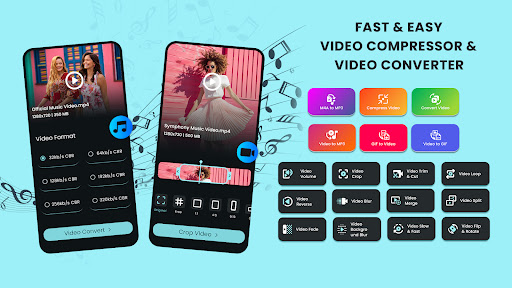
Transform your video editing experience with Video Compressor, an all-in-one app for compressing videos, converting formats, creating GIFs, extracting MP3 audio, and more—all without sacrificing quality.
✨ Key Features
🎥 Video Converter
Convert videos to a wide range of formats, including MP4, 3GP, FLV, MTS, MKV, MOV, WMV, and more.
• Batch convert multiple videos simultaneously.
• Simple, intuitive process: select videos, choose your desired format, and let the app do the rest.
✂️ Video Crop
Easily resize videos for platforms like Instagram, TikTok, and YouTube.
• Aspect ratios include 1:1, 16:9, 9:16, and …
Read the full description
Video Compressor: Reduce Video Size Without Compromising Quality Transform your video editing experience with Video Compressor, an all-in-one app for compressing videos, converting formats, creating GIFs, extracting MP3 audio, and more—all without sacrificing quality. ✨ Key Features 🎥 Video Converter Convert videos to a wide range of formats, including MP4, 3GP, FLV, MTS, MKV, MOV, WMV, and more. • Batch convert multiple videos simultaneously. • Simple, intuitive process: select videos, choose your desired format, and let the app do the rest. ✂️ Video Crop Easily resize videos for platforms like Instagram, TikTok, and YouTube. • Aspect ratios include 1:1, 16:9, 9:16, and more. • Customize cropping while maintaining high-definition quality. 🐢⚡ Speed Adjustment (Slow & Fast Motion) Add dynamic speed effects to your videos: • Slow down or speed up videos from -10x to 20x. • Effortlessly create captivating slow-motion or fast-motion clips. ✂️ Video Trim & Cut • Remove unwanted sections or extract specific clips. • Create perfectly timed content with just a few taps. 🔄 Flip & Rotate • Flip videos horizontally or vertically for mirror effects. • Rotate videos clockwise or counterclockwise to fix orientation. 🔁 Video Loop • Create seamless looping videos for captivating playback. • Smoothly blend the end and beginning of video clips. 🔊 Adjust Audio Volume • Increase or decrease the volume with ease. • Boost low audio or tone down excessive sound—perfect for precise audio control. ⏪ Video Reverse • Play videos in reverse for a mesmerizing, creative twist. 🎥✨ Video Blur & Background Blur • Blur specific areas or enhance storytelling with background blurring. 🎞️ Video Merge • Combine multiple videos into one cohesive masterpiece. • Perfect for montages, highlight reels, or long-form content. 🎬 Fade Effects • Add professional fade-in or fade-out transitions to your videos. 🔪 Video Split • Divide videos into smaller segments for detailed editing or to extract highlights. 🎉 Video to GIF • Convert videos into shareable, fun GIFs. • Customize duration and quality to fit your needs. 🔄 GIF to Video • Transform GIFs into videos in various formats, ready for editing or sharing. Unleash Your Creativity! With a powerful suite of tools, Video Compressor lets you effortlessly create, edit, and enhance video content. Whether you're a casual creator or a professional, this app has everything you need to make stunning, high-quality videos. 📲 Video Compressor is free to download—download now and start creating!
Installs since 13 Nov 2026 Measured
Exact Google Play install counts, collected daily
Daily history starts once this app is in our daily install sample.
Ratings
- 5 ★0.0%
- 4 ★0.0%
- 3 ★0.0%
- 2 ★0.0%
- 1 ★0.0%
Recent reviews
Latest public reviews from the store
- 24 Feb 2026
best of all time
- 10 Jul 2025
best
- 3 Jul 2025
awesome
- 28 Jun 2025
good app
What reviewers bring up
Topics mentioned in the latest 50 reviews, by how many reviews mention them
Liked in good reviews (38 reviews)
- looks 2
- ads 2
Raised in bad reviews (12 reviews)
- subscription 2
- trial 2
- waste 2
Top chart positions
Latest Google Play chart ranks by country, last 10 days
Not in any tracked top chart in the last 10 days.
Video Compressor MP3 Converter history
Release, install milestones, listing and store changes
- Reached 1,000+ installs 18 Jan 2025
- Reached 500+ installs 22 Jun 2024
- Reached 100+ installs 14 May 2024
- Reached 50+ installs 9 May 2024
- First released on the store 1 May 2024
Recent versions
Current version Varies with device
- Version 0.01315 Oct 2025
- Version 0.01218 Sep 2025
- Version 0.01011 Jun 2025
- Version 0.00919 Jul 2024
Listing keywords
Words and phrases Video Compressor MP3 Converter repeats most in its store listing
Top phrases: video compressor (5), reduce video size (2), convert videos (2), effortlessly create (2), fast motion (2).
Highlighted words also appear in the title. Counts cover the title, short description and description.
Business model and tech
From the store listing and declared permissions
- Business model
- Free to downloadIn-app purchasesShows ads
- Subscriptions and payments
- Google Play billing
- Sensitive access
- Photos, videos and filesAdvertising ID
21 permissions
0 special access, 7 sensitive, 14 standard
- Change or delete shared storageSensitive
- Read music and audioREAD_MEDIA_AUDIOSensitive
- Read photosREAD_MEDIA_IMAGESSensitive
- Read photos and videos the user picksREAD_MEDIA_VISUAL_USER_SELECTEDSensitive
- Read shared storageSensitive
- Read videosREAD_MEDIA_VIDEOSensitive
- Show notificationsPOST_NOTIFICATIONSSensitive
- Ad attribution (Privacy Sandbox)ACCESS_ADSERVICES_ATTRIBUTIONStandard
- Ad topics (Privacy Sandbox)ACCESS_ADSERVICES_TOPICSStandard
- Read how it was installed (install referrer)BIND_GET_INSTALL_REFERRER_SERVICEStandard
- Read the advertising IDAD_IDStandard
- Read the advertising ID (Privacy Sandbox)ACCESS_ADSERVICES_AD_IDStandard
Compliance
What the listing and the app package show
- Store status
- Live
- Upkeep
- Updated 15 Oct 2025
- Registered in
- India
- Privacy policy
- Linked on the listing
- Advertising
- Shows ads
- In-app purchases
- Offered
- Age rating
- Everyone
- Sensitive permissions
- 7 sensitive of 21
- Location access
- No
- Camera and microphone
- Neither
Apps like Video Compressor MP3 Converter
들어서 화면켜기Won3.5K installs★ 4.0
Height PredictionEcliptic App Ventures45.9K installs★ 2.4
Speicers`Pro VPNEldiablolucifer202021.2K installs★ 4.14
Lightning Tracker with AlertsYaksh Software4.3K installs★ 3.0
Mana Pathi (Unit Converter)Shirish Koirala2.2K installs★ 4.6
Multi-tab Calc - A simple app.Naoyuki Rikiji1.3K installs★ 5.0
Photo Recovery PlusBillApps7.1K installs★ 4.53
Just Silence. Scheduled.Akid Soft1.6K installs★ 5.0
- WoWp AssistantВиталий Робиновский2K installs★ 4.2
Video Compressor MP3 Converter: questions and answers
How many downloads does Video Compressor MP3 Converter have?
Video Compressor MP3 Converter has 2,519 installs on Google Play, measured from the store's own count on 13 Nov 2026.
Who makes Video Compressor MP3 Converter?
Video Compressor MP3 Converter is published by AppX Studio, a developer based in IN.
When was Video Compressor MP3 Converter last updated?
The latest version (Varies with device) was released on 15 Oct 2025.
Is Video Compressor MP3 Converter free?
Yes. Video Compressor MP3 Converter is free to download and offers in-app purchases, and it shows ads.
Is Video Compressor MP3 Converter still available?
Yes. Video Compressor MP3 Converter is live on Google Play as of 13 Nov 2026.
Track Video Compressor MP3 Converter and its competitors
Watch any app for new versions, rating drops, chart moves and removals. Free plan, no card.