
Video Format Converter
Convert videos to popular formats quickly and easily with custom settings !
- Installs
- 4.88K
- Measured
- Rating
- —
- Ratings
- —
- Version
- Varies with device
- Updated 23 Jan 2026
- Released
- 22 Sep 2024
- Tracked since 12 May 2026
- Size
- —
Screenshots
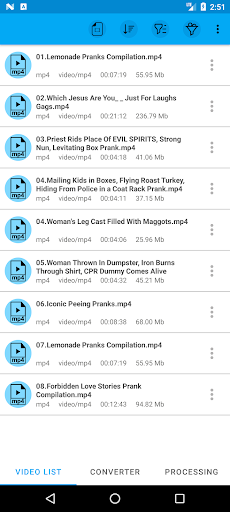
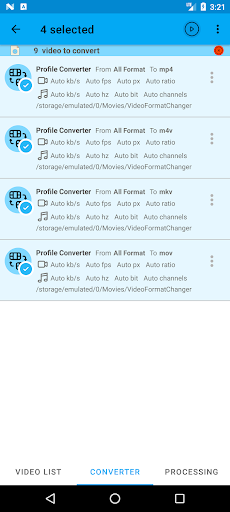
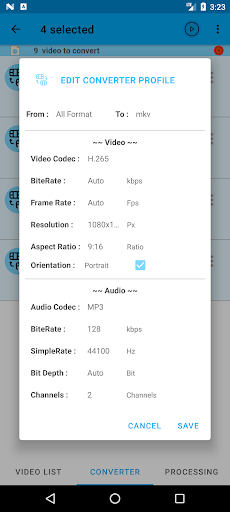
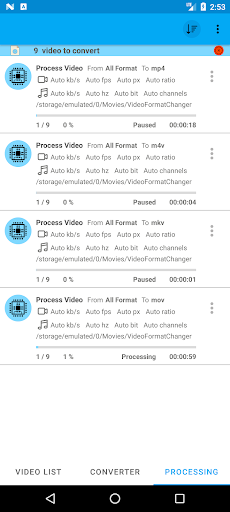
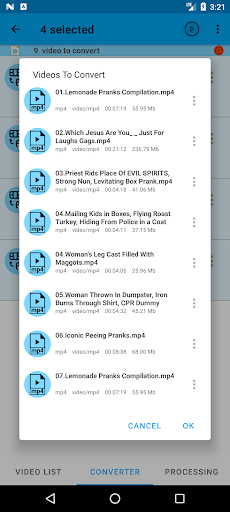
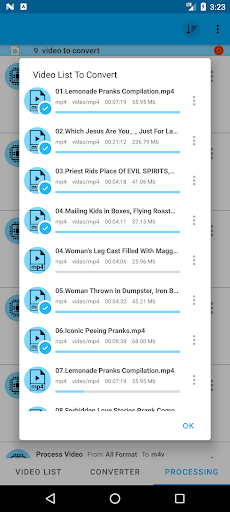

About Video Format Converter
The description on the store listing
Video Format Converter is a fast and easy-to-use app for converting videos into various formats. Whether you need to change formats, reduce file size, or adjust video quality, this app has you covered.
Supported Formats
Convert videos to popular formats like MP4, MKV, AVI, MOV, WMV, WEBM, 3GP, FLV, MTS, M2TS, TS, M4V, VOB, OGV, MPG, MPEG, and F4V.
Features
Quick conversion to multiple formats
Customizable settings for resolution, bitrate, and more
Batch conversion for multiple files at once
No watermarks on converted videos
Simple and intuitive interface
Custom Settings
Adjust video resolution, bitrate, frame rate, and audio settings to suit your needs.
Fast and Reliable …
Read the full description
Video Format Converter is a fast and easy-to-use app for converting videos into various formats. Whether you need to change formats, reduce file size, or adjust video quality, this app has you covered. Supported Formats Convert videos to popular formats like MP4, MKV, AVI, MOV, WMV, WEBM, 3GP, FLV, MTS, M2TS, TS, M4V, VOB, OGV, MPG, MPEG, and F4V. Features Quick conversion to multiple formats Customizable settings for resolution, bitrate, and more Batch conversion for multiple files at once No watermarks on converted videos Simple and intuitive interface Custom Settings Adjust video resolution, bitrate, frame rate, and audio settings to suit your needs. Fast and Reliable Convert videos quickly while maintaining high quality. Perfect for preparing videos for any device or platform. How to Use Select a video from your storage Choose the output format (MP4, MKV, AVI, etc.) Customize settings as needed Convert and save your video Get the ultimate video conversion tool for all your needs in one simple app!
Installs since 26 Aug 2026 Measured
Exact Google Play install counts, collected daily
Ratings
- 5 ★0.0%
- 4 ★0.0%
- 3 ★0.0%
- 2 ★0.0%
- 1 ★0.0%
Recent reviews
Latest public reviews from the store
- 28 Dec 2025
please add 700kb video bitrate in app now i see is 500kb or 800kb.app is not stable it freezing or stop at certain time even battery saver is turn off.output files some time come out in half or become same duplicate file .please fix it my phone is samsung galaxy a 12 and ver is 12.what i like about you app is it can batch compress mkv without lossing subtitle.please fix some bugs and add 700kb or custom video bitrate.dont foget the subtitle to convert as now in New ver release.app is going good.
Top chart positions
Latest Google Play chart ranks by country, last 10 days
Not in any tracked top chart in the last 10 days.
Video Format Converter history
Release, install milestones, listing and store changes
- Reached 1,000+ installs 23 Jan 2026
- Reached 500+ installs 24 Nov 2025
- Reached 100+ installs 25 Oct 2025
- Reached 50+ installs 25 Sep 2025
- Reached 10+ installs 29 Mar 2025
- First released on the store 22 Sep 2024
Listing keywords
Words and phrases Video Format Converter repeats most in its store listing
Top phrases: convert videos (3), mp4 mkv avi (2), video format converter (2), videos to popular (2), adjust video (2).
Highlighted words also appear in the title. Counts cover the title, short description and description.
Business model and tech
From the store listing and declared permissions
- Business model
- Free to downloadShows ads
- Sensitive access
- Photos, videos and filesAdvertising ID
12 permissions
0 special access, 3 sensitive, 9 standard
- Change or delete shared storageSensitive
- Read shared storageSensitive
- Read videosREAD_MEDIA_VIDEOSensitive
- Ad attribution (Privacy Sandbox)ACCESS_ADSERVICES_ATTRIBUTIONStandard
- Ad topics (Privacy Sandbox)ACCESS_ADSERVICES_TOPICSStandard
- Read the advertising IDAD_IDStandard
- Read the advertising ID (Privacy Sandbox)ACCESS_ADSERVICES_AD_IDStandard
- Keep the phone awakeStandard
- Run a foreground serviceFOREGROUND_SERVICEStandard
- Full internet accessStandard
- See network connectionsStandard
- Internal app permissionDYNAMIC_RECEIVER_NOT_EXPORTED_PERMISSIONStandard
Compliance
What the listing and the app package show
- Store status
- Live
- Upkeep
- Updated 23 Jan 2026
- Privacy policy
- Linked on the listing
- Advertising
- Shows ads
- In-app purchases
- None declared
- Age rating
- Everyone
- Sensitive permissions
- 3 sensitive of 12
- Location access
- No
- Camera and microphone
- Neither
Apps like Video Format Converter
들어서 화면켜기Won3.5K installs★ 4.0
Height PredictionEcliptic App Ventures45.9K installs★ 2.4
Speicers`Pro VPNEldiablolucifer202021.2K installs★ 4.14
Lightning Tracker with AlertsYaksh Software4.3K installs★ 3.0
Mana Pathi (Unit Converter)Shirish Koirala2.2K installs★ 4.6
Multi-tab Calc - A simple app.Naoyuki Rikiji1.3K installs★ 5.0
Photo Recovery PlusBillApps7.1K installs★ 4.53
Just Silence. Scheduled.Akid Soft1.6K installs★ 5.0
- WoWp AssistantВиталий Робиновский2K installs★ 4.2
Video Format Converter: questions and answers
How many downloads does Video Format Converter have?
Video Format Converter has 4,876 installs on Google Play, measured from the store's own count on 18 Nov 2026.
Who makes Video Format Converter?
Video Format Converter is published by Diora.
When was Video Format Converter last updated?
The latest version (Varies with device) was released on 23 Jan 2026.
Is Video Format Converter free?
Yes. Video Format Converter is free to download, and it shows ads.
Is Video Format Converter still available?
Yes. Video Format Converter is live on Google Play as of 18 Nov 2026.
Track Video Format Converter and its competitors
Watch any app for new versions, rating drops, chart moves and removals. Free plan, no card.