
Video Speed Shift
Change video speed from 0.1x to 10x, preview it, and save.
- Installs
- 1.82K
- Measured
- Rating
- —
- Ratings
- —
- Version
- Varies with device
- Released
- 16 Aug 2026
- Tracked since 10 Nov 2026
- Size
- —
Screenshots




About Video Speed Shift
The description on the store listing
Video Speed Shift turns any video on your phone into slow motion or fast forward, then saves it as a new file you can share anywhere.
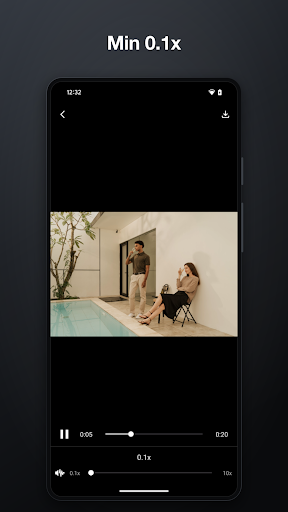
Pick a video from your gallery or shoot a fresh one with the camera, drag the slider, and watch the change play back right away. When it looks right, tap Save. That's the whole app — no timeline editors, no layers, no learning curve.
■ 14 speeds, from crawling to blink-and-you-miss-it
0.1x, 0.25x, 0.5x, 0.75x, 1x, 1.25x, 1.5x, 1.75x, 2x, 3x, 4x, 6x, 8x, 10x.
Stretch a two-second moment into a slow-motion study, or compress a long clip into a few quick seconds.
■ Preview before you save
The player applies the speed as you move the slider, so you …
Read the full description
Video Speed Shift turns any video on your phone into slow motion or fast forward, then saves it as a new file you can share anywhere. Pick a video from your gallery or shoot a fresh one with the camera, drag the slider, and watch the change play back right away. When it looks right, tap Save. That's the whole app — no timeline editors, no layers, no learning curve. ■ 14 speeds, from crawling to blink-and-you-miss-it 0.1x, 0.25x, 0.5x, 0.75x, 1x, 1.25x, 1.5x, 1.75x, 2x, 3x, 4x, 6x, 8x, 10x. Stretch a two-second moment into a slow-motion study, or compress a long clip into a few quick seconds. ■ Preview before you save The player applies the speed as you move the slider, so you hear and see the result before committing. Nothing is written to your storage until you tap Save, and your original video is never modified or replaced. ■ Your audio comes with you The sound track is converted along with the picture, so speech and music stay in sync at any speed. By default the pitch is preserved, so voices still sound like voices even when sped up. Prefer the classic chipmunk or slow-motion-monster effect? Turn on "Change pitch with speed" and the pitch rises and falls with the video. ■ Saved as a standard MP4 Converted videos go to your Movies folder as an ordinary MP4 file, ready to open in any player or upload to any app. A progress indicator shows how far along the conversion is, and you can cancel at any time. ■ Everything happens on your device No upload, no server, no waiting in a queue. Conversion runs locally, so it works in airplane mode and your videos never leave your phone. WHAT YOU CAN MAKE - Slow-motion replays of a golf swing, a skateboard trick, or a pet mid-jump - Fast-forward time lapses of cooking, drawing, cleaning, or a drive home - Sped-up lecture and tutorial recordings you can actually get through - Slowed-down instrument or dance videos so you can copy the moves step by step - Short, punchy clips for social posts, trimmed down by speed instead of cuts - Comedy edits with the pitch effect turned on HOW TO USE 1. Tap Gallery to choose an existing video, or Video to record a new one. 2. Drag the speed slider and play the preview. 3. Optionally turn on "Change pitch with speed" for the pitch effect. 4. Tap Save. The converted MP4 lands in your Movies folder. PERMISSIONS - Camera: only used when you choose to record a new video in the app. - Storage (Android 12 and below only): only used to save the converted video to your device. Choosing a video from your gallery does not require it. NOTES - Very high speeds may be more than some devices can render in the preview, but the speed is still applied correctly to the saved video. - On some devices the preview audio may be silent at extreme speeds; the saved video still contains its audio. - Conversion time depends on the length and resolution of your video and the speed of your device. Free, offline, and straight to the point. Change the speed, save the video, done.
Installs Measured
Exact Google Play install counts, collected daily
Daily history starts once this app is in our daily install sample.
Ratings
- 5 ★0.0%
- 4 ★0.0%
- 3 ★0.0%
- 2 ★0.0%
- 1 ★0.0%
Recent reviews
Latest public reviews from the store
No reviews in our sample for this app yet.
Top chart positions
Latest Google Play chart ranks by country, last 10 days
Not in any tracked top chart in the last 10 days.
Video Speed Shift history
Release, install milestones, listing and store changes
- First released on the store 16 Aug 2026
Listing keywords
Words and phrases Video Speed Shift repeats most in its store listing
Top phrases: slow motion (4), tap save (3), video speed (3), 1x 25x 5x (2), 25x 5x 75x (2).
Highlighted words also appear in the title. Counts cover the title, short description and description.
Business model and tech
From the store listing and declared permissions
- Business model
- Free to download
- Sensitive access
- No sensitive permission declared
Compliance
What the listing and the app package show
- Store status
- Live
- Privacy policy
- Linked on the listing
- Advertising
- No ads declared
- In-app purchases
- None declared
- Age rating
- Everyone
Apps like Video Speed Shift
들어서 화면켜기Won3.5K installs★ 4.0
Height PredictionEcliptic App Ventures45.9K installs★ 2.4
Speicers`Pro VPNEldiablolucifer202021.2K installs★ 4.14
Lightning Tracker with AlertsYaksh Software4.3K installs★ 3.0
Mana Pathi (Unit Converter)Shirish Koirala2.2K installs★ 4.6
Multi-tab Calc - A simple app.Naoyuki Rikiji1.3K installs★ 5.0
Photo Recovery PlusBillApps7.1K installs★ 4.53
Just Silence. Scheduled.Akid Soft1.6K installs★ 5.0
- WoWp AssistantВиталий Робиновский2K installs★ 4.2
Video Speed Shift: questions and answers
How many downloads does Video Speed Shift have?
Video Speed Shift has 1,821 installs on Google Play, measured from the store's own count on 10 Nov 2026.
Who makes Video Speed Shift?
Video Speed Shift is published by Photograph.
Is Video Speed Shift free?
Yes. Video Speed Shift is free to download.
Is Video Speed Shift still available?
Yes. Video Speed Shift is live on Google Play as of 10 Nov 2026.
Track Video Speed Shift and its competitors
Watch any app for new versions, rating drops, chart moves and removals. Free plan, no card.