
VR Mobile - Vibration Tools
A tool for vibration test and measurement professionals
- Installs
- 65.21K
- Measured
- Rating
- 3.83
- Ratings
- 199
- 34 reviews
- Version
- 4.4
- Updated 29 Jan 2026
- Released
- 28 Sep 2011
- Tracked since 13 May 2026
- Size
- 3 MB
- Needs 4.4
Screenshots




About VR Mobile - Vibration Tools
The description on the store listing
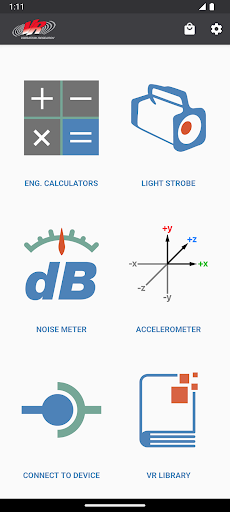
VR Mobile connects to an ObserVR1000 dynamic signal analyzer or VibrationVIEW for live vibration test monitoring using a phone or tablet. It also contains engineering calculators, a light strobe, a noise SPL meter, and accelerometer. All of this from your mobile device!
INCLUDED FEATURES:
Connect to nearby ObserVR1000 Dynamic Signal Analyzer & DAQ
- Setup inputs, record and monitor data.
- Live FFT Analysis
Record video in sync with ObserVR1000 recordings
- Record video with phone camera
- Record video with GoPro®️ Hero 5 and up cameras via bluetooth
Remotely control VibrationVIEW from within the VR Mobile App (while on the same network).
- Start/Stop tests
- View graphs …
Read the full description
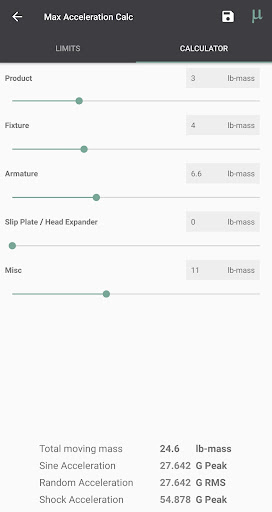
VR Mobile connects to an ObserVR1000 dynamic signal analyzer or VibrationVIEW for live vibration test monitoring using a phone or tablet. It also contains engineering calculators, a light strobe, a noise SPL meter, and accelerometer. All of this from your mobile device! INCLUDED FEATURES: Connect to nearby ObserVR1000 Dynamic Signal Analyzer & DAQ - Setup inputs, record and monitor data. - Live FFT Analysis Record video in sync with ObserVR1000 recordings - Record video with phone camera - Record video with GoPro®️ Hero 5 and up cameras via bluetooth Remotely control VibrationVIEW from within the VR Mobile App (while on the same network). - Start/Stop tests - View graphs - Adjust amplitude and frequency VR Library - Complete courses, take quizzes and earn certificates on VR University - Browse articles, case studies, engineering tools, research papers, and more - Watch video tips and tech talks - Gain access to VR product manuals Max Acceleration Calculator: - Calculate the maximum amount of acceleration that a shaker (from a database) can output based on the mass added to the system. Unit Converter: - Convert Acceleration, Force, Mass, Velocity, and Displacement units to and from common units. Sine Calculator: - Based on sinusoidal motion, calculate Acceleration, Frequency, Velocity, and Displacement by inputting any two of these values. Shock Calculator: - Pick between two impact types: Plastic or Elastic, and the pulse type. Shock Calculator will find the remaining two values given two inputs: Acceleration, Impact Time, Velocity Change, and Height Change. Noise Meter: - Measure minimum, current, and maximum dB from your mobile device's microphone. Accelerometer: - Measure minimum, current, and maximum acceleration in each of your mobile device's accelerometer axes. - Zero out acceleration to calibrate for an uneven surface. Strobe Light and Flashlight - Strobe your device's screen and/or flash LED from 1 - 30 Hz. Strobing helps one to see objects vibrating too fast for the eye to see. - Turn your device's screen and/or flash LED into a flashlight; this makes a convenient flashlight during test setups. - NOTE: Not all device's LED flash can be controlled by the VR Mobile app. Contact VR: - Watch YouTube videos from VR. - Visit VR's website. VR Products: - View our VR9700 and VR10500 Vibration Test Controllers, and the ObserVR1000 Dynamic Signal Analyzer. Permissions Explanation: android.permission.ACCESS_NETWORK_STATE: used for Remote Interface option. android.permission.ACCESS_WIFI_STATE: used for Remote Interface option. android.permission.CAMERA: used for LED Flash/Strobe option (does not take pictures) and Camera Sync (images and video stored locally on user's device). android.permission.CHANGE_WIFI_MULTICAST_STATE: used for detecting VibrationVIEW servers for Remote Interface option. android.permission.FLASHLIGHT: used for LED Flash/Strobe option. android.permission.INTERNET: used for Google Analytics (disable in app settings) and fetching of VR Library content. android.permission.RECORD_AUDIO: used for Noise Meter and Camera Sync options. android.permission.VIBRATE: used for error message. android.permission.BLUETOOTH: used for Camera Sync feature in order to connect to GoPro® devices. Note: This application uses Google Analytics to anonymously track usage data within the application, which can be disabled in app settings. Note: Camera Permission is for camera LED flash control and the Camera Sync feature. Images and video captured by the Camera Sync feature are only stored locally on the user's device.
Installs since 26 Aug 2026 Measured
Exact Google Play install counts, collected daily
Ratings
199 ratings, 34 reviews
- 5 ★51%
- 4 ★16%
- 3 ★0.0%
- 2 ★33%
- 1 ★0.0%
Recent reviews
Latest public reviews from the store
- 21 Aug 2024
very friendly and many talented artists
- 27 Dec 2022
Some of these ladies are totally miss treated, there pay is absolutely ripped away from them by the owner from the sounds of it. Goto (brian lewis) you're barber.... walk out with only spending $17 for a hair cut and beard trim and the attention to detail.
- 4 Aug 2020
The app works well enough. But call and double check your appointment. I've had the system change my appointment on my phone and not at the shop. That sucked! Had to come back the next day.
- 22 Nov 2017
Like the notices
What reviewers bring up
Topics mentioned in the latest 9 reviews, by how many reviews mention them
Liked in good reviews (3 reviews)
No topic comes up twice.
Raised in bad reviews (4 reviews)
- appointment 3
- book 3
- won't 2
- let 2
Top chart positions
Latest Google Play chart ranks by country, last 10 days
Not in any tracked top chart in the last 10 days.
VR Mobile - Vibration Tools history
Release, install milestones, listing and store changes
- Reached 50,000+ installs 23 Jun 2016
- Reached 10,000+ installs 14 Apr 2012
- Reached 5,000+ installs 30 Dec 2011
- Reached 1,000+ installs 3 Nov 2011
- Reached 500+ installs 13 Oct 2011
- Reached 100+ installs 4 Oct 2011
- First released on the store 28 Sep 2011
Update frequency
How often VR Mobile - Vibration Tools ships a new version, month by month
1 updates in the last 12 months. More often than most similar apps: they shipped a median of 0 updates in the same year.
Recent versions
Current version 4.4
- Version 4.429 Jan 2026
Bug fixes and performance improvements.
- Version 2.013 May 2013
- Version 1.528 Mar 2012
- Version 1.424 Mar 2012
Listing keywords
Words and phrases VR Mobile - Vibration Tools repeats most in its store listing
Top phrases: android permission (9), camera sync (5), option android permission (4), led flash (4), option android (4).
Highlighted words also appear in the title. Counts cover the title, short description and description.
Business model and tech
From the store listing, the SDKs in the app package and its declared permissions
- Business model
- Free to download
- Built with
- No cross-platform framework or game engine detected
- Ad networks (0)
- None detected
- Analytics and crash reports
- Google Analytics
- Sensitive access
- CameraMicrophone
1 ad, attribution and analytics SDKs detected. SDKs are read from the app package and permissions from the store listing, so code that loads later is not seen.
Technology
3 SDKs found in the app package
Development tools
8 permissions
0 special access, 2 sensitive, 6 standard
- Record audioSensitive
- Take photos and videosSensitive
- Control the flashlightStandard
- Control vibrationStandard
- Full internet accessStandard
- See network connectionsStandard
- See Wi-Fi connectionsStandard
- Allow Wi-Fi Multicast receptionStandard
Compliance
What the listing and the app package show
- Store status
- Live
- Upkeep
- Updated 29 Jan 2026
- Registered in
- United States
- Privacy policy
- Linked on the listing
- Advertising
- No ads declared
- In-app purchases
- None declared
- Age rating
- Everyone
- Sensitive permissions
- 2 sensitive of 8
- Location access
- No
- Camera and microphone
- Both
Apps like VR Mobile - Vibration Tools
Easy Schedule Notebookoxdb.net51.5K installs★ 5.0
Land Parcels Areas CalculatorGeoZidan46K installs★ 1.73
Gallery Vault - Hide PhotoMerryblue51K installs★ 4.2
Heat Index Calculator - How toVnMobileSolutions Inc.3.7K installs★ 4.24
2D OwnerTechnologyGateway46K installs★ 4.8
3D Print Cost CalculatorReme Le Hane38.5K installs★ 3.95
Bluetooth ScannerThe Tree Team51.3K installs★ 3.87
HD wifi EndoskopCEI Conrad Electronic International (HK) Limited117K installs★ 2.41
WGS84 ConverterPilaBlu - Apps111K installs★ 4.29
VR Mobile - Vibration Tools: questions and answers
How many downloads does VR Mobile - Vibration Tools have?
VR Mobile - Vibration Tools has 65,209 installs on Google Play, measured from the store's own count on 18 Nov 2026.
Who makes VR Mobile - Vibration Tools?
VR Mobile - Vibration Tools is published by Vibration Research Corporation, a developer based in US.
When was VR Mobile - Vibration Tools last updated?
The latest version (4.4) was released on 29 Jan 2026.
Is VR Mobile - Vibration Tools free?
Yes. VR Mobile - Vibration Tools is free to download.
Is VR Mobile - Vibration Tools still available?
Yes. VR Mobile - Vibration Tools is live on Google Play as of 18 Nov 2026.
Track VR Mobile - Vibration Tools and its competitors
Watch any app for new versions, rating drops, chart moves and removals. Free plan, no card.