
Wakelock Detector [Root]
** Find out what is draining your battery when your phone is idle **
- Installs
- 2.63M
- Measured
- Rating
- 3.06
- Ratings
- 28.3K
- 1.3K reviews
- Version
- 2.0.1
- Updated 16 Mar 2016
- Released
- 3 Mar 2013
- Tracked since 13 May 2026
- Size
- —
Screenshots



About Wakelock Detector [Root]
The description on the store listing
Notice for Android KitKat :
Need root access due to permission changes!
If not rooted, this alternative solution might help: http://goo.gl/Yqdh2F
More details on our blog:
http://uzumapps.blogspot.jp/2015/07/what-happened-to-wakelock-detector.html
_______________________________________
Ever wondered why your smartphone screen doesnt turn off automatically when it should have, the screen wakes up all of a sudden or you find your phone battery drained even when you exited apps and turned off the screen? This might be due to wakelock holding apps. ”Wakelock Detector” helps you to detect battery draining apps in your Android phone by checking wakelock usage history. Now you can …
Read the full description
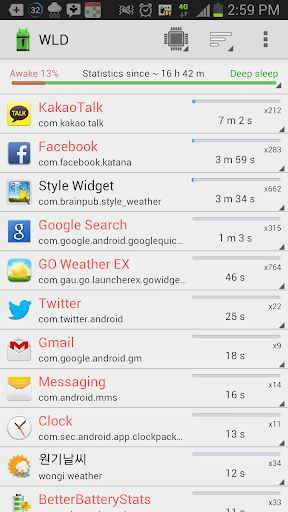
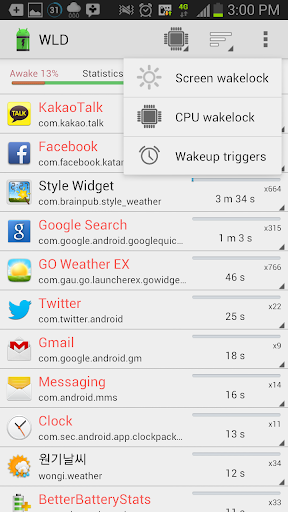
Notice for Android KitKat : Need root access due to permission changes! If not rooted, this alternative solution might help: http://goo.gl/Yqdh2F More details on our blog: http://uzumapps.blogspot.jp/2015/07/what-happened-to-wakelock-detector.html _______________________________________ Ever wondered why your smartphone screen doesnt turn off automatically when it should have, the screen wakes up all of a sudden or you find your phone battery drained even when you exited apps and turned off the screen? This might be due to wakelock holding apps. ”Wakelock Detector” helps you to detect battery draining apps in your Android phone by checking wakelock usage history. Now you can easily find out what keep your phone awake and drain your battery when it is idle! “Wakelock” is a mechanism of power management service in Android OS, which can be used to keep CPU awake (Partial wakelock) and keep the screen on(Full wakelock). Applications which use wakelock privilege improperly leads to situations where the CPU or phone screen stays active without user's knowledge and thus causing dramatic battery drain. “Wakelock Detector” shows wakelock usage statistics for all applications, which ever held wakelock since boot. By default it displays CPU wakelocks sorting by the longest usage time. Further, you can choose Screen wakelock type to see screen related wakelocks. For instance, if your screen is keeping on even after screen timeout or your screen turns on randomly by itself, then you can choose Screen wakelock type on the top (Brightness icon) to see which apps are using screen wakelock. Furthermore, if you are interested in currently running applications then you can change sorting type to "Active" which shows active running applications on the top. For further details please refer to FAQ inside Settings. Main features: # shows both CPU wakelock (Partial wakelock) and (Full wakelock) ; # merges wakelocks of corresponding app into one expandable view for better user experience; # currently active running applications are shown in red color; # allows easy sorting options by Running state , Wakelock time and Alphabetical order; How to use: #1 Charge your phone above 90% and unplug cable (or just reboot the phone) #2 Give it a time (1-2 hours) to accumulate some wakelock usage statistics #3 Open “Wakelock Detector” #4 Check the apps on the top, if they show very long wakelock usage time then you found the cause of your battery drain! #Notice We are working on improving the performance of the “Wakelock Detector” by adding new features regarding wakelock issues users usually face. We are trying to follow up all your comments. And we know that the application is not ideal yet. We would appreciate if you send us email before giving negative comments in the Play Store. Your feedbacks are always welcome! * MIUI users - Make sure that battery service is turned on. #Reviews XDA - http://www.xda-developers.com/android/defend-your-battery-with-wakelock-detector/ HowToGeek - http://www.howtogeek.com/142654/find-out-which-apps-are-keeping-your-android-awake-with-wakelock-detector/ LifeHacker - http://lifehacker.com/5993706/wakelock-detector-shows-you-the-apps-that-keep-your-phone-awake DotTech - http://dottech.org/103671/android-review-wakelock-detector/ Temefy - http://temefy.com/defend-your-battery-with-wakelock-detector Facebook - http://www.facebook.com/wakelockdetector Wakelock PPT [recommended] - http://goo.gl/7WgGz KW: wakelock detector, wakelock, partial wakelock, battery save, screen keeps on,cpu awake, battery drain, display which app drains battery, betterbatterystats, battery doctor, battery saver, easy battery saver, save battery, app analyzer, app battery usage statistics, battery help, save energy, greenify, detect battery drain, wake lock statistics widget, extend battery life, prolong battery life, battery defender, power saver, idle state monitor
Installs, last 30 days Measured
Exact Google Play install counts, collected daily
Ratings
28,345 ratings, 1,316 reviews
- 5 ★46%
- 4 ★11%
- 3 ★8.0%
- 2 ★7.0%
- 1 ★28%
Recent reviews
Latest public reviews from the store
- 20 Feb 2020
Didn't do anything for me because I don't have root.
- 5 Feb 2020
V good
- 27 Aug 2019
I like it
- 9 Aug 2019
It's ok
What reviewers bring up
Topics mentioned in the latest 50 reviews, by how many reviews mention them
Liked in good reviews (10 reviews)
No topic comes up twice.
Raised in bad reviews (37 reviews)
- failed 11
- task 8
- perform 7
- android 7
- try 5
- moment 4
- later 4
- root 4
Top chart positions
Latest Google Play chart ranks by country, last 10 days
Not in any tracked top chart in the last 10 days.
Wakelock Detector [Root] history
Release, install milestones, listing and store changes
- Reached 1,000,000+ installs 27 Jul 2014
- Reached 500,000+ installs 20 Nov 2013
- Moved from Tools to Productivity 4 Jul 2013
- Reached 100,000+ installs 13 May 2013
- Reached 50,000+ installs 7 Apr 2013
- Reached 10,000+ installs 2 Apr 2013
- Reached 5,000+ installs 28 Mar 2013
- Reached 1,000+ installs 16 Mar 2013
Update frequency
How often Wakelock Detector [Root] ships a new version, month by month
0 updates in the last 12 months. Less often than most similar apps: they shipped a median of 5 updates in the same year.
Recent versions
Current version 2.0.1
- Version 2.0.114 Mar 2016
Changes - Material design improvement - Added option to revoke Installed System app - Added WIFI state permission to support Marshmallow - Support for Marshmallow (both native api and dump sys) - Bug fix Note: if you have a ROOT, you can use WLD with or without installing it as a system app.
- Version 1.8.214 Aug 2015
- Version 1.8.027 Jul 2015
- Version 1.6.122 Apr 2014
Listing keywords
Words and phrases Wakelock Detector [Root] repeats most in its store listing
Top phrases: wakelock detector (6), battery drain (4), wakelock usage (4), partial wakelock (3), running applications (3).
Highlighted words also appear in the title. Counts cover the title, short description and description.
Business model and tech
From the store listing and declared permissions
- Business model
- Free to downloadIn-app purchases
- Sensitive access
- No sensitive permission declared
Compliance
What the listing and the app package show
- Store status
- Live
- Upkeep
- No update since 16 Mar 2016
- Registered in
- Netherlands
- Privacy policy
- Linked on the listing
- Advertising
- No ads declared
- In-app purchases
- Offered
- Age rating
- Everyone
Apps like Wakelock Detector [Root]
Sticky Note Widget: SunaoArtsPlanet1.1M installs★ 4.77
eDO AppPWPW S.A.3.6M installs★ 4.05
Xploree AI KeyboardKeyPoint Technologies17.7M installs★ 4.16
App Permission Managero16i Apps8.7M installs★ 4.09
VPN Pro - Fast & Secure VPNBean Studio HQ15M installs★ 4.45
Google AdminGoogle LLC8.5M installs★ 3.55
PeopleFirst(Only RIL Group)Reliance Enterprise Mobility1.4M installs★ 5.0
AnyList: Grocery Shopping ListAnyList1.8M installs★ 4.86
Launcher OS27: Liquid GlassHK Crafted1.5M installs★ 4.46
Wakelock Detector [Root]: questions and answers
How many downloads does Wakelock Detector [Root] have?
Wakelock Detector [Root] has 2,632,270 installs on Google Play, measured from the store's own count on 19 Nov 2026.
Who makes Wakelock Detector [Root]?
Wakelock Detector [Root] is published by Gomsak Apps, a developer based in NL.
When was Wakelock Detector [Root] last updated?
The latest version (2.0.1) was released on 16 Mar 2016.
Is Wakelock Detector [Root] free?
Yes. Wakelock Detector [Root] is free to download and offers in-app purchases.
Is Wakelock Detector [Root] still available?
Yes. Wakelock Detector [Root] is live on Google Play as of 19 Nov 2026.
Track Wakelock Detector [Root] and its competitors
Watch any app for new versions, rating drops, chart moves and removals. Free plan, no card.