Weather Clock Widget
Check the Current Time and Weather Condition. Simple and fast.
- Installs
- 1.88M
- Measured
- Rating
- 3.04
- Ratings
- 11.1K
- 630 reviews
- Version
- 1.9.8.3-30
- Updated 1 Sep 2018
- Released
- 3 Aug 2012
- Tracked since 13 May 2026
- Size
- 5 MB
- Needs 4.4
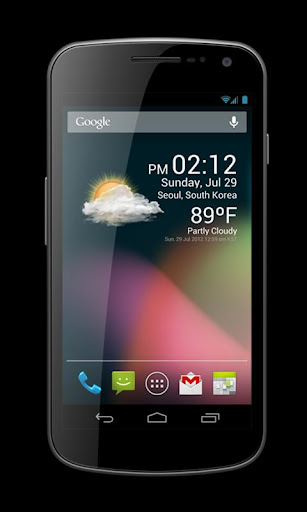
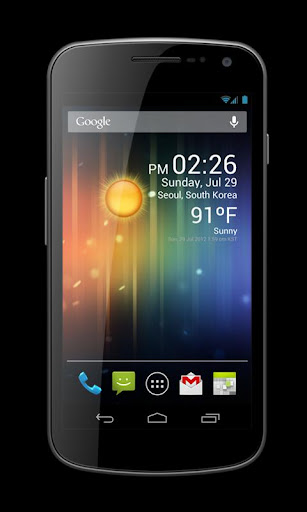
Screenshots


About Weather Clock Widget
The description on the store listing
Check the Current Time and Weather Condition.
Simple and fast
Application uses less battery power.
Weather Clock Widget is a replacement lock screen clock widget for Android 4.2+.
To add the widget to your Android 4.2 device's lock screen, simply swipe to the left-most page of your lock screen and touch the "+" icon. Then, select "Weather Clock Widget" to customize and add the widget. You can make this the primary lock screen widget, replacing the default clock, by first touching-and-holding it and then dragging it horizontally to the very rightmost position.
**Before running the application configuration is required.
SETTING: Settings->Location services->GPS satellites …
Read the full description
Check the Current Time and Weather Condition. Simple and fast Application uses less battery power. Weather Clock Widget is a replacement lock screen clock widget for Android 4.2+. To add the widget to your Android 4.2 device's lock screen, simply swipe to the left-most page of your lock screen and touch the "+" icon. Then, select "Weather Clock Widget" to customize and add the widget. You can make this the primary lock screen widget, replacing the default clock, by first touching-and-holding it and then dragging it horizontally to the very rightmost position. **Before running the application configuration is required. SETTING: Settings->Location services->GPS satellites enable To add a widget to a Home screen, follow these steps: 1. Touch and hold any empty section of a Home screen. 2. Touch Widgets. 3. Touch and hold a widget. You’ll see images of each Home screen. 4. Slide the widget to the Home screen image you prefer, then lift your finger. or Home->Application Menu->Widget https://support.google.com/nexus/answer/2781850?hl=en Forecast On/Off: Touch the Weather Image
Installs, last 30 days Measured
Exact Google Play install counts, collected daily
Ratings
11,107 ratings, 630 reviews
- 5 ★44%
- 4 ★7.0%
- 3 ★2.0%
- 2 ★3.0%
- 1 ★44%
Recent reviews
Latest public reviews from the store
No reviews in our sample for this app yet.
Top chart positions
Latest Google Play chart ranks by country, last 10 days
Not in any tracked top chart in the last 10 days.
Weather Clock Widget history
Release, install milestones, listing and store changes
- Reached 1,000,000+ installs 15 Jul 2014
- First released on the store 3 Aug 2012
Update frequency
How often Weather Clock Widget ships a new version, month by month
0 updates in the last 12 months. Less often than most similar apps: they shipped a median of 2 updates in the same year.
Recent versions
Current version 1.9.8.3-30
- Version 1.9.8.3-301 Sep 2018
ver.1.9.8.2 Update for Android O ver.1.9.6.6 bug fixed. ver.1.9.5.7 Low battery use. ver.1.9.4 forecast ver.1.9.3 hotfix ver.1.9.2 improve Weather info. ver.1.8.8 improve battery life. ver.1.6.4 hotfix. ver.1.6.2 Performance improvement. ver.1.5.0 Replacement lock screen clock widget for Android 4.2+ ver.1.4.2 bug fixed. ver.1.4.0 bug fixed. ver.1.3.6 various bug fixed. ver.1.3.0 bug fixed ver.1.2.6 Improve GPS Accuracy ver.1.0.0 Initial release
- Version 1.9.8.331 Aug 2018
- Version 1.9.8.217 Feb 2017
- Version 1.9.8.131 Jan 2017
Listing keywords
Words and phrases Weather Clock Widget repeats most in its store listing
Top phrases: clock widget (4), home screen (4), lock screen (4), weather clock widget (3), weather clock (3).
Highlighted words also appear in the title. Counts cover the title, short description and description.
Business model and tech
From the store listing, the SDKs in the app package and its declared permissions
- Business model
- Free to downloadIn-app purchasesShows ads
- Built with
- No cross-platform framework or game engine detected
- Ad networks (1)
- AdMob
- Subscriptions and payments
- Google Play billing
- Analytics and crash reports
- Firebase
- Sensitive access
- Location
2 ad, attribution and analytics SDKs detected. SDKs are read from the app package and permissions from the store listing, so code that loads later is not seen.
Technology
11 SDKs found in the app package
Ad network libraries
Ad networks
Advertising and install-attribution SDKs found in the app package
- AdMob
7 permissions
0 special access, 1 sensitive, 6 standard
- Approximate locationSensitive
- Read how it was installed (install referrer)BIND_GET_INSTALL_REFERRER_SERVICEStandard
- Keep the phone awakeStandard
- Full internet accessStandard
- See network connectionsStandard
- Receive push messagesStandard
- In-app purchases with Google PlayStandard
Compliance
What the listing and the app package show
- Store status
- Live
- Upkeep
- No update since 1 Sep 2018
- Registered in
- South Korea
- Privacy policy
- Linked on the listing
- Advertising
- Shows ads
- In-app purchases
- Offered
- Age rating
- Everyone
- Sensitive permissions
- 1 sensitive of 7
- Location access
- Yes, while in use
- Camera and microphone
- Neither
Apps like Weather Clock Widget
Weather ForecastKX Camera Team1.8M installs★ 4.21
Weather - Live Radar & Widgets1 Bit1.5M installs★ 4.32
FMI WeatherIlmatieteen laitos1.7M installs★ 2.47
W2U WeatherPro Maps USWeather2Umbrella721K installs★ 3.17
global stormsKelly Technology Inc.1.4M installs★ 4.16
Thermometer - HygrometerPower Star APPS1.7M installs★ 3.25
Earthquakes TrackerRadu Resinari771K installs★ 4.53
Weather Radar Live MapLeoStudio Global Ltd.496K installs★ 4.59
Weather: Any place on earth!email to: [email protected]617K installs★ 4.52
Weather Clock Widget: questions and answers
How many downloads does Weather Clock Widget have?
Weather Clock Widget has 1,876,691 installs on Google Play, measured from the store's own count on 19 Nov 2026.
Who makes Weather Clock Widget?
Weather Clock Widget is published by CORE TECHNOLOGY, a developer based in KR.
When was Weather Clock Widget last updated?
The latest version (1.9.8.3-30) was released on 1 Sep 2018.
Is Weather Clock Widget free?
Yes. Weather Clock Widget is free to download and offers in-app purchases, and it shows ads.
Is Weather Clock Widget still available?
Yes. Weather Clock Widget is live on Google Play as of 19 Nov 2026.
Track Weather Clock Widget and its competitors
Watch any app for new versions, rating drops, chart moves and removals. Free plan, no card.